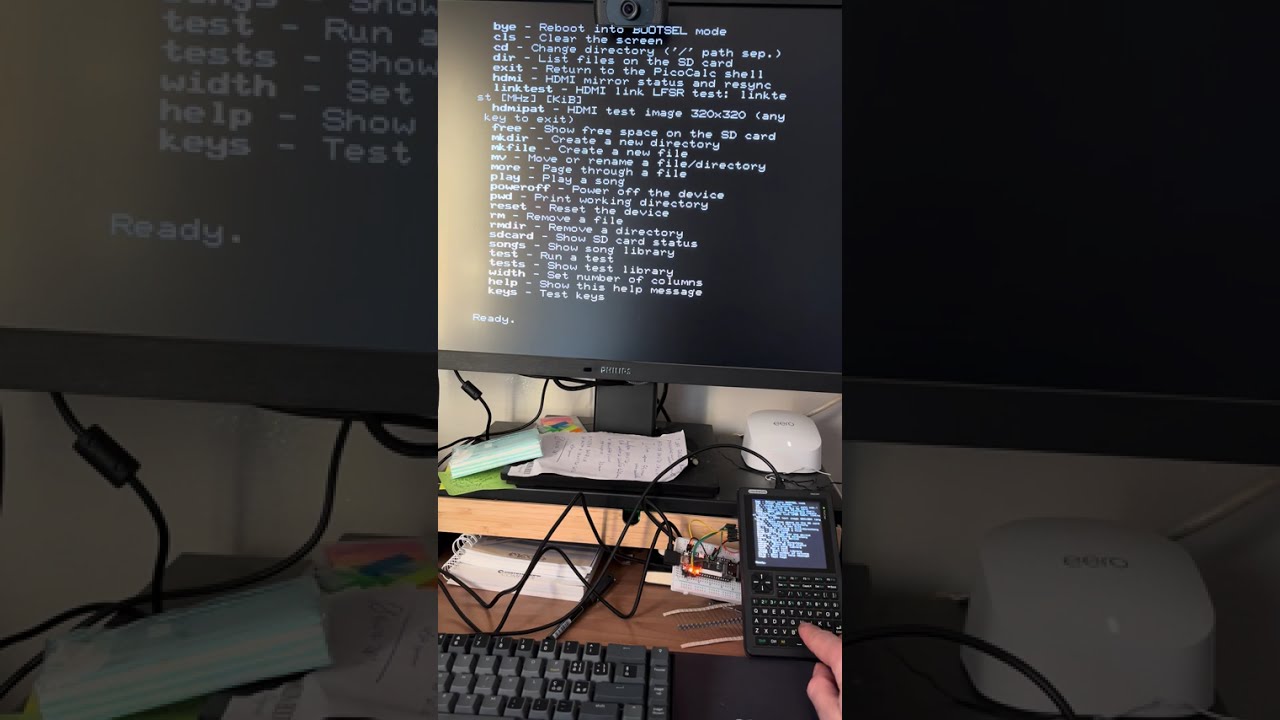
I wanted to see the PicoCalc’s 320×320 screen on a monitor in real time, without touching the display or slowing the firmware down too much.
The Pico sends a copy of every LCD command and data byte to an FPGA, which rebuilds the display memory and shows it over HDMI.
Hardware.
FPGA: a Sipeed Tang Nano 20K (GW2AR-18), using its onboard HDMI connector.
Video output: 720p60, with the image scaled 2× into a centred 640×640 window.
Framebuffer: the 8 MB SDRAM inside the chip.
Link: 6 wires from the PicoCalc’s J703 connector: GP2-5 as 4-bit data, GP21 as clock, GP28 as CS_N, plus ground. The link is one-way, similar to QSPI.
How the code works.
Pico side: the firmware is a modified picocalc-text-starter (by Blair Leduc). Inside the LCD driver functions, every command and every block of pixels sent to the ST7365P controller is also copied onto the link.
Transmission: a PIO program sends 4 bits per clock cycle. Pixels go through DMA, in parallel with the SPI transfer to the LCD.
Packets: they are framed by CS_N and come in three types: command, data, control. Everything sits behind a compile-time flag.
FPGA side: a decoder emulates the subset of the ST7365P that is needed (window, RAM write, vertical scroll, inversion, display on/off) and writes the pixels into the SDRAM. The terminal scroll is just a row remapping at read time. A line reader fills two line buffers, and the pixels go from there to HDMI.
Recovery: an hdmi command resends the state to the FPGA if it is powered up after the Pico.
Status. It works on real hardware: the test image is identical to the LCD, scrolling is correct, and the link runs at 15 MHz with no errors even on flying wires. It is an experiment.
Next steps.
Link: replace the flying wires with an interconnect board or something similar, to improve both the look and the link’s performance, taking it to 20-25 MHz. A faster link should reduce the overhead on the firmware.
Desktop version: add the BT/BLE support by Chris L Torkildson, to get a desktop version of the PicoCalc.
Giovanni, this is really nice work — teeing off the LCD command stream and replaying it into the FPGA’s own framebuffer is exactly the right seam, and it sits happily alongside the Bluetooth code, which hooks the same driver path.
Please help yourself to the keyboard support whenever you like — it’s MIT, so no need to ask. Two heads-ups to save you a build break:
- picocalc-extras 2.x needs Blair’s text-starter v0.17 and PicoCalc Shell v1.2. The pairing file is read through FatFs now, so on an older text-starter it won’t compile. If your fork is still on v0.15/0.16, you’ll want to move up first (I just did this across all my programs; happy to point you at what changed).
- 2.1 also pairs a mouse alongside the keyboard. On the handheld a mouse is nearly pointless, but for your HDMI desktop version it suddenly makes sense, so you’d get both in one go.
Really looking forward to seeing the desktop build come together.
Thanks, Chris, for the suggestions and encouragement
I’ll be working on it over the next few days and will keep you updated.
As soon as I have something useful, I’ll publish the repository with the code for Picocalc and the FPGA.
I’ve modified my Bluetooth code by integrating part of the code from the new version of btpair, so that it now supports the mouse as well.
I’ve integrated keyboard handling into the shell, together with the HDMI mirroring, and I’ve added mouse support to the shell. In the demo, I use the mouse wheel to scroll through the command history and to navigate the text in vi and more.
I’ve also written a program (mouse-test) to verify the mouse with HDMI mirroring.
The next steps are:
Create a git repository and make the code public.
Build a custom board to improve speed. With jumper wires, interference reduces the link speed.
Nice work, Giovanni. Mouse wheel through command history is a clever use of it, and seeing it on HDMI through the Tang Nano is impressive.
When you publish the repo, a couple of things:
Please put a licence on it (MIT or similar). If you’ve added wheel handling or found HID quirks that btkbd misses, I’d like to pull those back into picocalc-extras, and a licence makes that straightforward.
If you’ve kept the pairing.dat format (PBK2 with PTR0/PTL0 for the mouse), a device paired with btpair should work in your shell and vice versa. Worth confirming once so we don’t drift apart.
Your mouse-test program will be handy for me too. I’ll use it as an independent check when I get to my own mouse work.
Good luck with the custom board. Jumper wires and high-speed signals never get along.
I’ve published the repository for the first beta version of the code. You can find it at this address:
I’ve built a small perfboard that eliminates the jumper wires and connects, as specified in the repository, a series of resistors to the data line and the S_CLK signal. This allows the link to reach a frequency of 25 MHz.
I’ll also create a new thread called “Picocalc Desktop” (I know, I’m not very imaginative) to collect requests for help and bug reports from anyone who wants to try it.
I hope you’ll like it.
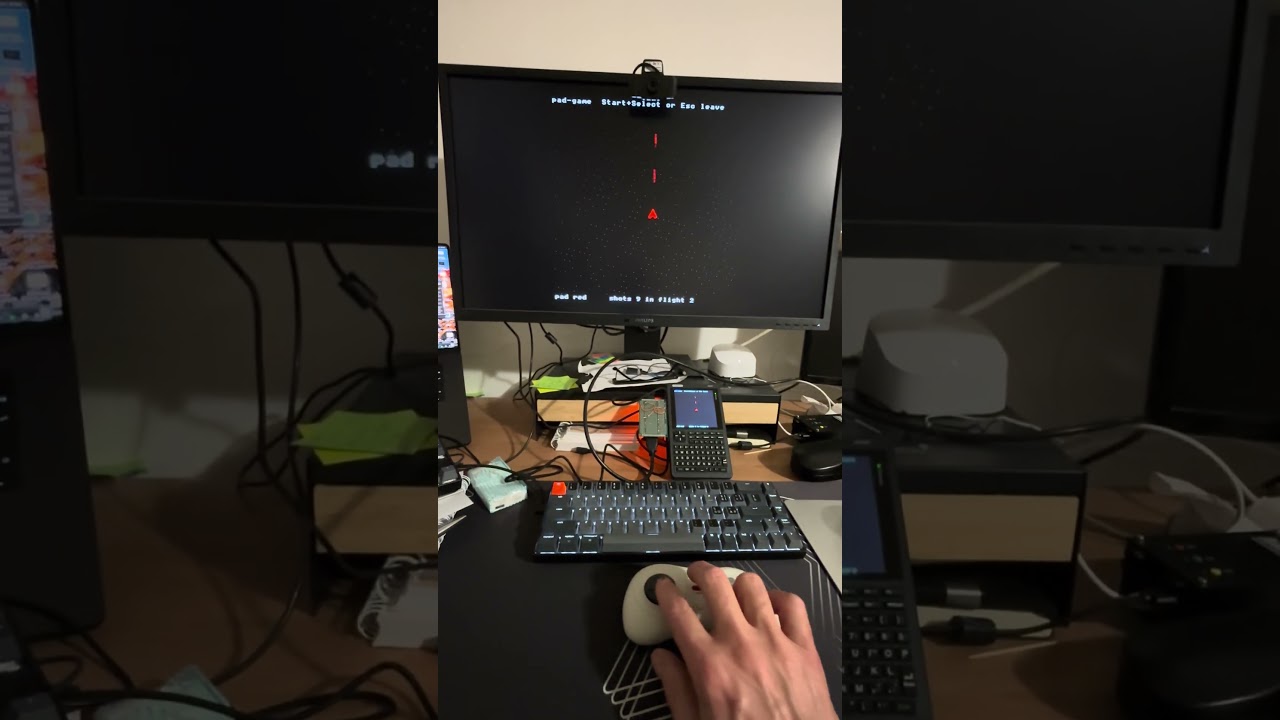
I’ve connected a gamepad to the PicoCalc via btpair, treating it as if it were a mouse. I’ve created a test program to try out the movements and buttons. The PicoCalc is connected to a monitor, again through the Tang Nano.
This is the alpha version. I’d like the gamepad to be handled as a different device type from the mouse, because at the moment it disables the mouse. This would require modifying the btpair program and adding a new entry to pairing.dat. As you wrote @chrisleif : let’s agree on the new format first, so neither of us breaks the other. Thanks.
Nice work, Giovanni, and thanks for asking first. Here’s a proposal that I think keeps us both safe.
The file stays PBK2: same magic, same size, same record layout. A gamepad just gets its own pair of tags, following the pattern of the other two:
KBD0 / KBL0: keyboard (classic / BLE)
PTR0 / PTL0: mouse (classic / BLE)
GPD0 / GPL0: gamepad (classic / BLE), new
The record itself is the same as the mouse’s: the address, the address type for BLE, and the name. So the gamepad gets its own slot, and pairing one no longer replaces the mouse.
Why this is safe both ways: btkbd loads the whole store into RAM and writes the whole store back, so a program that doesn’t know GPD0 still keeps that record untouched. Older builds of either of our programs won’t erase a paired gamepad. They just won’t use it. There’s room too: the store has 20 records, and three devices with their link keys use about six.
For telling a gamepad from a mouse at pairing time, I’d go by the HID report descriptor’s top-level usage (Generic Desktop: Mouse 0x02, Joystick 0x04, Gamepad 0x05, Keyboard 0x06), treating Joystick as a gamepad too, and fall back on the Class of Device’s minor class when there’s no descriptor yet. For the API, a btkbd_gamepad() alongside btkbd_mouse().
If that suits you, I’ll add the slot to btpair and btkbd in picocalc-extras and tag a release, so your shell can pick it up from there. Or if you’d rather do it, a pull request against picocalc-extras is very welcome. Just say which.
Thanks, Chris. I agree with your idea—it works really well. I’d prefer if you made the changes since you know the code better; I’ll then adjust my code accordingly. Thanks.
pairing.dat is still PBK2; the gamepad has its own record, tagged GPD0 (classic) or GPL0 (BLE), laid out like the mouse’s: the 6-byte address, for BLE then its address type, then the name. btpair 2.2 pairs it with G, and its first page shows the sticks and buttons live once it’s connected.
In code, btkbd_gamepad(&pad) fills a btkbd_pad_t: buttons (bit 0 is button 1), x/y for the left stick and z/rz (or rx/ry on some pads) for the right, each −127 to 127; brake/gas for analogue triggers, 0 to 255; and hat for the D-pad, −1 when it isn’t pressed, 0 up and round clockwise. It returns true when a new report has come. The details are in bluetooth/README.md and btkbd.h.
Tried so far: a Sony PS4 controller (classic), with the Logitech K380 keyboard and M720 mouse still pairing and reconnecting as before.
This is a pre-release for testing. If a gamepad misbehaves, press D then F5 in btpair, and send the two files it saves in /screenshots.
Hi all,
I updated the shell version to the latest release, 1.3, and updated the Bluetooth code to match the latest release.
New in 1.0.0
Bluetooth gamepad. Tried with an 8BitDo M30. It pairs beside the keyboard and mouse, and in the shell the D-pad gives the arrows. Two new programs go with it: gamepad-test shows everything the pad sends, and pad-game moves a ship and shoots.
File manager in your browser.web serves the SD card over Wi-Fi.
Congratulations on 1.0.0, Giovanni — and thanks for the credit. Good to hear the gamepad slot works with the M30; that’s a second pad besides my PS4 one, which was the test I was hoping for.
I’ll release picocalc-extras 2.2 with the gamepad support on Tuesday, so you’ll be able to point at a proper tag rather than the branch. Nothing in the interface changes from what you’re using now.