So I tried plugging in my USB keyboard when the update froze at “Waiting for device, exit with ctrl-c” but nothing happened. In fact, I do not even get to the point where one needs to hit fn-esc or LAlt-RAlt-Start. All I can do is reboot to get the keyboard back.
How recommendable is it to switch to QMK?
is it somehow “stable”?
can I safely switch back to stock firmware?
Is the USB Device Bug the only known one?
you will have gamepad + select+ball as scroll
(on lates stock you have fn + ball as scroll)
yes
yes
3 Likes
Yup, I fixed this. They work great now.
1 Like
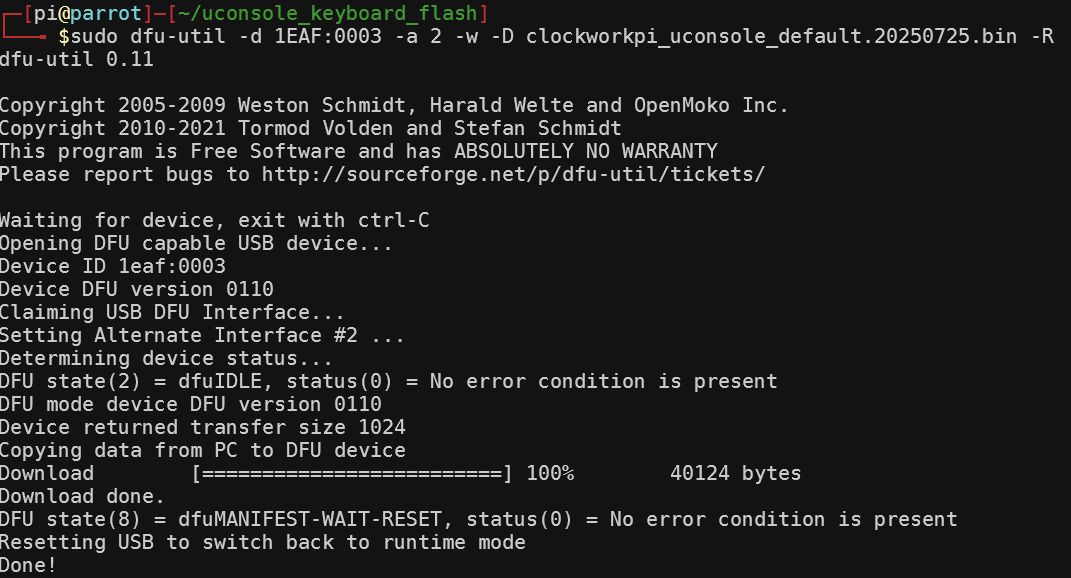
May someone else has trouble to flash the version because of Failed to open serial device -w option of dfu-util and a power hungry USB-Device like a USB ventilator helped in my case - just plug it in and out during the wait - somehow the USB-Host reset helped doing the rest:
sudo dfu-util -d 1EAF:0003 -a 2 -w -D clockworkpi_uconsole_default.20250725.bin -R
1 Like
What about the problem with the keyboard and trackball disconnecting if you connect anything to the USB port? Has this been resolved?
that’s not the QMK issue itself (probably it could reconnect usb device though), but hardware’s uconsole’s. Seems like less problem on CM4 than on CM5.
and seems like there is a solution, feel free to try on your own risk: Fixing uConsole power delivery limitations with CM5 - #16 by QuantumKraken
1 Like
Even plugging in some power-hungry device into USB does not move things forward for me. I am at the point of just giving up. Things still work, after all.
can you update the stock firmware to the latest version by instruction from their github?
1 Like
At this point, I do not know which firmware I have installed any more. I just re-installed the stock firmware according to the uconsole wiki page on github:
~/uconsole_keyboard_flash $ sudo ./flash.sh
Failed to open serial device.
/usr/bin/dfu-util -d 1EAF:0003 -a 2 -D uconsole_keyboard.ino.bin -R
dfu-util 0.11Copyright 2005-2009 Weston Schmidt, Harald Welte and OpenMoko Inc.
Copyright 2010-2021 Tormod Volden and Stefan Schmidt
This program is Free Software and has ABSOLUTELY NO WARRANTY
Please report bugs to http://sourceforge.net/p/dfu-util/tickets/dfu-util: Warning: Invalid DFU suffix signature
dfu-util: A valid DFU suffix will be required in a future dfu-util release
dfu-util: No DFU capable USB device available
Waiting for /dev/ttyACM0 serial…arm64
Done
Then used maple_upload, but both operations yielded errors:
:~/uconsole_keyboard_flash $ sudo ./maple_upload ttyACM0 2 1EAF:0003 ../clockworkpi_uconsole_default.20250725.bin
Failed to open serial device.
/usr/bin/dfu-util -d 1EAF:0003 -a 2 -D ../clockworkpi_uconsole_default.20250725.bin -R
dfu-util 0.11Copyright 2005-2009 Weston Schmidt, Harald Welte and OpenMoko Inc.
Copyright 2010-2021 Tormod Volden and Stefan Schmidt
This program is Free Software and has ABSOLUTELY NO WARRANTY
Please report bugs to http://sourceforge.net/p/dfu-util/tickets/dfu-util: No DFU capable USB device available
Waiting for /dev/ttyACM0 serial…arm64
Done
Is there a simple way of seeing the currently running firmware version?
@yasbean Did you tried my version of the command with the -w to flash?
Yes, I have. That is where I get stuck.
:~ $ sudo dfu-util -d 1EAF:0003 -a 2 -w -D clockworkpi_uconsole_default.20250725.bin -R
dfu-util 0.11Copyright 2005-2009 Weston Schmidt, Harald Welte and OpenMoko Inc.
Copyright 2010-2021 Tormod Volden and Stefan Schmidt
This program is Free Software and has ABSOLUTELY NO WARRANTY
Please report bugs to http://sourceforge.net/p/dfu-util/tickets/Waiting for device, exit with ctrl-C
^C
Thank you for asking!
So I was able to reproduce your situation and successfully reverted back to stock from QMK.
To do it I connected by ssh from laptop and run command twice. As I understand after first try it go to bootloader state and flashing works on the second run. (Probably you can replace ssh with external keyboard):
first time:
$ sudo ./flash.sh
Failed to open serial device.
Failed to open serial device.
/usr/bin/dfu-util -d 1EAF:0003 -a 2 -D uconsole_keyboard.ino.bin -R
dfu-util 0.11

Copyright 2005-2009 Weston Schmidt, Harald Welte and OpenMoko Inc.
Copyright 2010-2021 Tormod Volden and Stefan Schmidt
This program is Free Software and has ABSOLUTELY NO WARRANTY
Please report bugs to http://sourceforge.net/p/dfu-util/tickets/

dfu-util: Warning: Invalid DFU suffix signature
dfu-util: A valid DFU suffix will be required in a future dfu-util release
dfu-util: No DFU capable USB device available
Waiting for /dev/ttyACM0 serial...arm64
Done
Keyboard now disabled, only restart will help:
$ sudo ./flash.sh
Failed to open serial device.
Failed to open serial device.
/usr/bin/dfu-util -d 1EAF:0003 -a 2 -D uconsole_keyboard.ino.bin -R
dfu-util 0.11

Copyright 2005-2009 Weston Schmidt, Harald Welte and OpenMoko Inc.
Copyright 2010-2021 Tormod Volden and Stefan Schmidt
This program is Free Software and has ABSOLUTELY NO WARRANTY
Please report bugs to http://sourceforge.net/p/dfu-util/tickets/

dfu-util: Warning: Invalid DFU suffix signature
dfu-util: A valid DFU suffix will be required in a future dfu-util release
Opening DFU capable USB device...
Device ID 1eaf:0003
Device DFU version 0110
Claiming USB DFU Interface...
Setting Alternate Interface #2 ...
Determining device status...
DFU state(2) = dfuIDLE, status(0) = No error condition is present
DFU mode device DFU version 0110
Device returned transfer size 1024
Copying data from PC to DFU device
Download	[=========================] 100%        33824 bytes
Download done.
DFU state(8) = dfuMANIFEST-WAIT-RESET, status(0) = No error condition is present
Resetting USB to switch back to runtime mode
Done!
Waiting for /dev/ttyACM0 serial...arm64
Done
It helped without restart. Bye-bye QMK.
@olly Is there any git repository for the firmware or only your private binaries?
1 Like
The repo is here. Make sure you’re looking at the uconsole branch.
4 Likes
Gave the higher powr limit firmware a go, didn’t help unfortunately
Hi, is it possible to use the YXBA keys in the os not only for gaming ?
So I can map the B to cmd and the A to enter and so on ?
you can use programs like GitHub - AntiMicroX/antimicrox: Graphical program used to map keyboard buttons and mouse controls to a gamepad. Useful for playing games with no gamepad support.
I have in my todo list to modify & compile stock firmware to remap gamepad buttons to keyboard ones, just can’t collect enough willpower to do it (may be this weekend?).
or you can modify stock/qmk firmware yourself! (it’s not a rocket science after all and there is an instruction how to compile and upload stock firmware)
1 Like
Im waiting for my uconsole and then i saw this. Awesome i was already using qmk for my own custom build keyboards. Did anybody try if Via works? Because if it does you would be able to remap keys from the via app (https://www.usevia.app/) from the uconsole itself.
on my uconsole its not working (i am on the latest qmk from olly). →https://github.com/the-via/app