# uConsole hardware directory
**URL:** https://forum.clockworkpi.com/t/uconsole-hardware-directory/22222
**Category:** uConsole
**Tags:** tinkering, community, hardware
**Created:** [April 28, 2026, 4:04pm UTC](https://forum.clockworkpi.com/t/uconsole-hardware-directory/22222 "2026-04-28T16:04:00Z")
**Posts on this page:** 12
**Page:** 1
### Author:  [@trinity](https://forum.clockworkpi.com/u/trinity)
#### Post date: [April 28, 2026, 4:04pm UTC](https://forum.clockworkpi.com/t/uconsole-hardware-directory/22222/1 "2026-04-28T16:04:00Z")
This is a summary of the various hardware peripherals/modifications purpose-built for the uConsole. Prices are in United States dollars unless noted. I’ll be slowly working on this as there is a large uConsole hardware ecosystem to document. For a guide to software, see the [companion OS directory](https://forum.clockworkpi.com/t/22029).
## Base unit
> [@First look of uconsole](https://forum.clockworkpi.com/t/first-look-of-uconsole/10309/1):
>
> 
There are a couple ways to acquire a uConsole, but the best way really is the official shop.
- [The official ClockworkPi shop](https://www.clockworkpi.com/shop) is the only first-party supplier. The A-06 and R-01 SKUs are sold out but the CM4 is still in stock at **$250 excluding shipping**. This includes the uConsole, a ClockworkPi CM4 adapter board, and a CM4104000, which is a 4GB RAM, eMMC-less Raspberry Pi Compute Module 4 with on-board WiFi/Bluetooth. Shipping from ClockworkPi takes a very long time; one of the oldest posts in the uConsole topic on this forum is [an ad-hoc shipping batch tracker](https://forum.clockworkpi.com/t/10478/).
The extreme wait times lead people to pay very high prices to third-party resellers to get a uConsole early. Please note that **you are totally being played** if you pay more than, say, **$350 including shipping** for a base unit. Even the “super hacker” “pimped-out” uConsoles on-line where someone actually added a modicum of value are rarely worth it.
- AliExpress, at, for example, [aliexpress.us](https://www.aliexpress.us/w/wholesale-uconsole.html), is a popular uConsole source, though it’s of poor reputation.
- [eBay](https://www.ebay.com/sch/i.html?_nkw=uconsole) sometimes has some uConsoles being sold.
- OpenSourceSDRLab has [a uConsole listing](https://opensourcesdrlab.com/products/opensourcesdrlab-uconsole-kit-rpi-cm4-lite-with-clockworkpi-v314-mainboard) at a reasonable price.
Instead of turning to these resale websites, see if you can find someone selling their uConsole here on the forum, where you can scroll people’s profiles and see what they actually did with their console and why they’re moving on. It’s harder to lie about the accessories you have installed (for example, calling an AIOv1 a modded AIOv2) on the forums frequented by the makers of those accessories.
It is advised _not_ to purchase from either “ETech Devices” or “PiMod Labs” as they have been spammed here by bots.
### Chassis
It’s possible to build a “ship of Theseus” uConsole without having ever purchased the base unit; the device is open hardware and is composed of three PCBs excluding adapter boards, cores, or the keyboard. ClockworkPi offers [3D models of the uConsole in OBJ and STEP formats](https://www.clockworkpi.com/product-page/uconsole-3d-models-in-obj-format-free) ( **$5** or free with coupon code `UC`) for reproduction. There are also [coarse models](https://github.com/57Bravo/uConsole_3D_Models) that were deduced prior to the official release.
There are also plenty of unofficial chassis 3D models for printing.
> [@My uConsole 3D printed back](https://forum.clockworkpi.com/t/my-uconsole-3d-printed-back/21146/1):
>
> 
Above is the [uConsole back cover for passive cooler](https://makerworld.com/en/models/2115543-uconsole-back-cover-for-passive-cooler) on Maker World.
> [@Introducing the Omega Chassis for the uConsole rocket](https://forum.clockworkpi.com/t/introducing-the-omega-chassis-for-the-uconsole/22584/1):
>
> 
The uConsole Omega Chassis is beams’ modular chassis design. Its [announcement](https://jing.io/projects/the-omega-chassis-a-modular-backplate-for-the-uconsole/) (with [accompanying thread](https://forum.clockworkpi.com/t/22584)) explains the rationale; much is changed to improve airflow, battery capacity, I/O capacity, and the speakers’ sound.
For **£26** available [on Jing’s website](https://s.jing.io/downloads/uconsole-omega-chassis/) one can license the design files for personal use, which include thorough documentation and an ordering guide for actually obtaining the components.
> ### Production Cost Estimation
>
> Following the purchase of the build guide, here is an estimated cost to produce the major parts. The CNC components are modular and require no major updates so these are likely a one-time cost.
>
> | Prouduction | Cost Estimate |
> | --- | --- |
> | CNC Parts | ~85 USD + Shipping |
> | MJF Nylon Parts | ~32 USD + Shipping |
> [@Introducing the Omega Chassis for the uConsole rocket](https://forum.clockworkpi.com/t/introducing-the-omega-chassis-for-the-uconsole/22584/9):
>
> It does not mean you have to have all parts installed at start. There’s a steady upgrade path.
## Mainboard
The official uConsole motherboard is the ClockworkPi v3.14 mainboard. Two versions retailed; [the original](https://github.com/clockworkpi/uConsole/blob/master/clockwork_Mainboard_V3.14_Schematic.pdf) and its [fifth revision](https://github.com/clockworkpi/uConsole/blob/master/clockwork_Mainboard_V3.14_V5_Schematic.pdf). There are no known cases of the uConsole shipping with an original v3.14 mainboard, only the R5 board. The board is [available for purchase separately](https://www.clockworkpi.com/product-page/clockworkpi-v3-14) through the shop for **$40 excluding shipping**. Be careful not to choose [the similarly-named v3.1 board](https://www.clockworkpi.com/product-page/cpi-v3-1) which is a different product for the GameShell.
> [@Troubleshooting a formerly working UConsole device](https://forum.clockworkpi.com/t/troubleshooting-a-formerly-working-uconsole-device/19180/9):
>
> they no longer produce old versions, devterms produced after the uconsole launch also had the v5 mainboard
### USB power brownout
The mainboard can sometimes have issues supplying power to all the peripherals on the Universal Serial Bus if there’s a sudden increase in power draw, such as when a flash drive with status LED is attached. This problem affects the keyboard most of all:
> [@Fixing uConsole power delivery limitations with CM5](https://forum.clockworkpi.com/t/fixing-uconsole-power-delivery-limitations-with-cm5/19119/1):
>
> I’m encountering power related issue on my uConsole (CM5) that initially appeared to be isolated to the keyboard, but may point to a broader power delivery problem.
>
> **Primary symptom:**
>
> - The built-in keyboard disconnects when plugging any device to the usb port and re-enumerates as `Leaflabs Maple DFU` (`1eaf:0003`), at which point it no longer functions until rebooted (reboot solves the problem only while running on the battery).
> - Sometimes it also disconnects while trying to flash ESP32 based board using the USB.
> - [USB resets, unbind/bind, and toggling authorized do not recover it](https://forum.clockworkpi.com/t/qmk-firmware-for-uconsole-keyboard/14410/112) - the device remains in bootloader mode until rebooted or power-cycled.
> [@QMK firmware for uConsole keyboard](https://forum.clockworkpi.com/t/qmk-firmware-for-uconsole-keyboard/14410/151):
>
> Regarding USB power issues, I saw these report - I am sure there is a power brownout issue that triggers QMK going into DFU mode - because the main board is designed for cm3
There’s a hardmod one can make to the mainboard to prevent the brownouts entirely:
> [@Fixing uConsole power delivery limitations with CM5](https://forum.clockworkpi.com/t/fixing-uconsole-power-delivery-limitations-with-cm5/19119/18):
>
> 
>
> I replaced C513 on the back of the main board.
> [@Fixing uConsole power delivery limitations with CM5](https://forum.clockworkpi.com/t/fixing-uconsole-power-delivery-limitations-with-cm5/19119/20):
>
> Just in case if someone is interested in such mod:
> Type: type B / 3528 / 3.5x2.8 mm
> Capacitance: 220uF
> Voltage: 10v(but I could only find 6.3V for a reasonable price)
This workaround is still useful if one needs a certain level of reliability from the US bus but another option is to install [beams’ QMK firmware](https://forum.clockworkpi.com/t/21521).
> [@QMK firmware for uConsole keyboard](https://forum.clockworkpi.com/t/qmk-firmware-for-uconsole-keyboard/14410/159):
>
> In case of power surge, the keyboard would move to bootloading mode, if no firmware uploading happens to it then it will verify, load the firmware as usual. I have tested with my ethernet cable with 100% backlight on, it restores the keyboard behaviour after power surge (see lights off & back on shortly - and it looks kinda cool as well!), no need to reboot or flashing the firmware now. 🙂
### Indicator LED
> [@Uconsole charging LED](https://forum.clockworkpi.com/t/uconsole-charging-led/21811/2):
>
> As others have said:
>
> > [@](#):
> >
> > that indicator is pretty finicky. it doesn’t work when uconsole is powered off (probably because it works programmatically), and seems like OS updates can break it also: [Bookworm 6.12.y for the uConsole and DevTerm - #474 by Rex](https://forum.clockworkpi.com/t/bookworm-6-12-y-for-the-uconsole-and-devterm/15847/474) I suppose it works this way because ‘charging board’ is a separate module, but it should charge batteries even if indicator doesn’t show it.
>
> The charge LED is driven by the kernel and is used as a live system charging indicator. [Two inline USB-C PD power meters on Amazon](https://www.amazon.com/dp/B0D8PJ46WV) are $10. I have them on most of my power supplies for ease of troubleshooting because they’re so useful, and particularly if you’re recharging your uConsole while powered off, as they’ll show 0A current pull when the charge controller believes the battery is full.
The charge LED is wired to the AXP228 charge controller.
### Mainboard WLAN
The mainboard has a WLAN adapter for use over SDIO with compatible cores (listed in the **Cores** section).
It’s inaccessible through any available adapter board.
> [@Radxa CM5 - Will it work?](https://forum.clockworkpi.com/t/radxa-cm5-will-it-work/19329/9):
>
> On the mainboard, the WLAN subsystem uses the GPIO pins 3-7 for basic configuration, 14-17 for UART, 18-21 for PCM, and 22-27 for SDIO. These are all wired to the SODIMM connector for the core modules. The adapter board wires the SODIMM pins to the CM4 pins like so:
>
> - SODIMM GPIO3-5 → CM4 GPIO3-5
> - SODIMM GPIO6-7 → floating
> - SODIMM GPIO14-27 → floating
>
> So the best one can do with the CM4 adapter board is mess with the enabled state of some of the radio components on the mainboard, and one would need a new adapter board to use the mainboard’s radios.
The antenna connector on the mainboard is for the mainboard WLAN and only has function if using that WLAN adapter.
### New revision
In March 2025 ClockworkPi was working on another mainboard revision:
> [@Ideas for a new ClockworkPi Main Board/uConsole 2](https://forum.clockworkpi.com/t/ideas-for-a-new-clockworkpi-main-board-uconsole-2/16062/6):
>
> I sent an email to Alex last week and he told me that **a new mother is under development** , but he didn’t give me any more information besides that.
> [@New QMK Firmware, Trackball Guide and Keyboard Diffuser](https://forum.clockworkpi.com/t/new-qmk-firmware-trackball-guide-and-keyboard-diffuser/21521/5):
>
> Unfortunately I do not know, there is no information being confirmed for what the upgrades are and when it might be released.
Around the start of June 2026 another person, this time on Facebook, claimed to have heard about the new mainboard from official sources:
> [@Anyone else heard this? (PicoZero and new mb for uConsole)](https://forum.clockworkpi.com/t/anyone-else-heard-this-picozero-and-new-mb-for-uconsole/22620/1):
>
> 
## Screens
### TXW50017B0 (first panel)
> [@Replacement Screen for the uConsole](https://forum.clockworkpi.com/t/replacement-screen-for-the-uconsole/11094/9):
>
> The exact model number is on the back there, and it is a TxWEI screen, part number TXW50017B0.
>
> Dimensionally, the module is 119mm x 65mm, with a 111.25mm x 63mm active area starting 1mm x 1mm from the top-left, the primary ribbon connected to the right hand side, and exiting the footprint 75mm from the left.
>
> Electrically, it’s a standard 40-pin LVDS (like a laptop screen). It is _not_ MIPI (like the official Raspberry Pi display).
>
> Logically, it’s 1280x720 resolution.
>
> Practically, your best option is to email clockwork to see if you can source a replacement directly. I just worked out this stuff because I wanted to see what my options might be for upgrades. The fact that it’s standard LVDS implies I might be able to re-case it in a variety of ways with size-matched screens with just a few tweaks to config.txt.
### TXW500170B0-FPC-01 (second panel)
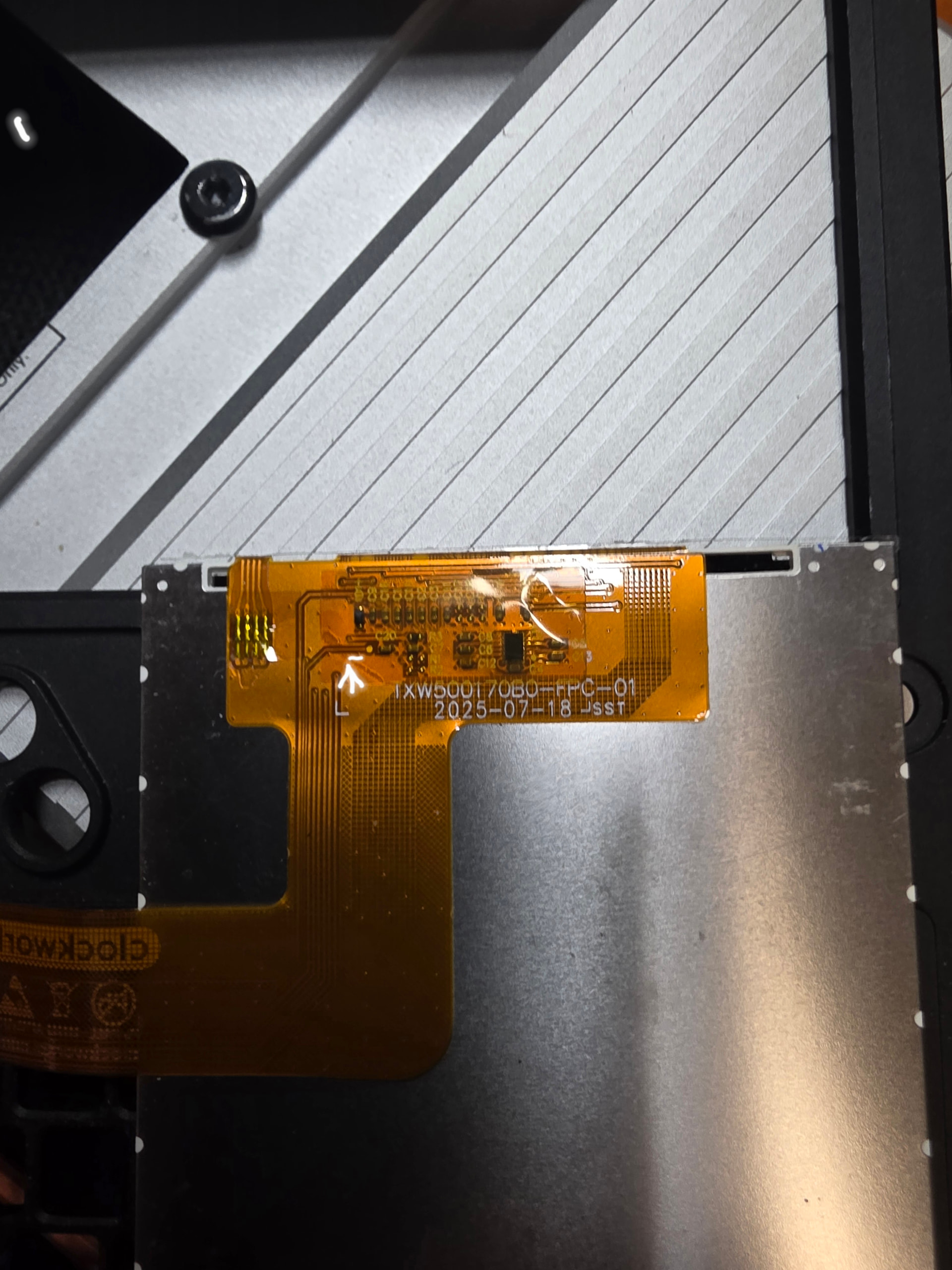
> [@Updated Images for new uConsole screens](https://forum.clockworkpi.com/t/updated-images-for-new-uconsole-screens/21666/6):
>
> What are the differences between the old and new panels ?
> [@Updated Images for new uConsole screens](https://forum.clockworkpi.com/t/updated-images-for-new-uconsole-screens/21666/7):
>
> practically nothing, just minor differences in the driver initialization
> [@uConsole new vs old display](https://forum.clockworkpi.com/t/uconsole-new-vs-old-display/22638/1):
>
> After comparing the [second and third panels], it turns out the only real hardware difference is a single [resistor], shown below.
> [@uConsole new vs old display](https://forum.clockworkpi.com/t/uconsole-new-vs-old-display/22638/2):
>
> this is the [second] display module.
>
> 
### TXW500242B0-FPC-00 (third panel)
> [@uConsole new vs old display](https://forum.clockworkpi.com/t/uconsole-new-vs-old-display/22638/1):
>
> This is the new display module.
>
> 
uConsoles have been shipping with newer panels since 2025. Not all released operating systems have compatible kernels. If using a newer panel, see the notes for the distribution. Rex’s distributions have updated kernels, and there is one distribution for the A-06 with a compatible kernel:
> [@LCD garbled on new uConsole with A-06](https://forum.clockworkpi.com/t/lcd-garbled-on-new-uconsole-with-a-06/21964/16):
>
> Just made a minimal archlinux for A06 with new screen driver,hopefully can resolve the garbled problem.
### Touchscreen
> [@Will There Ever Be](https://forum.clockworkpi.com/t/will-there-ever-be/12987/1):
>
> A Touchscreen uConsole?
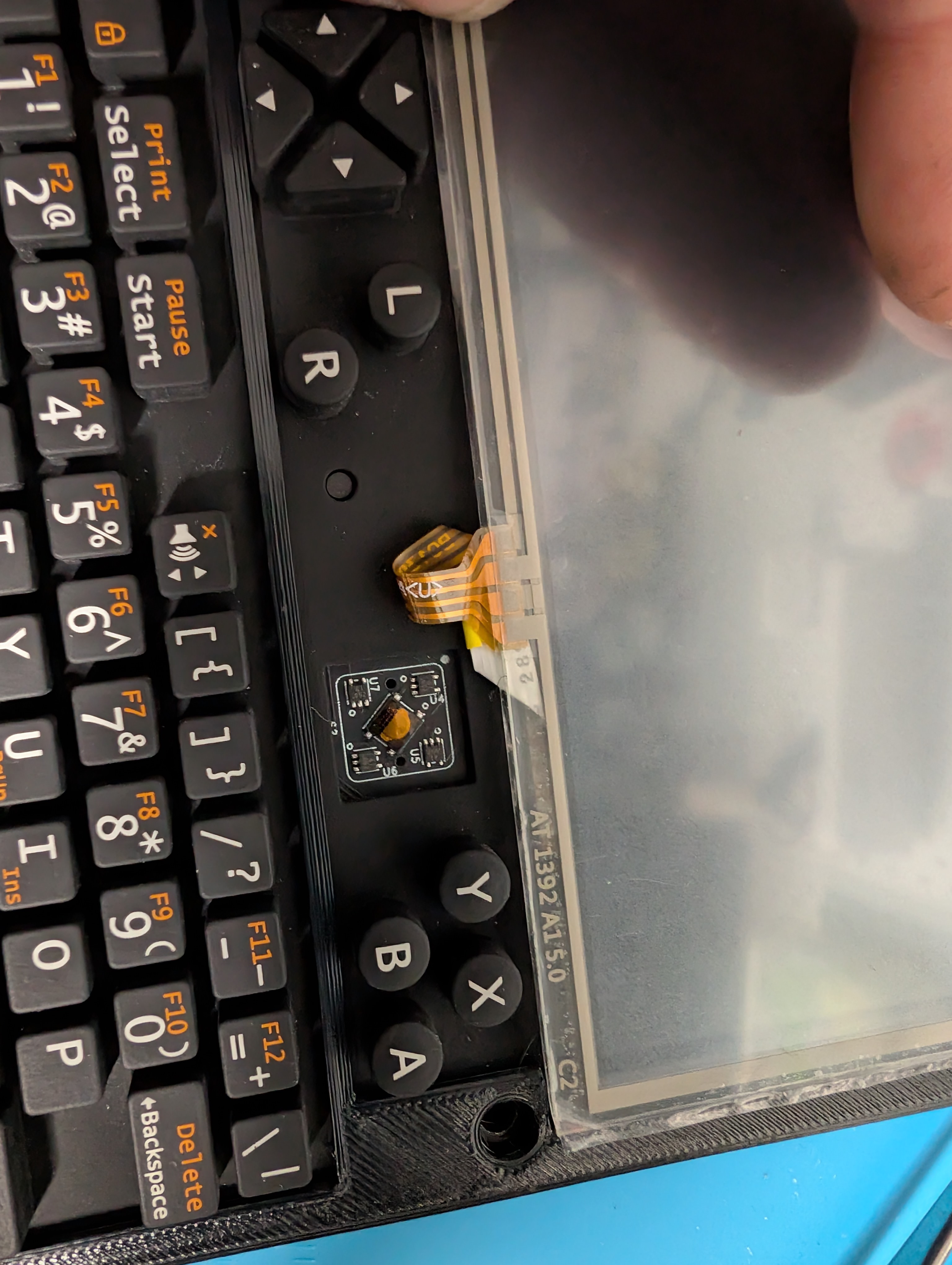
@timmotools managed to mod a touch screen into their uConsole using a digitizer and a USB controller for it. They have [a thread](https://forum.clockworkpi.com/t/22441) and a [writeup on GitHub](https://github.com/Timmotools/uConsole-Touchscreen-Mod).
### External displays
As the cable is a passive electrical component any micro HDMI to HDMI plug-plug adapter should work without complaint.
> [@uConsole - Alternate Display](https://forum.clockworkpi.com/t/uconsole-alternate-display/10537/11):
>
> Just got these and they work perfectly:
>
> [Amazon.com: Cable Matters 2-Pack 8K@60Hz / 4K@240Hz Micro HDMI to HDMI Adapter - 6 Inches, with HDMI2.1 & HDR Support for Raspberry Pi 4 (RPI4), Raspberry Pi 5 (RPI5) : Electronics](https://www.amazon.com/Cable-Matters-Adapter-Support-Raspberry/dp/B095L6C8SM)
>
> Pete B.
## Adapter boards
## Cores
See the separate [core and adapter board directory](https://forum.clockworkpi.com/t/22664).
## Extension boards
See the separate [extension board directory](https://forum.clockworkpi.com/t/22474).
## Battery boards
> [@Understanding battery module pinout; upgrading battery module](https://forum.clockworkpi.com/t/understanding-battery-module-pinout-upgrading-battery-module/10260/10):
>
> 
The battery board routes the power from the batteries to the mainboard, where the mainboard’s AXP228 controls charging. Other than some fail-safe circuitry the stock battery board is fairly sparse. Aftermarket battery boards tend to add functionality by routing additional data lines off the mainboard or core.
## Batteries
> [@Batteries for uConsole](https://forum.clockworkpi.com/t/batteries-for-uconsole/14526/9):
>
> …They all output 3.7 volts. It’s the amps that we are discussing here [in the context of capacity]. More accurately the Amp-Hours. Amp-Hours determine how long the batteries can keep a device powered on. What we have found is that many battery manufacturers are out right lying and claiming huge capacities. Then when they are tested their capacity is far far lower. Example: the 9900 mAh battery that is only 500 mAh. The manufacturers are just outright lying… 🙂
It’s not just capacity that matters, it’s current output. The battery needs to deliver enough current to power all of the attached devices, or the device will lack power and shut down. Capacity is how much power, total, the battery can output, while the current output refers to how quickly the battery can output that power. A liter bucket of water can fill your cup, but if you can only draw water from it a single drop at a time, you’ll still be thirsty.
Here’s a reasonable recommendation:
> [@Battery life - how to get most out of battery?](https://forum.clockworkpi.com/t/battery-life-how-to-get-most-out-of-battery/16048/7):
>
> These are the ones I use and recommend. Get them from a reputable source and not amazon or aliexpress.
>
> [https://www.18650batterystore.com/products/samsung-35e](https://www.18650batterystore.com/products/samsung-35e)
And here are two expensive options:
> [@Batteries for uConsole](https://forum.clockworkpi.com/t/batteries-for-uconsole/14526/12):
>
> I am currently using those from nitecore, and they provide 5-6 hours of work.
> [NL1840](https://flashlight.nitecore.com/product/nl1840) Their length is over 69mm (69.8) but they actually are fitted well.
> [@Compatible Batteries for uConsole](https://forum.clockworkpi.com/t/compatible-batteries-for-uconsole/22540/5):
>
> 
18650 cells are only available in capacities up to 4000mAh (at which they are very expensive).
“Protected” cells are cells which include circuitry to momentarily cut the connection when hazardous conditions are observed such as overheating (too much heat), overcurrent (draining too much energy at once), overvoltage (charged too full), or undervoltage (dangerously low charge). They help prevent some types of error which are more likely to cause a fire. The mainboard charge controller won’t over- or undervolt the 18650s, so protected cells will, in addition to the functionality present in unprotected cells, _only_ cut power if they’re being overdrawn or running too hot.
### Warning
Here is the obligatory warning before this directory covers battery-related uConsole modifications. In normal use, one doesn’t need to worry about one’s uConsole suddenly bursting into flame. There aren’t any known cases of this happening to a uConsole with the stock or an aftermarket battery board, at least on this forum. The danger comes with messing around with parallelizing many batteries or other custom solutions to electricity storage. Although members on the forum discuss these modifications and configurations as if they’re simple, because they are, without understanding electrical basics it’s easy to unknowingly introduce problems which can snowball into thermal runaway after a number of charge cycles.
> [@LiPo Battery Issue](https://forum.clockworkpi.com/t/lipo-battery-issue/21374/77):
>
> …anyone who doesn’t know what parallel connection means or how it works should not be tinkering with lithium batteries. It’s not fun, it’s very dangerous.
An electrical battery is a cell containing a chemical mixture designed to store as much energy as possible. Energy-dense chemical pouches have some inherent danger and especially when it’s possible to release that energy another way, such as through ignition. Sometimes chemical processes inside the cell inflate it, puncture the casing, and ignite, or in layman’s terms, **SOMETIMES THEY JUST RANDOMLY EXPLODE**. In a laboratory environment this isn’t a big deal, but [if you’re a co-pilot on a plane you can kill yourself and 65 others](https://wccftech.com/egypt-plane-crash-exploding-iphone-culprit/). Big and small companies struggle to keep their batteries from halting and catching fire. [Samsung’s Galaxy Note 7 was infamous](https://wccftech.com/galaxy-note-7-battery-root-fires-samsungs-investigation-allegedly-finds/) for [maiming its users](https://www.johnsonbecker.com/product-liability/samsung-galaxy-note-7-lawsuit/).
> Last September, Joni Barwick woke up in the middle of the night to her Galaxy Note 7 phone spewing flames 16 inches from her face.
> “There’s orange and red and smoke and fire, and it took me just a split second to process that my phone was on fire,” [she recalled](https://www.cbsnews.com/news/samsung-galaxy-note-7-fine-print-class-action-waiver-lawsuits/).
Ten years later there has been no revolution in manufacturing these batteries, we just better understand which designs work and which ones shoot meter long flames into the skulls of people pressing them against their heads for telephone calls. There’s always a chance that a manufacturer’s battery even when used as directed will burn down your car, home, airplane, or fireworks production factory. That’s the risk we take in exchange for easy portable electricity storage.
If a company worth $1,000,000,000,000 can’t stop their batteries from spontaneously combusting when used _properly_, maybe you shouldn’t use your own batteries like you’re a side character in an 80s apocalypse movie.
> [@My 18650 batteries vented when I put them in the PicoCalc](https://forum.clockworkpi.com/t/my-18650-batteries-vented-when-i-put-them-in-the-picocalc/19975/11):
>
> 18650s aren’t simply “better AAs”. You need to treat them with respect, and don’t just assume that everything will be ok if you do something dumb. _Any_ time you have a loose cell you have to think through everything you’re doing before you do it, then stop and check again.
>
> And “protected” cells aren’t magically safe either - they can potentially prevent certain classes of failure, but they’re not idiot proof, and they can make you complacent.
The United States’ of America [National Fire Protection Agency has a section of their webpage dedicated to lithium ion battery safety](https://www.nfpa.org/education-and-research/energy-transition/lithium-Ion-batteries). Here’s a [simple guide from fireblanket.com](https://fireblanket.com/blog/how-to-put-out-lithium-battery-fire) advising the user place a fire blanket (among other steps) on a burning battery. **KNOW HOW TO FIGHT THE FIRE BEFORE IT HAPPENS**.
### Charge controller: AXP228
The datasheet is available [here from alldatasheet.com](https://www.alldatasheet.com/datasheet-pdf/pdf/1134500/XPOWER/AXP228.html). The charge controller controls the charging LED and provides to the kernel the statistics regarding the power subsystem.
### Voltage
> [@Changing charging voltage (4.4v)?](https://forum.clockworkpi.com/t/changing-charging-voltage-4-4v/21246/2):
>
> The AXP228 can only charge to a maximum of 4.2v.
### Current
> [@LiPo Battery Issue](https://forum.clockworkpi.com/t/lipo-battery-issue/21374/29):
>
> add up the maximum current draw of all hardware components of your setup and choose a battery that can provide this total current as a continuous load
**TODO**
## Keyboards and pointing devices
### USB brownout
There is a mainboard power issue that can make the stock keyboard disconnect when USB devices are attached. See [mainboard](#p-94185-mainboard-2).
### Kapton replacement
> [@Kapton tape keyboard fix](https://forum.clockworkpi.com/t/kapton-tape-keyboard-fix/21971/1):
>
> 
The stock keyboards use kapton to adhere conductive, flexible domes. This kapton can use its adherence, and when it does, the domes fall off, as shown above. [It’s easily repairable](https://forum.clockworkpi.com/t/21971).
### Diffuser
Shown in my kapton replacement forum post is beams’ improved keyboard diffuser.
> [@New QMK Firmware, Trackball Guide and Keyboard Diffuser](https://forum.clockworkpi.com/t/new-qmk-firmware-trackball-guide-and-keyboard-diffuser/21521/1):
>
> 
> [@New QMK Firmware, Trackball Guide and Keyboard Diffuser](https://forum.clockworkpi.com/t/new-qmk-firmware-trackball-guide-and-keyboard-diffuser/21521/1):
>
> 
> [@New QMK Firmware, Trackball Guide and Keyboard Diffuser](https://forum.clockworkpi.com/t/new-qmk-firmware-trackball-guide-and-keyboard-diffuser/21521/1):
>
> The primary goal here wasn’t just aesthetics, it was to greatly improve the touch-typing experience. It means it should be clicky but just enough force required to type on each key.
They have a write-up on [their blog](https://jing.io/projects/uconsole-keyboard-diffuser/). The 3D model [is available for download](https://s.jing.io/downloads/uconsole-keyboard-diffuser/) for **£4.50** and pre-printed diffusers [are available](https://buy.stripe.com/3cI7sM1601aJfZn2tfeZ201) for **£9.50 excluding shipping**.
### Trackball
> [@New QMK Firmware, Trackball Guide and Keyboard Diffuser](https://forum.clockworkpi.com/t/new-qmk-firmware-trackball-guide-and-keyboard-diffuser/21521/1):
>
> If you are experiencing trackball issues, it is mainly because the EVQWJN007 Trackball production is not exactly the same as the original blackberry trackball (not a surprise). Or the trackball unit has left in warehouse build up moisture and it may need to be ‘cleaned’ or ‘roughed-up surface’. The main difference is the ball variation does not provide enough friction against the 4 magnetic rollers to create the hall effect.
>
> You can experiment with other balls, the ball diameter is 5.5mm-5.6mm.
>
> You will be able to fix or maintain it when it is facing issues by using this [maintenance & modding guide.](https://jing.io/garden/EVQWJN007-Trackball/)
### Touchpads
There are stick-on touchpads for any device:
> [@Will There Ever Be](https://forum.clockworkpi.com/t/will-there-ever-be/12987/19):
>
> 
> [@I wish they would make a stick-on optical trackpad](https://forum.clockworkpi.com/t/i-wish-they-would-make-a-stick-on-optical-trackpad/22407/4):
>
> They make stick-on touchpads. Here’s one: [Amazon.com: ETPA Mini USB Computer Touchpad, Trackpad, Mouse, Wired, 1.1 x 1.3 inches Ergo Touchpad ETP001MTPUSB : Electronics](https://www.amazon.com/dp/B087QTBXFN) - 0.348cm x 0.2825cm ( **for $60** - yowch!), so it might fit in the center spot, but I’m doubtful. If you took out the trackball mechanism you could stick it on top.
### Trackpad keyboard
An integrated solution is Lulu’s keyboard replacement for the uConsole. It doesn’t suffer from kapton adhesion wear either.
> [@Trackpad on uconsole!!!Will on sale formally!Tell you all!](https://forum.clockworkpi.com/t/trackpad-on-uconsole-will-on-sale-formally-tell-you-all/20848/27):
>
> 
> [@Trackpad on uconsole!!!Will on sale formally!Tell you all!](https://forum.clockworkpi.com/t/trackpad-on-uconsole-will-on-sale-formally-tell-you-all/20848/72):
>
> 
Lulu’s [trackpad keyboard](https://hack2you.tech/products/uconsole-trackpad-keyboard?variant=48810242867450) has [open firmware](https://github.com/Bill-lulu/uc9900/) - v1.1 can be had for **$35 excluding shipping** and v2.0 can be had for **$40 excluding shipping**.
---
### Author:  [@arkekklesia](https://forum.clockworkpi.com/u/arkekklesia)
#### Post date: [April 28, 2026, 8:35pm UTC](https://forum.clockworkpi.com/t/uconsole-hardware-directory/22222/2 "2026-04-28T20:35:21Z")
Yeah, I feel like one stop posts like this should be pinned. great work!
---
### Author:  [@snipeytje](https://forum.clockworkpi.com/u/snipeytje)
#### Post date: [April 28, 2026, 9:05pm UTC](https://forum.clockworkpi.com/t/uconsole-hardware-directory/22222/3 "2026-04-28T21:05:14Z")
it would help if they were accurate though, the mainboard is sold separately in the store
no mention of any of the non scalping resellers
---
### Author:  [@trinity](https://forum.clockworkpi.com/u/trinity)
#### Post date: [April 28, 2026, 9:18pm UTC](https://forum.clockworkpi.com/t/uconsole-hardware-directory/22222/4 "2026-04-28T21:18:36Z")
I’m still working on this list. I don’t know any non-scalping resellers.
I hadn’t seen that the v3.14 board was available in the shop, I thought I had only seen the v3.1 board (for the GameShell). I’ll add it to the post. If you have more corrections feel free to list them.
---
### Author:  [@lululvlv](https://forum.clockworkpi.com/u/lululvlv)
#### Post date: [April 28, 2026, 11:47pm UTC](https://forum.clockworkpi.com/t/uconsole-hardware-directory/22222/5 "2026-04-28T23:47:07Z")
my board do not support CM4
,xixi
---
### Author:  [@trinity](https://forum.clockworkpi.com/u/trinity)
#### Post date: [April 29, 2026, 12:04am UTC](https://forum.clockworkpi.com/t/uconsole-hardware-directory/22222/6 "2026-04-29T00:04:57Z")
Thank you, I corrected the post.
---
### Author:  [@Codiator](https://forum.clockworkpi.com/u/Codiator)
#### Post date: [April 29, 2026, 1:06am UTC](https://forum.clockworkpi.com/t/uconsole-hardware-directory/22222/7 "2026-04-29T01:06:52Z")
There is one more expansion card:
> **[uEther by WTDstore on Tindie](https://www.tindie.com/products/wtdstore/uether/#)**
>
> USB 2.0 to 10/100 Ethernet Bridge with USB type C for clockwork uconsole
---
### Author:  [@brlowe](https://forum.clockworkpi.com/u/brlowe)
#### Post date: [April 29, 2026, 3:00am UTC](https://forum.clockworkpi.com/t/uconsole-hardware-directory/22222/8 "2026-04-29T03:00:01Z")
You might want to include open source labs as a place to get a Uconsole without a wait. Mine was delivered 10 days after order. Included the new 3.14 board and the price was not inflated.
> **[OpenSourceSDRLab uConsole Kit RPI-CM4 Lite with ClockworkPi v3.14 mainboard](https://opensourcesdrlab.com/products/opensourcesdrlab-uconsole-kit-rpi-cm4-lite-with-clockworkpi-v314-mainboard?VariantsId=10394)**
>
> OpenSourceSDRLab uConsole Kit RPI-CM4 Lite with ClockworkPi v3.14 mainboard
---
### Author:  [@snipeytje](https://forum.clockworkpi.com/u/snipeytje)
#### Post date: [April 29, 2026, 5:32am UTC](https://forum.clockworkpi.com/t/uconsole-hardware-directory/22222/9 "2026-04-29T05:32:53Z")
Rpishop.cz is an option for Europe I think there’s also a polish one now, but don’t know their name
---
### Author:  [@Codiator](https://forum.clockworkpi.com/u/Codiator)
#### Post date: [April 29, 2026, 7:13am UTC](https://forum.clockworkpi.com/t/uconsole-hardware-directory/22222/10 "2026-04-29T07:13:51Z")
One more: @BILLY_WANG’s KVM extension, but I didn’t find the link where to order.
---
### Author:  [@snipeytje](https://forum.clockworkpi.com/u/snipeytje)
#### Post date: [April 29, 2026, 8:27am UTC](https://forum.clockworkpi.com/t/uconsole-hardware-directory/22222/11 "2026-04-29T08:27:45Z")
> **[Openterface KVM Ext. for uConsole](https://shop.techxartisan.com/products/openterface-kvm-ext-for-uconsole)**
>
> The Openterface KVM Ext. for uConsole transforms your uConsole into a powerful and portable KVM console. This plug in extension module fits directly into the uConsole expansion slot and replaces the standard 4G or LTE module. Once installed, it...
---
### Author:  [@trinity](https://forum.clockworkpi.com/u/trinity)
#### Post date: [May 26, 2026, 4:58am UTC](https://forum.clockworkpi.com/t/uconsole-hardware-directory/22222/13 "2026-05-26T04:58:10Z")
It would help me out if people would message me links to forum posts containing valuable information that may have been buried with time. I’ve been working on this post over the weeks but there are so many posts in this topic alone. “Todo” sections, as the name implies, need work, but please share corrections to the finished sections.
Please DM me to avoid congesting this thread’s replies.
In particular, I’m looking for:
- current draw statistics for individual components, especially stock components
- minimum battery voltages needed to power the stock uConsole configurations
- high current discharge battery recommendations
- additional expansion cards; the section may be complete?
- additional core adapter boards; the section may be complete?
- any big uConsole news or information that didn’t make it to the forum