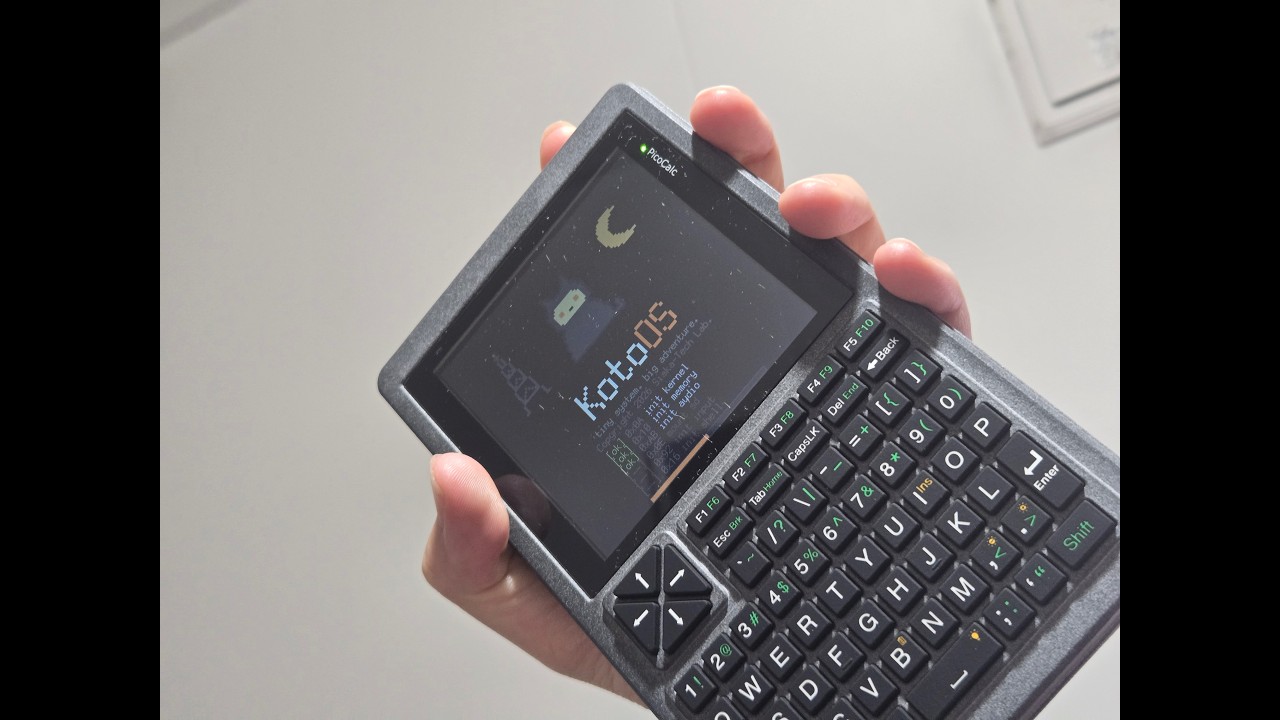
KotoOS — a Japanese PDA environment & game runtime for PicoCalc, written in Rust (open source)

Hi everyone,

I’ve been building KotoOS, a lightweight PDA environment and small-app runtime for the PicoCalc, and it’s now open source (MIT/Apache-2.0):

GitHub: GitHub - siska-tech/KotoOS: KotoOS: a lightweight Japanese PDA environment and small-app runtime for the ClockworkPi PicoCalc (RP2040), written in Rust · GitHub
Release (UF2 + SD card zip): Release KotoOS v0.1.0 — first public release · siska-tech/KotoOS · GitHub

What it is

  • A launcher shell with app details, status strip, and battery/SD indicators
  • A bytecode app runtime with its own small high-level language (“Koto”) and host-side compiler — apps are compiled to compact bytecode and streamed from PSRAM through a windowed code cache, so games run well beyond the RP2040’s SRAM
  • A Japanese SKK-style IME running entirely on the device, with an original CC0-licensed dictionary (2,771 readings / 4,982 words) read directly from SD — as far as I know, the first Japanese input method on a PicoCalc
  • A dual-core audio service: core 1 renders KotoMML music + SFX while core 0 runs the game loop
  • Seven bundled apps: KotoBlocks, KotoRun, KotoRogue, KotoSnake, KotoShogi, KotoMines, Sokoban, plus a memo app with the IME

Try it (hardware)

  1. Copy the contents of kotoos-sdcard-v0.1.0.zip to the root of a FAT32 SD card
  2. Flash kotoos-firmware-v0.1.0.uf2 to the stock Pico (1H) via BOOTSEL
  3. Boot — arrow keys navigate the launcher, Enter launches, F-keys drive app functions

Try it (no hardware needed)

The repo includes KotoSim, a desktop simulator that shares the same core crates as the firmware — cargo run -p koto-sim -- --window gives you the same shell and apps on your PC, and the whole app-development loop (compile → package → run → screenshot) works host-side.

Tech notes, for the curious

  • 100% Rust (Embassy on RP2040); the renderer never allocates a full framebuffer — it paints 16-line RGB565 strips and converts to the panel’s wire format on the fly
  • PSRAM is treated as block-transfer storage (not memory-mapped), with a two-tile code window cache for bytecode
  • Retained-mode graphics with dirty-rect derivation keeps most game frames partial — KotoRun runs at ~20-40 fps depending on scene
  • Everything is validated by host-side harnesses (golden frames, budget gates, fixture scripts) before it touches hardware

Current limitations

  • Stock Pico 1H (RP2040) only — no RP2350/Pico 2 support yet
  • UI text is Japanese (it is a Japanese PDA :slightly_smiling_face:) — the games are perfectly playable without reading it
  • Keyboard backlight, Wi-Fi (Pico W), and power management are not integrated yet

Feedback, issues, and questions are very welcome — especially from anyone who tries the IME or wants to write an app in the Koto language.

11 Likes

I would highly recommend porting this to the RP2350, and getting it so that it can use the on-board PSRAM of the Pimoroni Pico Plus 2(W). Many people have upgraded their PicoCalcs to the Pico 2(W) or Pico Plus 2(W), so sticking to the RP2040 of the original Pico would require many people to essentially downgrade their PicoCalcs just to use your code.

2 Likes

Thanks for the push!

RP2350A / Pico 2 W support is now available in KotoOS v0.2.0 and has been tested on real hardware.

There are now separate UF2 builds for RP2040 and RP2350A, with a shared SD card package for both platforms. The original RP2040 target remains fully supported.

4 Likes

I was able to try out KotoOS on a PicoCalc equipped with a RasPICO 2W.
The PicoCalc has been transformed into an easy-to-use PDA that supports a Japanese-language environment.

While it was possible to achieve a Japanese-language environment by equipping the PicoCalc with a Luckfox Lyra or RasPiZero2, those options involved the hassle of installing an OS and required a long time to boot up after powering on.
(Of course, I realize that one shouldn’t simply compare them directly or judge which is superior.)

KotoOS greatly expands the potential of the PicoCalc.
Thank you for such wonderful development work.

4 Likes

Hi everyone,

I wanted to share a quick update on KotoOS, my small application platform for the ClockworkPi PicoCalc.

KotoOS has evolved quite a lot over the past week.

  • July 13: v0.1 released with RP2040 support
  • July 15: v0.2 added RP2350A support and audio streaming
  • v0.3 alpha: KotoUI, multilingual application support, and Wi-Fi networking

During the final stretch, I also got Wi-Fi connectivity, SNTP time synchronization, and TLS 1.3 communication working on real RP2040-based PicoCalc hardware.

KotoOS now includes its own VM, application language, SDK, GUI framework, simulator, graphics, audio, Japanese input, localization, and packaged applications.

The current v0.3 work is still alpha quality. There are some regressions and stability issues to fix, especially after adding networking under very tight SRAM constraints.

But I wanted to preserve and share this milestone because the platform has now grown from a standalone RP2040 application environment into a multi-target, network-connected embedded platform.

One of the next goals is to build higher-level network applications on top of this foundation, such as weather clients, MQTT telemetry, and portable dashboards.

I also created a short demo video showing the current state of KotoOS and how it evolved during OpenAI Build Week:

Project / source code:

I’d be very happy to hear feedback from other PicoCalc users, especially about applications or features you’d like to see on a small programmable handheld like this.

6 Likes

Thank you for the KotoOS update.

I discovered via X (Twitter) that some people are already creating games and other applications for KotoOS. I would like to share them here:

I have currently installed the OpenAI Build Week Preview of KotoOS v0.3.0alpha on my PicoCalc + RasPICO2W setup and am enjoying playing various games and using the apps.
I have also noticed a few things regarding “Koto Memo,” which I have listed below.
(Please note that some of these points might be based on a misunderstanding on my part.)

  • While Japanese input is possible using [F1], it seems I cannot confirm the input using [RShift].
    Also, it appears that I cannot cancel the operation using [Ctrl].

  • What is the function of saving via [F2]?
    Is it supposed to save files to the SD card?
    Even when I specify a new filename and save, the file does not appear on the SD card.

  • When I enable text wrapping using [F3], characters disappear at the point where the text wraps.

  • Is the [F4] function intended for opening files from the SD card?
    Even when I place text files in the SD card’s root directory, they do not appear in the list.
    Also, I cannot return from the file list screen using [Ctrl].

  • Editing a new memo via [F5] instantly wipes out the existing memo without displaying any dialog box, making it a rather frightening feature.

I would appreciate any advice or information you could provide regarding the above points.

Thank you for your work on the development and updates of KotoOS.

2 Likes

I love this OS. Myself and Claude are tinkering. Thx for including the sim.

PS: I tried KotoOS on the Pimoroni Pico Plus 2W and it works! :slightly_smiling_face: My game however is bugged. :melting_face:

2 Likes

Thank you very much for trying the OpenAI Build Week Preview and for taking the time to write such a detailed report.

I am also very happy to see other developers creating games and applications for KotoOS. Thank you for sharing the KotoOS-apps repository here!

Regarding Koto Memo, your observations are very helpful. The v0.3.0 alpha preview was created as a snapshot of the rapid development that took place during OpenAI Build Week, and it still contains a number of regressions and incomplete behaviors.

The issues you reported — confirming and cancelling Japanese input, saving and opening files, returning from the file list, text wrapping, and the potentially dangerous behavior of F5 — all need to be investigated and improved.

In particular, clearing the current memo immediately without a confirmation dialog is clearly not a good user experience. I agree that it is a rather frightening feature in its current form!

I am currently working on several improvements intended for the full v0.3 release, including:

- improving and stabilizing Wi-Fi connectivity

- implementing MQTT communication

- developing a gateway server for connecting KotoOS to external network services

- adding a Ctrl+Alt+Del software reset into BOOTSEL mode

- renaming the Koto application language because of a naming conflict :sweat_smile:

- improving VM performance using a Mandelbrot benchmark

- fixing regressions and improving applications such as Koto Memo

I will investigate each of the Koto Memo issues you listed. Please continue sharing anything you notice, including unexpected behavior, usability problems, or feature requests. Reports from people actually using KotoOS on physical hardware are extremely valuable.

Thank you again for your support and for helping test KotoOS!

1 Like

That is great news — thank you for testing it on the Pimoroni Pico Plus 2W!

I do not currently own that board, so I had not been able to validate it myself. Knowing that the existing RP2350A build can already boot and run on it is very useful.

I would be interested to hear more about the bug in your game. Please feel free to share the code, logs, or symptoms. I am also very glad that KotoSim has been useful for your development!

2 Likes

This is quite amazing, very cool! I tried the v0.3.0 alpha on my PicoCalc, 2350 Pico 2W.

  1. I have an error on startup “sram fallback” – what does this mean?
  2. I was unable to boot it with pelrun’s uf2 loader – is this a known limitation?
  3. For some reason I can’t use the Enter key – the other keys work, I am able to get into Settings, etc.

Cheers, looking forward to exploring!

Update: I tried v.0.2.0 and the Enter key works. Strange.

1 Like

Thank you for the additional details!

Regarding the Enter key issue, I have not been able to reproduce it on my own hardware so far. I have tested two setups — one RP2040-based and one RP2350A-based PicoCalc — and Enter works normally on both.

Since v0.2 works correctly on your device, I’d still like to keep an eye on this as a possible v0.3 regression. Could you also please check that your PicoCalc keyboard firmware is up to date? That may help narrow down whether the issue is on the KotoOS side or the keyboard firmware side.

For pelrun’s UF2 loader, my understanding is that it remains resident in SRAM. KotoOS already pushes SRAM usage very close to the limit, especially in the v0.3 alpha builds, so there may simply not be enough headroom for both to coexist reliably. I haven’t validated that combination yet, but memory pressure would be my first suspicion.

The “SRAM fallback” message is also related to KotoOS operating very close to the available SRAM limits. I’ll continue reviewing this behavior as part of the v0.3 stabilization work.

Thank you again for testing and reporting this — hardware-specific feedback like this is extremely useful.

1 Like