Yeah just add a usb wifi adapter and load the drivers for it. For example I have wired up a tp-link Archer AC600 to the usb host port on the Lyra and I leave it inside the PicoCalc case. I have added the drivers to a folder in “/lib/modules/6.1.99/kernel/drivers/”. Then I can run “depmod -a” and the drivers should be loaded automatically when I boot the Picocalc. You can also use the insmod command to load a driver module manually.
1 Like
Hi, I’m still waiting my Picocalc to be ship out. I’m planing to install elinks on my upcoming Picocalc, does its support the screen size and javascript?
I have not had any trouble with the screen size. Elinks does have experimental support for javascript, but it is disabled by default, so you need to enable it in the settings. I would suggest keeping your expectation low though, it is a text based browser after all.
1 Like
Hello everyone, in the image of @hisptoot, the keyboard driver has a mouse mode which uses R_Shift for switching. This makes the operation a bit inconvenient.
I have made some improvements. Change the toggle key to press L_Shift and R_Shift together . Also, in the mouse mode, modify F4 and F5 to trigger PageUp and PageDown.
The source code will be uploaded to GitHub later. To use it, simply mount the .ko file using insmod (theoretically, it should also be compatible with Ubuntu systems that use the Hisptoot image kernel).
Note that if you want to temporarily test it, you need to first remove the module by using “rmmod”, Since the picocalc keyboard will stop working after rmmod. You can execute this command in an SSH terminal.
Updated:The Github Repo
https://github.com/beapig/picocalc_luckfox_lyra.git
4 Likes
Here a Ubuntu 24.04.3 OS SDK builder for use with adaptor board for mount and use Luckfox Lyra Zero W on Picocalc


-
USB-C OTG0 port
for power supply and program burning -
USER-LED
for indicating system operation status in the default image -
USB-C HOST port
for connecting USB peripherals -
RESET button
-
BOOT button
Press it when powering on or resetting to enter download mode -
Antenna connector
-
Onboard antenna
-
DSI display interface
MIPI DSI 2-lane -
512MB DDR3L
-
RK3506B
Multi-core heterogeneous SoC with built-in Triple-core ARM Cortex-A7 + ARM Cortex-M0 -
Wi-Fi / Bluetooth module
2.4G Wi-Fi 6 / Bluetooth 5.2 / BLE module -
MX1.24 4P header
can be converted to USB-A HOST port or used for LCD screen power input -
TF card slot
-
40PIN GPIO header
Compatible with some Raspberry Pi HATs
You need to have the 4layer PCB adaptor board made by PCB manufacturer
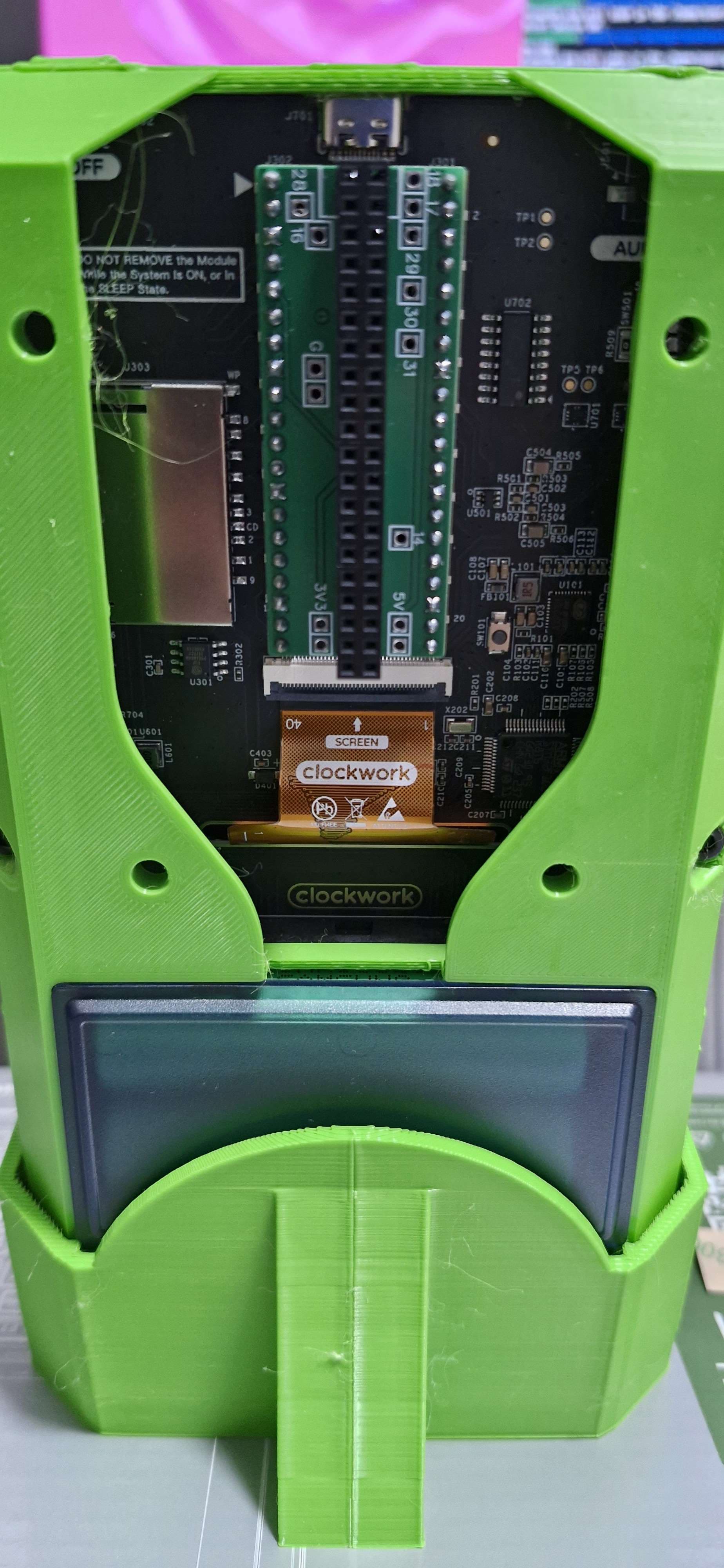
3d case files credit to @n602_na
https://www.thingiverse.com/thing:6998636#google_vignette
Stand by sn0ren @sn0ren_1842114
https://www.printables.com/model/1254039-picocalc-stand
PicoCalc Display, Keybaord, SND drivers by hisptoot https://github.com/hisptoot/picocalc_luckfox_lyra/
After first boot enable onboard wifi
adb shell "cd /home/lyra/aic800/ && make install; reboot"

#test
adb shell nmcli dev wifi list

#connect
nmtui
Install and enable XFCE4 (if you really want)
dpkg-reconfigure tzdata
timedatectl set-ntp off; timedatectl set-ntp on

apt -y update; apt install -y --no-install-recommends xserver-xorg-input-all xserver-xorg-core xinit xfce4-terminal xserver-xorg-video-fbdev x11-utils;

apt -y install xfce4 dbus-x11 mesa-utils xubuntu-default-settings xfce4-goodies lightdm-gtk-greeter lightdm-gtk-greeter-settings;

rm /etc/systemd/system/default.target;
systemctl set-default graphical.target;
reboot
Return to Console only
systemctl set-default multi-user.target
2 Likes
Thank you, this is great! What I think about you may use an other Display with the DSI Interface … mmmh.
1 Like
I was having trouble with my USB wifi dongle not working unless I plug it in after boot. FYI guys if you stick a 100nF ceramic cap directly into the JST connector (or solder to the board) it resolves this issue.
Hi,
Can you explain where to stick it actually?
Only between Vsys and USB Vsys or somewhere else?
regards

It’s across the outer two pins (power and GND). I just jammed it in the connector but you could probably solder direct to the board if you’re careful.
3 Likes
Thanks for the clarification!
Hello all; I am new to this forum, and although I have plenty of experience building and hacking on Linux for embeded systems, I will echo that I am having extreme difficulty getting up to speed on getting anything at all to boot on luckfox+picocalc. To those who are actually able to produce a build from scratch, my god you must be dedicated souls. It has taken me a day to get a yocto image built through kas (filed/fixed two issues to even get that accomplished), but it doesn’t boot so now I’m at another total dead-end. Do I have to use a serial console now? Does this SoC not even have USB debugging? Why is nobody documenting any of this? From my perspective it’s impossible for an experienced person to even jump in and start hacking. Ugh.
1 Like
Hi,
It has adb shell. You must install ADB.
Normally you can find this Infos on luckfox wiki, but the side is currently out of order ?!
Ah, it works again:
Thanks @michael_mayer I was able to make some progress! I am building with @0xd61’s meta-picocalc using kas on linux/arm64 and almost had a working build. There were still some issues with the uboot boot.scr that I need to continue to work through. I was able to make workarounds manually at the uboot prompt via stm32 serial console and finally get a boot. The information about adb is also a relief. Thanks; I couldn’t accees any of that stuff earlier.
I will endeavor to commit fixes back as PRs to @0xd61’s github project
1 Like
@johnlaur You should also be able to get serial output when connecting the Picocalc via USB (the USB port of the Picocalc, not Luckfox Lyra). The command to access the serial console would be:
sudo picocom -b 1500000 /dev/ttyUSB0
1 Like

I have been having some fun with this project over the weekend. @0xd61 meta-picocalc is a great repo..really got things off to the races. This is the way forward IMO.
Among a ton of other small quality fixes and adding meta-rtlwifi support, I refactored the picocalc_kbd driver into a mfd device with peripherals. I have battery, backlight, and keyboard backlight drivers now. I’ll get my work posted to github as soon as i can get things in a little more stable state.
root@luckfox-lyra:~# cat /sys/class/power_supply/picocalc/capacity
100
root@luckfox-lyra:~# cat /sys/class/power_supply/picocalc/status
Full
4 Likes
As posted above, I have been playing with the yocto build and the drivers to have some fun.
I have some initial changes to share that others might find useful. They are posted here: https://github.com/johnlaur/meta-picocalc
- Add mfd driver (multifunction device) for stm32 i2c firmware
- Refactor input driver to use PicoCalc mfd interface
- Add power_supply driver for PicoCalc battery management system
- Add backlight driver for PicoCalc display backlight
- Add led driver for PicoCalc keyboard backlight
- Support VGA8, 6x8, and MINI4x6 fonts at boot
- Add rtl8821cu support via meta-rtlwifi (easily add additional rtl usb devices)
- Change overlayfs to use partition on internal microsd, freeing SD for removal
- Auto expand overlayfs partition, (8GB minimum microsd)
- Small fixes and size optimizations
- Support for building on Linux/aarch64 hosts (I build on an M2 Mac) [merged upstream]
@0xd61, please let me know which if any of these changes you would like to have; the commits are well organized, so any you like can be lifted as individual PRs
I plan on looking at installable package support, and further driver work. For example, I would like to add support for the rtc eumulation, and power state management (watchdog, wakeup, etc) in @JackCarterSmith‘s alternate STM32 firmware. I plan on trying to further improve the input driver. I have seen information about needing to run the i2c bus at 10khz, but everything seems to be working fine at 400khz. Does anyone have any information about that? Also, is there a pico sketch where I can see an example of the interrupt driven keyboard/i2c interface in action?
Is there anything else that the community wants to prioritize at this stage?
6 Likes
Great work @johnlaur! I had also wanted to refactor the drivers but didn’t have time. Please feel free to open a PR with those changes. I’m currently waiting for a milkV-duo device which I also want to support in the meta layer.
1 Like
Thanks @0xd61. I am happy to push PR’s your way. I’m not sure which changes you agree with and would want to incorporate. You can review the set of commits here Comparing 0xd61:main...johnlaur:main · 0xd61/meta-picocalc · GitHub
I have some small additional driver changes that I would like to make, but following that, I’d suggest that I batch these into PR’s as follows:
- All driver changes
- Overlayfs changes
- Fixes and Enhancements (meta-rtlwifi, fonts, etc.)
- Opinionated Changes (115200 baud, changes to base packages)
But if you like everything and just want to merge the whole ball of wax, you are certainly welcome. I’d prefer to drive this distro in the same direction either way. In trying to jump into getting this going the other day, it is pretty evident that ecosystem around lyra+picocalc is pretty fractured, with lots of dead ends. I think that’s mostly a result of the low quality of the “official” SDK stuff and the way it’s distributed. The only way to really get ahead of that is to just make something that is much higher quality and much easier to use so that users and developers will prefer to use it. To really lower the bar, I think that requires an online package repo and an online update mechanism which yocto and rauc provide. I have been using rauc install http://.../picocalc-luckfox-lyra-bundle.raucbduring development which has been fantastically easy.
For those who bascially just want “Picocalc but a full computer” It would be great to be able to rally around a strong central project and improve the onramp for both end users who want to play with their calculators and people who want to tinker. To me that is more important than worrying about the flavor of Linux that one can make work, although i certainly do not mean to discourage anyone who wants to do that, as it’s kind of a big point of the hardware.
1 Like
I’ve been building my own wrapper around all the SDK stuff to try and consolidate things, and I couldn’t agree more with just about everything.
I’ve actually gotten Gentoo working on the picocalc + lyra (with binary packages - i’m not crazy enough to try compiling everything on the lyra!), but the way I did it was so ugly I couldn’t bear sharing it with the world and have been trying to do something that doesn’t rely on the SDK. What are you guys doing for the kernel that doesn’t rely on the SDK? I had assumed there were a lot of Rockchip specific patches in there that were needed.
I would love to contribute to something with a community around it with a solid core.
2 Likes