personally, the journal
Just programming various things in BASIC is nostalgic fun for me.
Most recently I wrote a solver for the All Ten math puzzle, now my kid’s math teacher emails for help when stuck.
I wrote a console Star Trek game updated to include the Borg, and also a Lunar Lander game.
2 Likes
I would be interested in this. Let me know if you put any of this online 
I have been writing software for a long time, over 40 years. I plan to have fun with Python. Python is the new BASIC, IMHO.
Some folks, play games for entertainment. I write code.
The PicoCalc will be much better than balancing my laptop on my chest in bed!
2 Likes
Two of them are here: https://commutenation.com/picocalc/
1 Like
Hey thanks, I’ll give it a go later 
Great! Let me know what you think.
I like anything to do with Star Trek, so I really like it. Never played the original.
1 Like
The Executive Calendar is complete (pretty much).
It’s based on the TRS-80 Model 100 program, but as I was porting it, I realized that there was too many compromises made for the Model 100 that didn’t need to be there for the PicoCalc. So I ended up rewriting it from scratch using the Model 100 program as a model.
It features:
Calendar - display by month
A daily agenda.
A daily to do list.


It’s up on my GitHub site.
13 Likes
Im fairly new to the PicoCalc World. But for me the PicoCalc is a tool for me to learn Python. So i have loaded mine up with LofiFren MicroPython. Then I have ported some games to it to test and run and learn the nuts and bolts of picocalc and python. I also have used assistance of AI to build a Thonny Plugin and Agent so that i can move files using Thonny through WiFi connection instead of connecting a cord to the PicoCalc and SD card. I have had a lot of fun doing that and learning along the way. i forgot to mention i did put a Pico 2W in my PicoCalc to give it WiFi and Bluetooth abilities. I also built a WiFi Manager Py to make it connect to my home WiFi and installed a different Py editor.

1 Like
Wow this is great to see someone else did this in high school. I did the same thing but for me I had a TI-86 and a TI-81 Calculator in high school.
I use mine to log into the SDF Unix system, play the MUD and do bits and bobs. I like coding with BASIC and Logo. I’m tinkering with a little text editor inspired by WordStar. Last night I was playing Ultima IV on it using the SMS emulator.
1 Like
It’s interesting for many reasons - not the least an old thread/question resurfacing - there’s only so much scrolling through history one can do…
So, for me, it was a vehicle to initially help with one aim I had for my own little retro style operating system/environment (Imagine early 80s without C and things progressing from 6502 to 65816 to a RISC system of that era; not ARM - it’s a sort of souped-up CP/M but not as detailed as a Unix) and language compiler but since doing the initial port and getting it going I feel its opened up many more possibilities.
As for a real-world use - not much really, but I’m toying with the idea of writing “PDA” type applications for it - I already have an editor, so calendar (need an internal RTC), then but what about a better note-taking editor - trivial formatting and managing small notes a page at a time - however then my head starts to think along the lines of “what if I link one note to another” and before you know it I’ll have re-invented Hypercard… The obvious other application is a good calculator - I have 2 good and old calculators, the ones I used at school and uni some 45+ years ago though, so who knows. But the fact I can write and run programs directly on the device is good - but again, back then my Sharp PC1211 and PC1500 realised that, so this will have an obvious modern twist to it.
Other software - I’m not a fan of Python or Forth and I’ve written a couple of Basics, so porting one of my Basics to it is on the cards. Logo keeps popping up though but I’d like something that run in my environment rather than standalone and I’d like to tackle Fortran or Pascal at some point, but that in the future. The “native” language of my OS is a very retro BCPL - runs entirely on the RISC-V CPUs on a Pico2.
I’ll leave it at that - it’s a small, handheld development platform my my retro ideas…
-Gordon
2 Likes
Do you have any more info on that editor? I am also looking for something like that.
Hi, this is the repo GitHub - AntoniaLivia79/picocalc-ministar: A mini Wordstar clone for the PicoCalc device · GitHub . There is a binary for Pico 2 in releases. I haven’t tested it on Pico 1 but it can be compiled for that board.

3 Likes
Thank you. It looks interesting.
1 Like
I’ve had mine for about 6 months. Mostly I’m having fun writing Basic programs, like I did back in the late 1970s on my TRS-80. I’ve recently wrote a database program for the PicoCalc which I’m using to keep track of maintenance activities I perform on the Car, yard machines, and various devices in the home. For example, oil changes, replace filters, major repairs etc.
It’s pretty much a portable hobby device…Brian
1 Like
Old photos, must update…

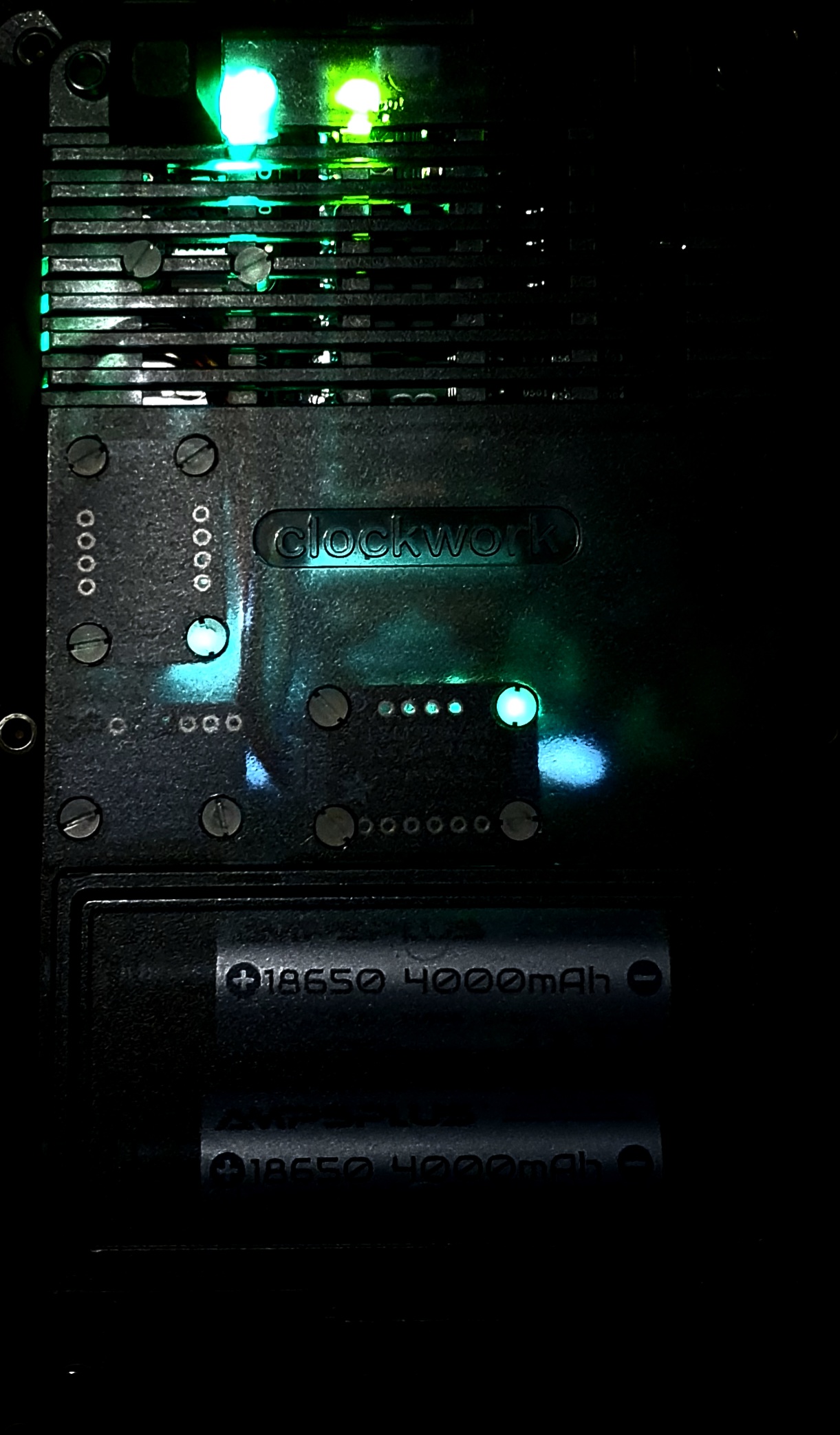
High accuracy RTC clock, i2c breakout, high accuracy temperature/humidity, homemade FRAM memory stack (2x 1Mbit) with level shifter, accelerometer/magnetometer, high accuracy barometer.
Waiting to fit. Heart rate/blood oxygen sensor, speech module, 16bit led driver, 16bit I/O driver with external socket.
Boot menu with three pages…

Various test/diagnostic programs constantly improving…


5 Likes
Oh - nice to see how you’ve mounted them in - I’ve just ordered the RTC module from Pimoroni - I’m using their Pico+2W module which has the qwst connect on-board (not on the same pins the system is using and there may not be enough room in the case to use the connector anyway, but I’ll address that later)
-G
1 Like

