Hi everyone,
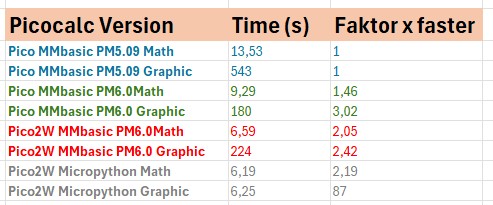
I ran a performance comparison on the PicoCalc using the Raspberry Pi Pico, Pico 2W, as well as PicoMite 5.09 and 6.0, alongside MicroPython. The results can be seen in the table.
As has often been mentioned in the forum, data transfer from the microcontroller to the display is relatively slow, which has a significant impact on graphics performance. Interestingly, graphics performance on the Raspberry Pi Pico 2W running PicoMite 6.0 is actually slower than on the Raspberry Pi Pico running PicoMite 6.0.
When running MicroPython on the Raspberry Pi Pico 2W, the graphics performance is almost identical to the performance achieved without any graphical elements.
The tests were set up as follows and, much like my programming skills, are based on a simple bar being drawn on the display alongside a basic mathematical task. The mathematical calculation consists of 100,000 operations ( x = math.sin(i) + math.sqrt((i % 100) + 1)). The graphics routine was run 1,000 times and then multiplied by 100.
We can continue the discussion here and share further tests.
Happy greetings
Gordon