@michael_mayer
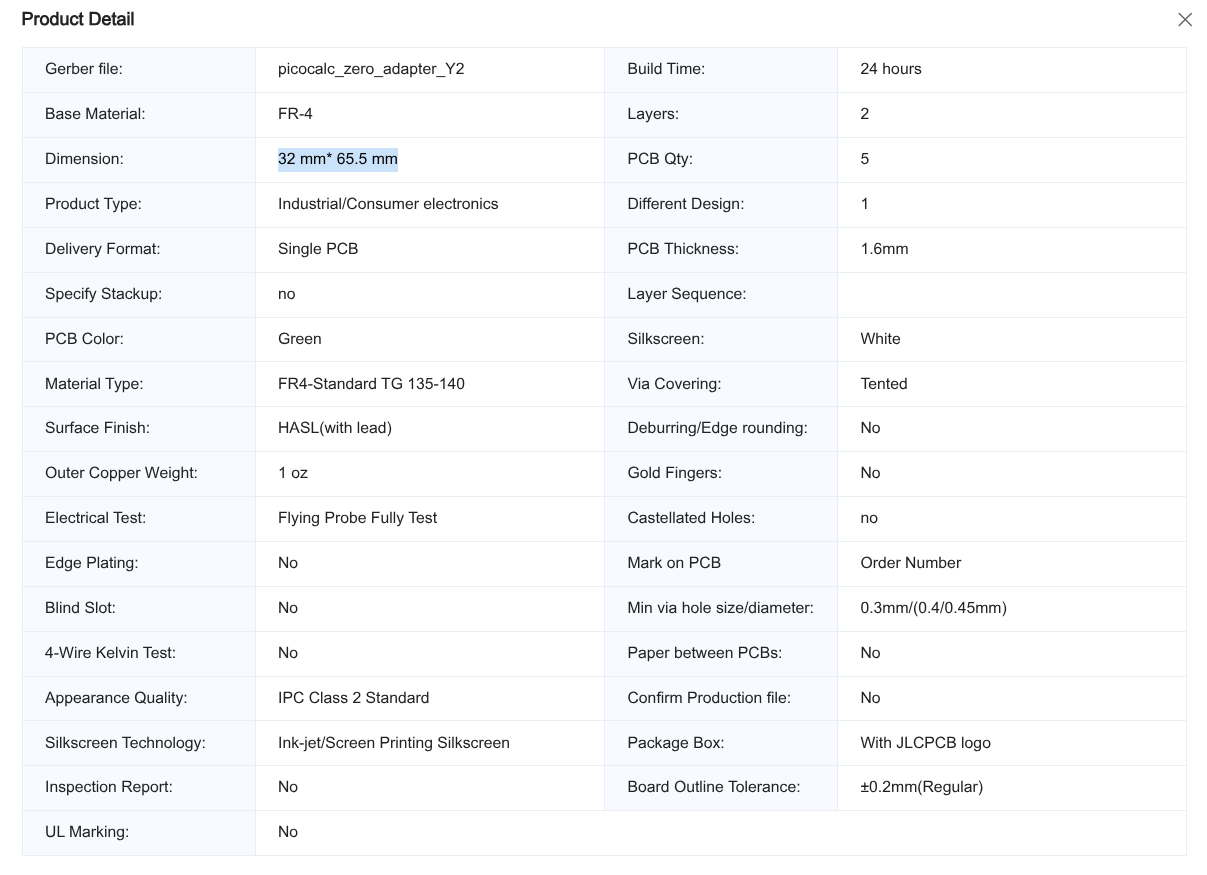
I need help with the calculation for estimate the price of the pcb you designed/have.
if you want help, you’re going to need to ask an actual question people can answer
what do you mean? I just want a price estimate of the pcb that michael is using
because I tried my best and it came up with around $30 including shipping to me and idk if that was in USD or what.
yes, those prices are in USD, and depending on how fast you want it you can get way cheaper shipping than the default option.

Hi, would someone be interested in the kicad project? Maybe we can improve on the design?
1 Like
Hi,
I have done some progress with Bookworm.
I have now a terminal (Bookworm without desktop), but i struggle with wrong colors.
This is my current /boot/firmware/config.txt (Only the additional lines)
dtparam=spi=on
# Keyboard -- You have to execute the setup_keyboard script from wasdwasd105
dtparam=i2c_arm=on
dtoverlay=picocalc_kbd

# Enable audio (loads snd_bcm2835)
dtparam=audio=on
dtoverlay=audremap,pins_12_13

# display
dtoverlay=spi0-1cs
dtoverlay=fbtft,spi0-0,ili9341
dtparam=reset_pin=25
dtparam=dc_pin=24
dtparam=width=320
dtparam=height=320

# Enable DRM VC4 V3D driver
dtoverlay=vc4-kms-v3d
max_framebuffers=2
I think i have to recompile ili9341 for gamma correction because fbtft does not allow the gamma parameter.
Update:
You have to add the fbcon:map to the /boot/firmware/cmdline.txt
console=serial0,115200 console=tty1 root=PARTUUID=bfbd32b8-02 rootfstype=ext4 fsck.repair=yes rootwait quiet splash plymouth.ignore-serial-consoles cfg80211.ieee80211_regdom=AT fbcon=map:10
Update:
I have now managed it do install bookworm on the picocalc!
It was a matter of compiling an overlay. It is easier than I thought.
Current solution:
Update:
Celebrated a little to early, Blue red are swapped.
I think it is somewhere in the initial code:
 init = <0x1000001
		0x2000005
		0x1000028
		0x10000cf 0x00 0x83 0x30
		0x10000ed 0x64 0x03 0x12 0x81
		0x10000e8 0x85 0x01 0x79
		0x10000cb 0x39 0x2c 0x00 0x34 0x02
		0x10000ea 0x00 0x00
		0x10000c0 0x17 0x15
		0x10000c1 0x41
		0x10000c5 0x00 0x12 0x80
		0x1000036 0x48
		0x100003a 0x55
		0x10000b0 0x00
		0x10000b1 0xd0 0x11
		0x1000021
		0x10000b4 0x02
		0x10000b6 0x02 0x02 0x3b
		0x10000b7 0xc6
		0x10000e9 0x00
		0x10000f7 0xa9 0x51 0x2c 0x82
		0x10000e0 0x00 0x03 0x09 0x08 0x16 0x0a 0x3f 0x78 0x4c 0x09 0x0a 0x08 0x16 0x1a 0x0f
		0x10000e1 0x00 0x16 0x19 0x03 0x0f 0x05 0x32 0x45 0x46 0x04 0x0e 0x0d 0x35 0x37 0x0f
		0x1000011
		0x2000064
		0x1000029
		0x2000064>;
1 Like
Check if adding
bgr=0
to /boot/fimware/cmdline.txt make a difference ?
1 Like
Hi,
Thanks for the help.
I have done a new *.dtbo file like described below for the ili9341. Using the init sequence from wasdwasd0105 repository (above).
But even if I set 0x1000036 to 0x00 bgr(blueredswap) is still present.

I have not tried bgr=0 with fbtft overlay. ( I have tried true/false on/off ). I will give it a shot.
In cmdline.txt it does not work.
Update:
It worked! Thanks a lot.
I have to add it in the dts file:
bgr = <0>;
In FBTFT it may worked but it was inverted, and there is no obvious parameter for “Display Inversion ON (21h)” for FBTFT.
I have updated the github repository:
best regards
michael
1 Like
sweeeeet, i found this issue with another milkv-duo before
How do we change the resolution on the Pico is there a simple guide.
The PicoCalc LCD’s resolution is 320x320 and cannot be changed, but with “Pi Zero 2 on Picocalc,” you can manipulate the apparent resolution with settings.
To change the settings, rewrite the HDMI settings in “configfig.txt” in the “/boot” directory of the Raspberry Pi Zero 2 W boot SD card.
To do this, follow the steps below:
- Using a text editor, open “config.txt” in the “/boot” directory of the Raspberry Pi Zero 2 W boot SD card and find the following line:
hdmi_cvt=320 320 60 1 0 0 0
- Change it to the following and overwrite “config.txt.”
hdmi_cvt=640 640 60 1 0 0 0
3). Restart PicoCalc (with the Raspberry Pi Zero 2 installed).
The fonts, icons, and everything else on PicoCalc’s LCD screen will appear small, as if it were 640x640 pixels.
You may need to change the settings to make the fonts, icons, and other settings larger for easier viewing.
I think the above is correct, but if I’m misunderstanding something, please let me know.
1 Like
I would love the kicad project, I doubt I will be improving it, but I would love to use it to learn kicad.
1 Like
KiCAD Files are Uploaded. Tell me if something is missing. You will need KiCad9
Basically you start with the Schematic Editor and using Labels(CTRL-L) for connection. (Finding the Footprints is a story for itself)

Then you can draw the connection in the in the PCB Editor.

Be careful on which layer you have your elements. You can change the layer in the properties … menu. (Right click on the element)


BTW: there is a strange bug were KiCad doesnt show the layer. Then you have to activate them in the Object TAB:

Good Luck!
3 Likes
Thank you so much, looking forward to playing with it.

Success after a few scripts here and there sucess.
Thank you to all that helped to make this happen.
My poor Lyra board will need to take a back seat for a while now theres a new board in town lol.


Original back cover fits fine and usb mod is on internal for now till I get the moded cover. Watch out for a review soon.


5 Likes
Few questions,thanks for your reply:
- Is the sound ouput stero?
- Does SDcar slot on picocalc works?
- Bluetooth working fine?like connecting keyboards and mouses or event headphones;
- With Rasbian system is it possible to hibernate or “sleep”?
- Sound is Stereo.
- Picocalc SD Card is not connected as I know. Only Audio, Display and Keyboard.
- Bluetooth is working fine. (It is part of the Pi Zero and have nothing to do with the Picocalc)
- Hibernate or Sleep is something that is not implemented. I am not sure if this Feature is available on the Pi-Zero.
Remark: Most question are related to Pi-Zero it self. If it works with the PI Zero it will also work with the Mod.
1 Like