Hi,
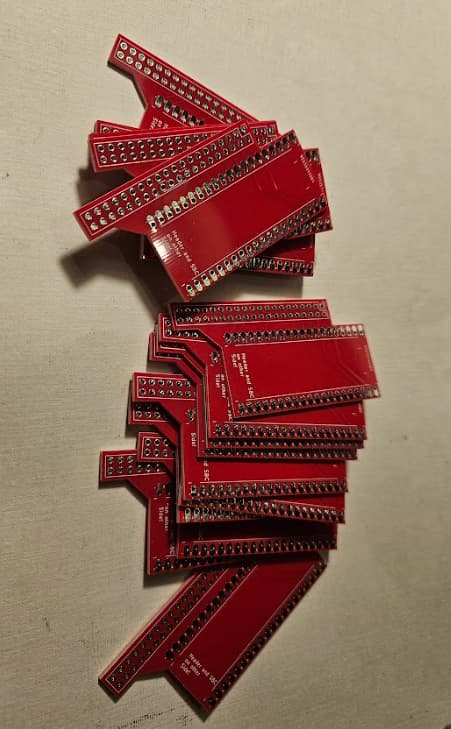
I have done now a Project on PCBWay for all of you who don´t want messing with gerberfiles.
Sadly minimum Quantity is 5 boards.
Hi,
I have done now a Project on PCBWay for all of you who don´t want messing with gerberfiles.
Sadly minimum Quantity is 5 boards.
my Luckfox Lyra powered ones in green
Left: Luckfox Lyra Zero W Core Right: Luckfox Lyra Core with USB AC600 Wifi Donlge (edited)
Hi, I have ordered some additional boards.
If some of you are interested send me a PM.
UPDATE: 30.09.2025 (09/30/2025)
I have still some boards to give away. (No US sadly)
UPDATE: 08.01.2026: All gone!
I would be interested. gilwood960@gmail.com Thanks.
So I have managed to get mine working with just the CLI. Mainly because setting up the desktop just makes it lagged and any apps take forever. The only use I had for the desktop was for pico-8 anyway.
In the past projects with pi and pico8 I have managed to get it to run from the CLI but finding it difficult with this. Most tutorials out there or problem solving is related to hdmi or composite so non screen related.
I have tried a bunch of things but keep getting SDL errors despite the drivers being installed.
Anyone have an idea as to what I am missing? Some tests give me the pico8 boot beep so I know it runs I just have nothing on screen.
Same here, Also fighting with getting SDL2 running. (only with bookworm) Some Framebuffer Applications are working: like MPlayer, fbterm and fbi.
It seems to be the same on both Bookworm and Bullseye.
I am sorry for you from the US who requested some Boards. I have tried to send the letter with the PCB today but I am not allowed to send it to US per letter. The Post Officer mumbled something about tariffs.
Update to US Situation:
To be more precise: Only Express Letter is allowed with goods. Costs over 50 Euro.
EU and all other Countries are not an issue at all.
I went through JLCPCB and had no issue and it was pretty cheap if anyone from the US is needing boards. I think with shipping for me it only cost me like $5 to ship to the US.
Thats cool. I am in Austria, not cool for US shipping.
I know. Just recommending it to those in US who want the board since you are unable to ship it. Frustrating as it is.
Hi,
I written today a simple sdl program to show me the drivers that are compiled into SDL:
x11
wayland
KMSDRM
offscreen
dummy
evdev
Thats it, no FB Driver.
Every where KMSDRM. Here you have to compile you own Driver (tinydrm) and hope that it works with mesa. Update! Maybe not.
I will now check how to compile sdl.
UPDATE:
I figured out how to make an Overlay for DRM, no Error but SDL still does not work. At least I have still a Terminal Display. For some reason it does not show up in /dev/dri/ folder. I have to investigate this further.
Yeah I’ve been wrestling with this as well. Getting a headache from it. 
Hi,
I have written a Python Script so it shows when it is loading (percent is +128)
import subprocess

result=subprocess.check_output(["cat","/sys/firmware/picocalc/battery_percent"]).decode('utf-8')
percent = int(result)
if (percent > 100):
        print('L'+str(percent-128) + '%')
else:
        print(str(percent) + '%')
Works fine. L means charging. ( I know, german speakers!)
conky.text = [[
 ${color black} ${exec python3 /home/<user>/batt.py}
]]
I switched from Bullseye to Bookworm using your github setup and after installing SDL2 via libsdl2-dev, when I run ./pico8_dyn I get the boot sound for Pico-8 but no visual at the moment.
Hi, this where I currently Stuck.
I will upload my DRM dts today to github. Maybe you can find something while I try it for myself.
Would be appreciated.
Update:
I have uploaded my current DRM version to Github.
BTW: This is the forum entry where I found the most informations.
Hi,
Success!
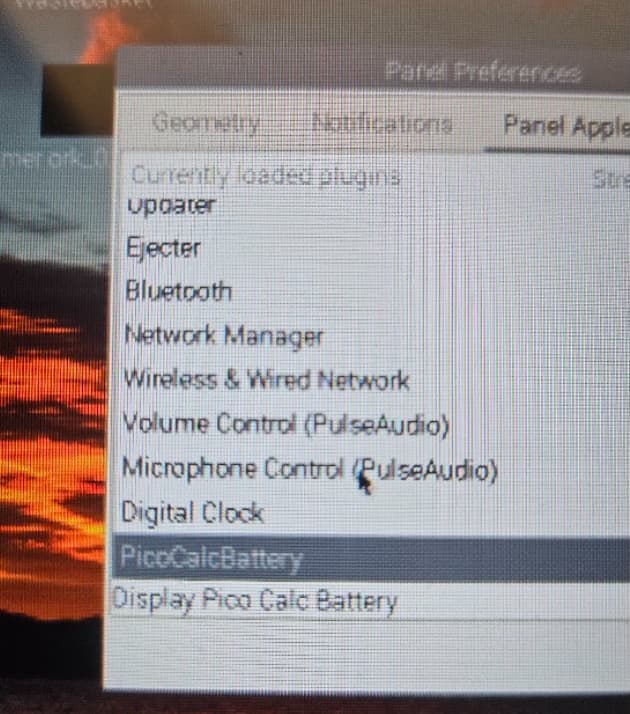
I implemented Battery Meter lxpanel Plugin.
Here we are:
You need to copy picocalcbattery.so to (32 Bit version)
/usr/lib/arm-linux-gnueabihf/lxpanel/plugins/picocalcbattery.so
It is uploaded to Github:
Update: Is now working fine! But only on Bullseye for now.
Remark: It takes some seconds to recognize the plug in and plug out of the charging cable. The plugin refreshes all 3 Seconds but I think it takes the ESP or the Kernel Driver longer to update the battery_percent value.
Hi,
I have found time to continue with this issue:
config.txt: (picomipi is a arbitrary name)
dtoverlay=mipi-dbi-spi,spi0-0
dtparam=compatible=picomipi\0panel-mipi-dbi-spi
dtparam=width=320,height=320,width-mm=43,height-mm=43
dtparam=reset-gpio=25,dc-gpio=24
dtparam=backlight-gpio=18
You need then an initialize bin file in /lib/firmware/ :
it is generated with a python script called mipi-dbi-cmd (You can copy the bin file also directly)
git clone https://github.com/notro/panel-mipi-dbi/
cd panel-mipi-dbi/
./mipi-dbi-cmd picomipi.bin picomipi.txt
sudo cp picomipi.bin /lib/firmware/.
I loaded both files to github. (picomipi.bin, picomipi.txt)
If I now do
ls /dev/dri
by-path  card0  card1  renderD128
I have two cards. I still not able to use SDL but I think this is a progress never less.
At least dual screen is now working:  (mouse pointer does not show up on picocalc screen)
Update: I have tried it with trixie and it works out of the box with the bin file and the update in config.txt. (Mouse and monitor extension) But it is very slow. Compiling keyboard driver and stuck with stupid latex rebuilding. ( Have taken 50-60 Minutes  )
)
For the keyboard you have to change the setup_keyboard_script: (kernel-package instead of raspberrypi-kernel-headers)
sudo apt update
sudo apt install -y \
    build-essential \
    kernel-package \
    device-tree-compiler \
    git
Keyboard is working. Audio also.
I finally got some PCBs in and wanted to check out (and review) this project!
As seen in your pictures, I can wire the Zero directly to the PicoCalc without needing a Pico to manage the power/other pins?
24 holes x 15 holes (length x width). Does that fit with your custom case too? (assuming I need to remove the back-plate/slider)