Because most people after buying a PicoCalc, buy a Pico2w anyways, so why don’t they ship with them?
I for one aren’t interested in the wifi variants as they can’t overclock very much. The Pico1 is also cheaper for them.
cheaper by not much, and if there is an option between non wifi and wifi, why not take wifi. And pico 2 is more powerful anyways.
I’m running pico2 @378Mhz, soon to be higher. Added a good RTC too.
You can still flash PicoMite on the 2W and just not use WiFi. Then I’m pretty sure you can overclock it to the same high speeds as the Pico 2. The limits in WebMite are in place because it supposedly becomes unstable at higher clock rates. I’ve never tried to change it in the code to see what happens, but just took Peter’s word for it on TheBackShed. Seems like one of the reasons WebMite exists at all is to allow Geoff to continue to use his gardening setup.
I didn’t realize that until I dug deeper, but that explains why it has no Bluetooth support, and only a subset of commands to use WiFi, mostly for hosting a web server. The TFTP server is somewhat useful, though slow and a bit buggy. And while I haven’t actually used them it should be possible to open up a TCP or UDP port and connect to another device that way. But anything even remotely complex, like say an FTP server seems like it would be an absolute nightmare to try to code in MMBasic using WebMite. At some point I’d like to investigate if it’s possible to add some simple hooks to get some simple Bluetooth BLE client/server functionality in place. But given how often the fragile nature of WebMite is discussed on TheBackShed, something tells me that may not be possible without the risk of breaking existing functionality.
1 Like
I’m guessing they found a partner with a bunch of Picos they were looking to get rid of for cheap, since no one is interested in buying them anymore. 
It’s a strange choice to showcase their device. But the same could be said about the onboard PSRAM which doesn’t easily work with any modules either. I guess that might have been good for marketing materials, since maybe it encouraged some buyers who would have otherwise been on the fence. They might still be able to use the PSRAM for something, but probably not as intended. It also sounds like some of the pinout choices were a bit odd too, with conflicts on some of the included hardware like the keyboard. I think that’s what might have been going on here, though ultimately, in another thread, it sounded like a hardware patch was required to get it working correctly.
WebMite actually limits you to 252000 regardless of whether or not you use WiFi. Of course, it’s an easy matter to remove the restriction in the code.
Right, but I suggested flashing PicoMite, not WebMite to a 2W. That won’t have the limits because it won’t be built as WebMIte, and will only have the PicoMite limits.
Have you had any crashes or issues with WebMite if you removed those restrictions? My understanding was that some WiFi related stuff was always running in the background, like the TFTP server, the telnet console (though maybe that’s one you have to turn on, I forget – I always have it on anyway since I always do serial over WiFi and don’t bother messing around with cables), and perhaps parts of the web server even if it’s not actually hosting anything.
I haven’t had any issues running WebMite as my main firmware and just keeping it at 252000. Nothing feels particularly slow, and while I guess some of the graphics code could run a little faster, it hasn’t bothered me.
All that code in only activates in WebMite. If you load PicoMite, there’s no WiFi code run, AFAIK. I’ve had no issues at 300000 so far. I’ll try higher rates to see what happens.
1 Like
Correct, I wasn’t suggesting using WiFi code with PicoMite. Just that PicoMite runs fine on the Pico2W if you don’t want to use WiFi functionality and want to run at a higher (and presumably more stable CPUSPEED. The WiFi hardware can be there and just go unused.
I only did this to test once or twice, and figured if I ever valued speed over WiFi capability and wanted to continue using MMBasic, I could just do that permanently and continue to use my 2W. Realistically if I want to do anything serious with WiFi and Bluetooth, I don’t think I’ll be using MMBasic anyway. So much more is possible with the Ardunio platform and C++, or I suppose MicroPython, though I’m not personally that enthusiastic about Python in general. If I do go that route, I’ll ditch the Pico stuff entirely and use the ESP32. At some point I guess I need to do the hardware mods for the Lyra as well, but that just seems like a hassle.
I really like the quick coding and testing with the built in editor of PicoMite, but I wish it was more fully featured when it comes to the wireless features, and that there was more overlap between the usual usage of PicoMite and the possibilities that could exist on the PicoCalc.
Doesn’t overclocking the pico make it over heat and reduce its life expectancy
By a little bit but for about 10 bucks, I’m not too worried.
What RTC? There’s so many options.
Maybe DS3231 module with small footprint like mine to hotglue upside down on top of the SD card cage and give easy access to the battery.
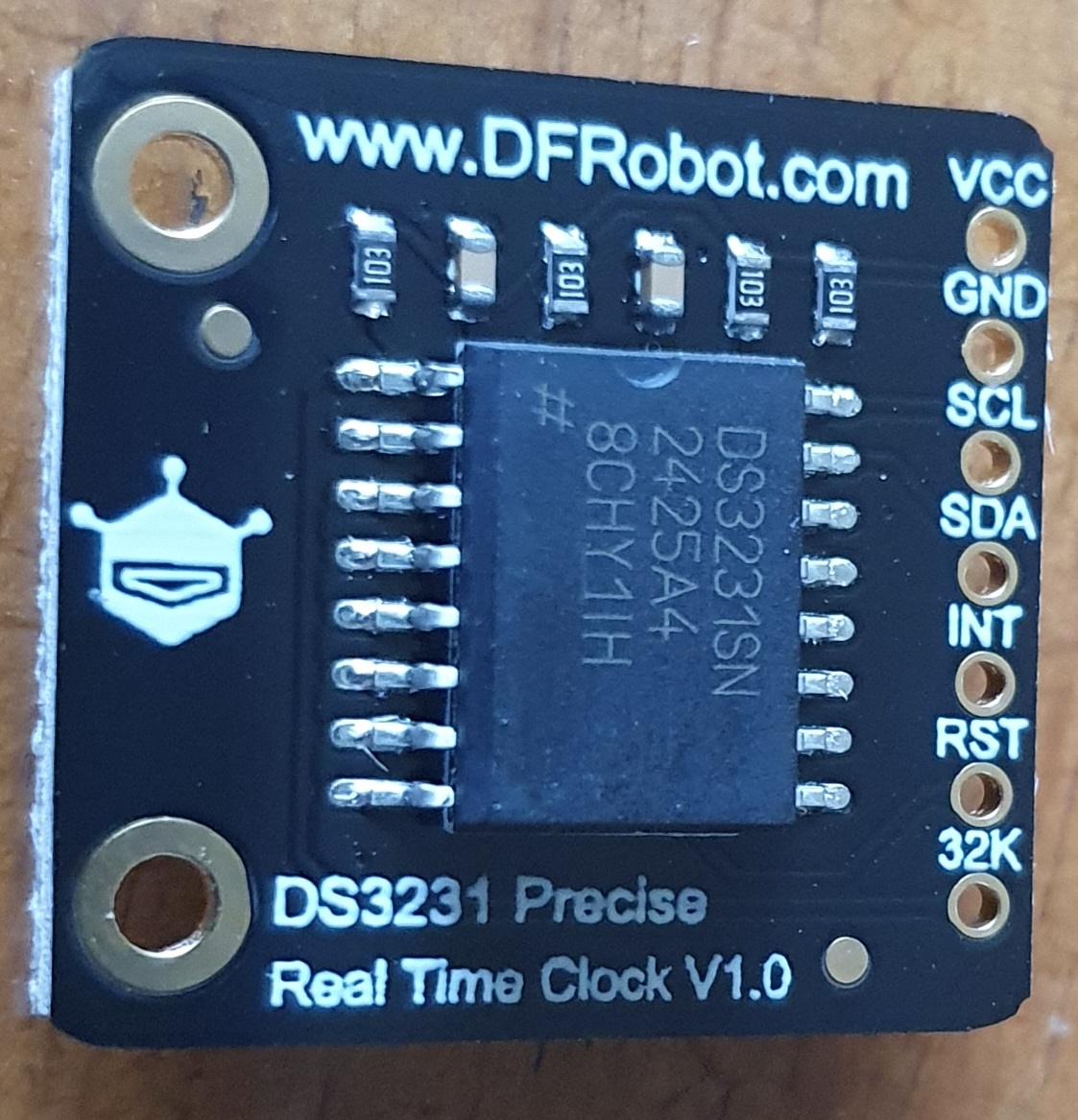

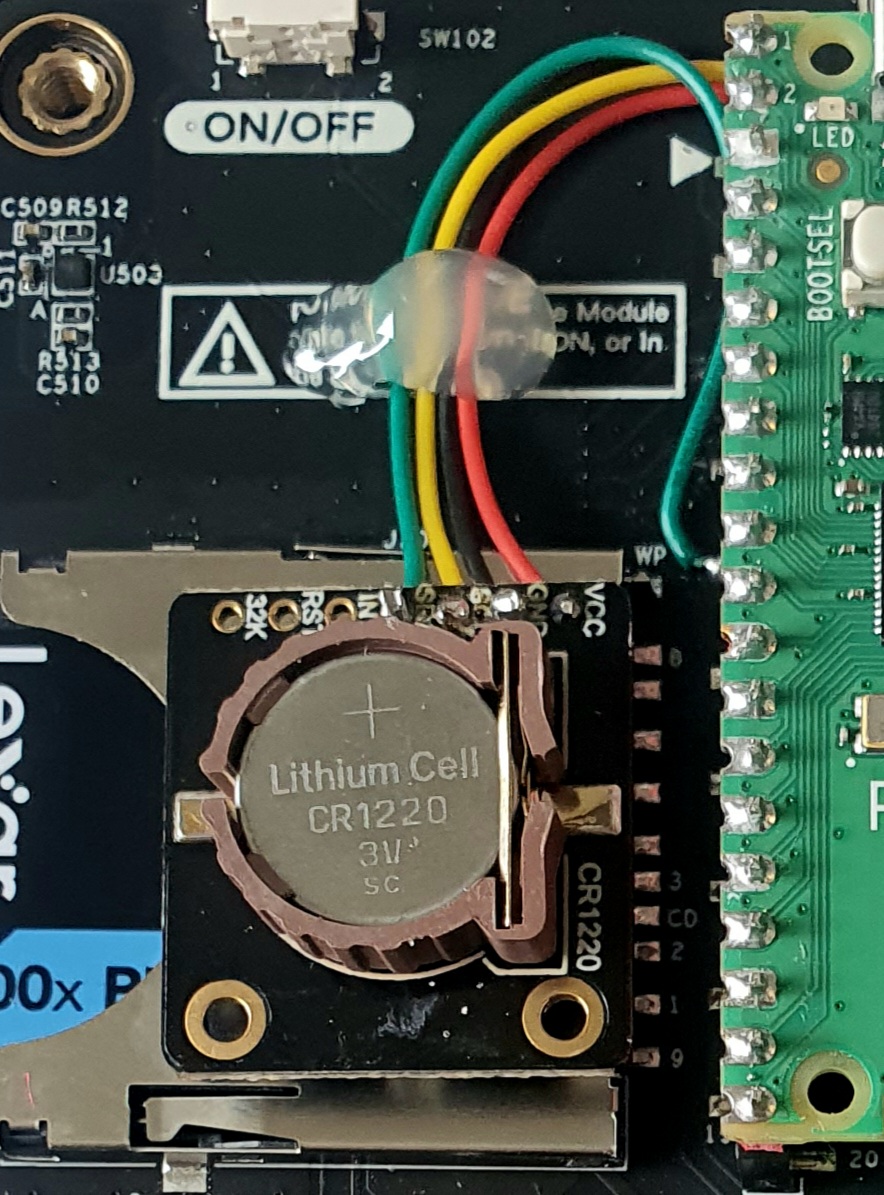
DS3231 is very accurate so you can almost forget about it. If you want to play with it there are several calibration registers etc you can access via I2c. Some more expensive varients include battery backed or ferrite ram too but quite slow to access. Note if in a country that uses ‘daylight saving time’ like the UK you’ll have to write an autoboot program to adjust accordingly before setting the Pico clock at startup…