Soldering is an important skill, even though I understand wanting to keep your original PicoCalc as-is.
For Calculinux to run soldering is no must. But indeed, soldering is truly a valuable skill.
For my taste, the PicoCalc case is already quite thick. That’s why I’m not giving up on fitting the Wi-Fi module into the original case. And if I have to solder under a scanning electron microscope… 
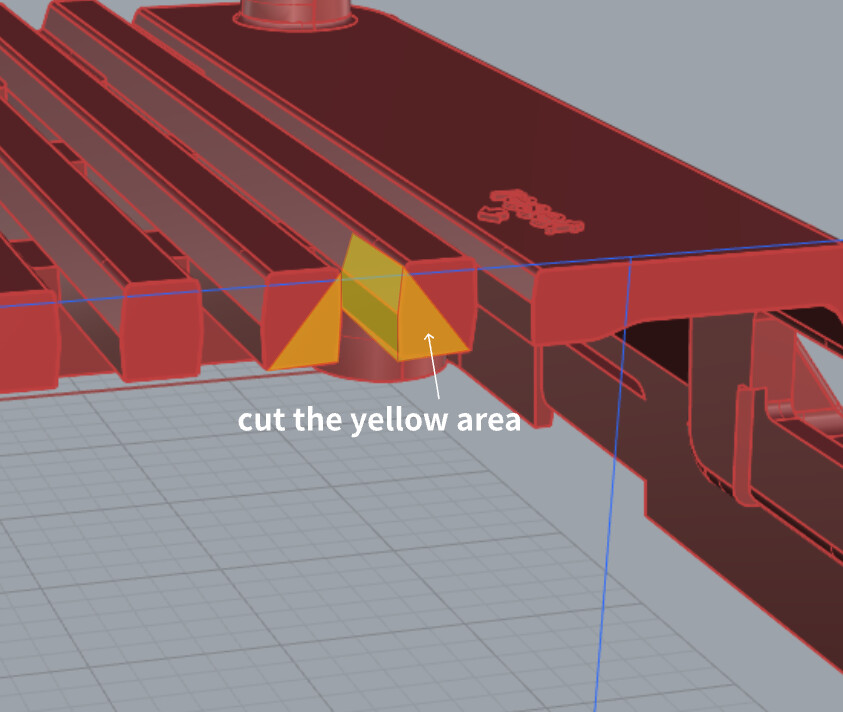
If you are open to making minor modifications to the back case, using a rotary tool (like a Dremel) or a file to grind down half of the crossbeam will create just enough clearance. Depending on the tolerances of your MX1.25 connector, you may also need to file a ‘chamfer’ onto the terminal itself. In my case, the result of this modification left a gap roughly equivalent to the thickness of two sheets of A4 paper."

4 Likes
Definitely the clean way to do it! I ended up taking one of the bars out and personally I dont mind it.
Thank you to all who have put work into calculinux! Using wifi module RTL8188FTV 6188-UF and it worked right out of the box! Just wasn’t getting amazing reception so I ordered this antenna to connect
Also got ssh set up and tried logging into my pi and it works so well.
One thing I’ve been playing around with using pip and textual, I noticed there are some characters missing that define the corners of some tui elements and the pip progress bars. Any chance these could be added in the build?

I have noticed the same thing and have worked on it a little in the past. I’ve tried a few things, mostly without great success. Right now i’m working on devicetree overlays, and once i’ve reached my goals on that one I’ll take another look at getting the box drawing and as many other unicode characters as I can into the fonts.
1 Like
Networking guide shows commands to use nano to edit /etc/default/usb-gadget-network
to switch to rndis for use with windows.
nano is not preinstalled in the image, and there’s no way to install it without networking, so the guide should surely use vi instead?
1 Like
You can use USB networking => USB Networking - Calculinux
I’m aware of that, just pointing out that there are commands within that guide which don’t work.
2 Likes
Suppose I use a 16gb sd.. is it possible to extend the usable disk space to span the entire drive? I can’t recall what the disk usage is now but I believe it was about 2gb and the os took up a majority of that. I was installing some pip packages and quickly ran out of space. I was going to try with gparted but wanted to see if anyone had any insights.
I created a separate thread in which I describe my solution for adding a Wi-Fi module to the Luckfox Lyra without modifying or bending the original PicoCalc case.
I would be happy if you would also share your solutions there. Then we have a common thread for the topic of Wi-Fi with the Luckfox Lyra.
2 Likes
Is there a way to display the battery charge level in Calculinux?
Question worthy of @benklop attention
1 Like
I use cat /sys/class/power_supply/picocalc/capacity and add an alias of it to .shrc so I have a shortcut ‘batt’
1 Like
Great. Thanks! That helps a lot.
@clk50: How do you know about this path? Have I missed some documentation that might contain more useful information?
1 Like
Glad I could help, I’ve just been trying to learn more about what all the main directories in linux are for. I came across it while using a pip package called Ranger that is a pretty cool file manager and makes exploring the system so much easier.
1 Like
accroding to the impliment of keyboard driver
with stock firmware,you can read the battery level,and plus set the brighness of screen and kb throught shell command
1 Like
I’m putting together a PR adding nano and other things. I use VI myself and didn’t realize it was missing
The image is pretty small. It has a 2gb read only partition (and a second one for update rollback). It is SUPPOSED to create a write partition using all the remaining available space. This happens during first boot, you can see feedback from it on the USB serial terminal if it’s not working right.