Emu8 (beta): Apple II, C64, NES, Atari 2600, MSX, Master System, ColecoVision and ZX Spectrum in one PicoCalc firmware

Hey everyone!

I’ve been working on emu8, a multi-system retro emulator, and it now runs on the PicoCalc. I’d love some help testing it. It’s one .uf2: you pick a system from a menu at boot and load games straight from the SD card.

this is beta software. Expect bugs, games that don’t load, the odd crash, and settings that change between releases. Please don’t put anything on the SD card you can’t afford to lose. That said, it’s already pretty fun to play with!

What’s in the box

  • Apple II+ / IIe: .dsk .do .po floppies, ProDOS hard disks (.hdv .2mg)
  • Commodore 64: .prg .d64 (.crt cartridges only partly work)
  • NES: .nes, mappers 0–4
  • Atari 2600: .a26 .bin
  • MSX1: .rom cartridges, plus .dsk with Disk BASIC
  • Sega Master System: .sms .bin
  • ColecoVision
  • ZX Spectrum 48K: .sna .z80 .tap .tzx, with instant tape loading

Other goodies

  • Works on both mainboards: RP2040 (Pico) and RP2350 (Pico 2)
  • A settings window for every system, with a file browser to pick games. Load and unmount them right there.
  • A system menu over the running game: switch systems without losing your place
  • Remembers your last system and the last game you loaded on each one
  • Sound mutes while a menu is open
  • Plays nicely with pelrun’s UF2 Loader: Ctrl+Shift+Up jumps back to the loader menu

Keys

Keys What it does
Ctrl+F1 Settings / file browser
Ctrl+Shift+F1 System menu (switch systems)
Ctrl+Shift+F3 Hard reset back into the current system
Ctrl+F3 Apple II reset / SMS pause
F3 Reset on Atari, Coleco, ZX and PC-XT
Ctrl+Shift+Up Back to the UF2 Loader

Getting started

  1. Grab the latest picocalc-v* release: Releases · hexadevti/emu8 · GitHub
  2. Copy the right .uf2 onto your SD card: pico1-apps/ for RP2040, pico2-apps/ for RP2350. Then pick it in the UF2 Loader. If you don’t use the loader, hold BOOTSEL and drop it on the USB drive.
  3. Make a /roms/ folder on the SD card and put the system ROMs in it. Apple, C64, MSX, ZX, Coleco and the PC BIOS need them. They’re copyrighted, so I can’t ship them. The README links straight to each file under the name emu8 expects.
  4. Toss your games in the SD card root, mixing systems freely, and have fun!

ROM sources

The system ROMs each core loads from /roms/ on the SD card. They are copyrighted by their original owners, so this repo does not include them: the Download links go straight to each file, already under the name emu8 expects (the PC-XT BIOS is published only as a C array).

Download What it is
Apple2_Plus.rom (AppleWin) Apple II+ Applesoft/Autostart Monitor ROM
Apple2e_Enhanced.rom (AppleWin) Enhanced Apple IIe ROM
DISK2.rom (AppleWin) Disk II 16-sector boot PROM (P5, 341-0027)
HDDRVR.BIN (AppleWin) ProDOS block-device (hard disk) slot firmware
MouseInterface.rom (AppleWin) Apple Mouse Interface card ROM
basic-901226-01.bin (VICE) Commodore 64 BASIC V2 (901226-01)
kernal-901227-03.bin (VICE) Commodore 64 KERNAL rev. 3 (901227-03)
chargen-901225-01.bin (VICE) Commodore 64 character ROM (901225-01)
coleco.rom (RetroPieBios) ColecoVision BIOS (1982)
hotbit12.rom (blueMSX machine set) MSX1 BIOS + MSX BASIC, Sharp Epcom HotBit 1.2
hb3600_disk.rom (File-Hunter) MSX Disk BASIC 1.1, Brazilian Epcom version
biosrom.h PC-XT BIOS, “8086tiny plus 2.34”
48.rom (Fuse emulator) Sinclair ZX Spectrum 48K ROM

How you can help

Testing! Try your favourite games and tell me what breaks. The most useful reports include:

  • RP2040 or RP2350
  • system + game file name
  • what you expected vs. what happened (a photo helps a lot)

Bug reports and ideas are welcome here or on GitHub issues: Issues · hexadevti/emu8 · GitHub

Code! Pull requests are very welcome. Some areas that could use help:

  • C64 cartridge support
  • more NES mappers
  • PC-XT
  • performance on the RP2040, which is tight on RAM

The repo has a desktop (SDL2) build, so you can hack on the cores without flashing every time.

Repo: emu8 — multi-platform 6502/65xx & Z80/x86 retro console emulator

Thanks for checking it out. Can’t wait to see what you break

11 Likes

Could you put all the needed files and configuration in a subdirectory instead on the root?

2 Likes

Thanks for your suggestion, I’ll do that.

1 Like

I’ve downloaded v1.2 and copied the rom files to /roms

When emu8 starts, I get the waiting for USB serial, then reading settings…

This is where it seems to hang.

1 Like

Hi Phil,

Which board have you been using? RP2040 or RP2350?

I’m struggling to test on RP2350, because I don’t have it yet. It’s on the way :slight_smile: …
I’ve noticed some issues on new boards installed. It’s resolved now.

I’m preparing a new release with some fixes… Can you try again?

please, lmk if it good now.

im stuck at “Reading settings”

using 1.2.1 via the uf2 loader, pico 2W, 2350 firmware

just tried 1.3.0 - same problem

Hi Mike,

Try this one… I tried to resolve without the Pico 2 board, not sure if it’s going to work because I don’t have how to test on the real board. Anyway, tomorrow I’ll be able to test on Pico 2.

2 Likes

Yes, that did it! Thanks

2 Likes

Hi @Luciano_Faria - This is amazing. I’ve just tried 1.31 (I have a Pico2W) and it is all working.

You have no idea how much joy and memories this gives me having a c64 and apple ][+ prompt on my picocalc.

Thankyou, and looking forward to playing with it more.

1 Like

emu8 v1.4.0 for PicoCalc: save states, battery gauge, smooth scaling

emu8 runs Apple II+/IIe, C64, NES, Atari 2600, MSX, Master System, ColecoVision, ZX Spectrum 48K and an experimental PC-XT on the PicoCalc, all from one .uf2. Here is what is new since v1.1.0.

Download: Release emu8 v1.4.0 — ClockworkPi PicoCalc · hexadevti/emu8 · GitHub Use the rp2350 file for a Pico 2 and the rp2040 file for the original Pico. Both work with the UF2 Loader or over BOOTSEL.

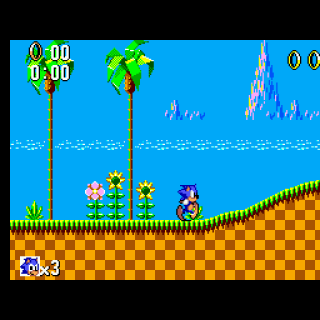
Snapshots Master System, SMOOTH

New

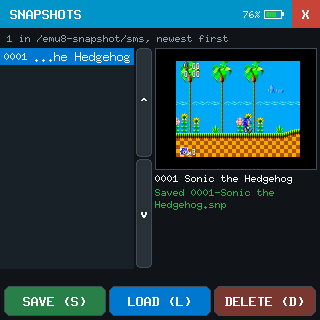
  • Save states on every system. Ctrl+Shift+F5 opens the snapshot page, where S saves, L loads and D deletes. Each snapshot has a screen thumbnail and remembers the mounted disk or cartridge.
  • Battery gauge in the menus, with charge in percent and a charging indicator.
  • SCREEN: SMOOTH scales any system up to fill the 320x320 screen.
  • Faster: the RP2040 runs at 250 MHz, only changed screen areas are redrawn, and there is a new Z80 core for MSX, Master System, ColecoVision and ZX Spectrum.
  • Menus: sharp new fonts, a HELP / CONTROLS page for each system, UNMOUNT everywhere, and live CPU speed and fps in the title bar.
  • File browser: folders first, sorted names, and up to 1000 entries per folder.
  • Apple IIe double hi-res fixes, C64 LOAD without RUN, and an MSX DISK ROM setting.

Fixes

No more audio pops while a cartridge loads. A fresh install, or a Pico 2 with the UF2 Loader, no longer hangs at “Reading settings”. On the Pico 2, games no longer run slowly after a settings save.

Feedback is welcome, here or on GitHub.

3 Likes

Hey @Luciano_Faria, I have it working now on the Pico 2 W with your latest update.

I tried running some programs on the Apple IIe in BASIC I wrote a while back, no problems. I also tried playing Petscii Robots on the Apple II (e or +) and it did not work.

I also tried playing H.E.R.O. on the 2600. I was able to play it but there is many graphical problems.

Very cool overall, and great presentation. I am looking forward to following this project!

Wonderful project ! Thank you for this jewel !

1 Like

Hi @BlairLeduc ,

Thank you for reporting these bugs!

I fixed HERO issue, but I don’t have this Ap2 game in order to test and fix this bug. Can you send me a copy or a link to download this game?

Speaking about bugs, I think there is something fishy with the paddle emulation in Apple][ +/e playing Lode Runner (from Total replay 6.1) … the buttons (F4/F5) are ok, but the movments are difficult to impossible to perform with the arrow keys.
Sorry for not being more specific.

I’m gonna try to figure out what is going on. Thanks for your reply! Yes, you were specific enough, thanks! I’ll let you know any improvements…

1 Like

Thank you for sharing this! It’s pretty incredible. I’m using an rp2350 and have noticed a few things.

I tested some NES games and found that the NES emulator works great with:
Mario Bros., Super Mario Bros. 1, 2 & 3, Contra, Dr. Mario, Metroid, Millipede, Pac-Man, Ms. Pac-Man, Tetris, Ducktales, Mega Man II, Excitebike (with minor background glitches that don’t affect gameplay), Bugs Bunny Crazy Castle, Yoshi’s Cookie, Zelda 1, Zelda 2

Super C & TMNT 1 run very slowly

Kung Fu and Rad Racer have some graphical glitches but play fine. Kung Fu also has missing sound effects when punching and kicking.

The placement of the A and B buttons for NES make it difficult to play a lot of games, especially Super Mario and Ducktales. Mapping B & A to [ & ] or two other adjacent buttons on the right edge of the keyboard in that vicinity would make a huge difference in play-ability.

I also tested the C64 emulator. As expected from your post there are some problems with cartridges.

Jupiter lander cart shows a blank screen.
Pac-man cart starts but returns to the title screen when pressing any of the arrow keys.
Ms. Pac-Man cart: Ms. pac-man moves out of the playfield randomly and jumps around or gets stuck.

Dig-Dug cart works fine.
Centipede cart works but since the space bar is mapped as pause it pauses the game when pressing the spacebar for fire. Maybe there could be an option to choose another key for fire?

Also .prg files from the OneLoad64 project are hit or miss. (Most of the games are in .crt format but there is an Alternate Formats folder with the .prg files for some games)

The C64 emulator VICE for desktop computers took years and years to get things emulated properly, so the fact that this works as well as it does on the PicoCalc with much more limited resources is amazing.

When using the C64 core on a RP2040 pico it has the same issues but it runs too fast in some games.

Thank you again for your work on this and for sharing it with us all!

1 Like

I have installed 1.4.0 and Apple IIe games work, color is a little off. When I load C64 games, .d64 using the load command the emulator goes all blue and nothing happens, if I hit esc I will get the commoder screen. Atari 2600 used pacman and the second ghost was invisable and other games are jerky as well. I get the pop still when loading new files. I have a Pico2W.

I just released

tell me if it’s fixed.

Thanks for your report.

1 Like

I just released

Tell me is my fix resolve the issues reported. Tks!