Gnome desktop environment install - does not work

Hey Guys,

tried it several times to change desktop environment on uconsole, but without success.

1.) clean install sd-card with V2 image from github

2.) boot and setup system

3.) sudo apt update && sudo apt full-upgrade -y

4.) sudo tasksel and choose GNOME

5.) sudo update-alternatives --config x-session-manager

6.) sudo raspi-config and disabled auto login desktop

But it wont work. Finaly Pixel DE is loaded.

Finally I tried to switch to X11 instead of wayland with sudo raspi-config.

But it wont work at all - only blank screen with cursor

Any suggestions? THX a lot.

you’re using one of the official images from the clockwork github? Those aren’t the best supported, you’ll have much more luck starting from one of Rex’s images from this forum. They use newer kernels and don’t break when you try to update them.

yes, trying with offical supported images.

I will try to use rex ones.

Maybe it depends on greeker is using for DE.

I installed Gnome on Rex’s Trixie via Tasksel. It kind of broke the DE in general. So I installed gnome desktop via CLI and can start it from CLI. Everything seems to work, other than manual start

I tried it several times, too ,with rex image “trixie”, but with no success.

Using a raspberry pi 3b or 4b with same procedure like described above works perfect.

i made it

clean install of rex trixie image

sudo apt install task-gnome-desktop

after this command dialog comes up to select desktop manager, here i choose gdm3.

after install ffinished sudo reboot and WOW GNOME is working.

2 Likes

…And how’s the performance?

does it load straight to the Gnome after reboot?

hello, console boots up into GNOME desktop.

Performance with cm4 4GB lite and 64GB sandisk is realy good. The first start was little long after this boot sequence time is realy good.

best of all are using workspaces and energy adjustments for energy safings and sleep. so console react like home pc.

1 Like

can anyone help to set Super key in Gnome to, for example, Start button? It is inconvenient to press Fn+Cmd+D or basically any other shortcuts with more then two buttons when you thumb-typing

You had to do that combo with your GNOME? [Fn] + [Left Alt] worked for me just fine. What keyboard firmware are you running on? You may want to consider updating to the QMK-based firmware here.

I see you also asked this in other posts. Tell me, where do you think the “Start” button is in the uConsole keyboard?
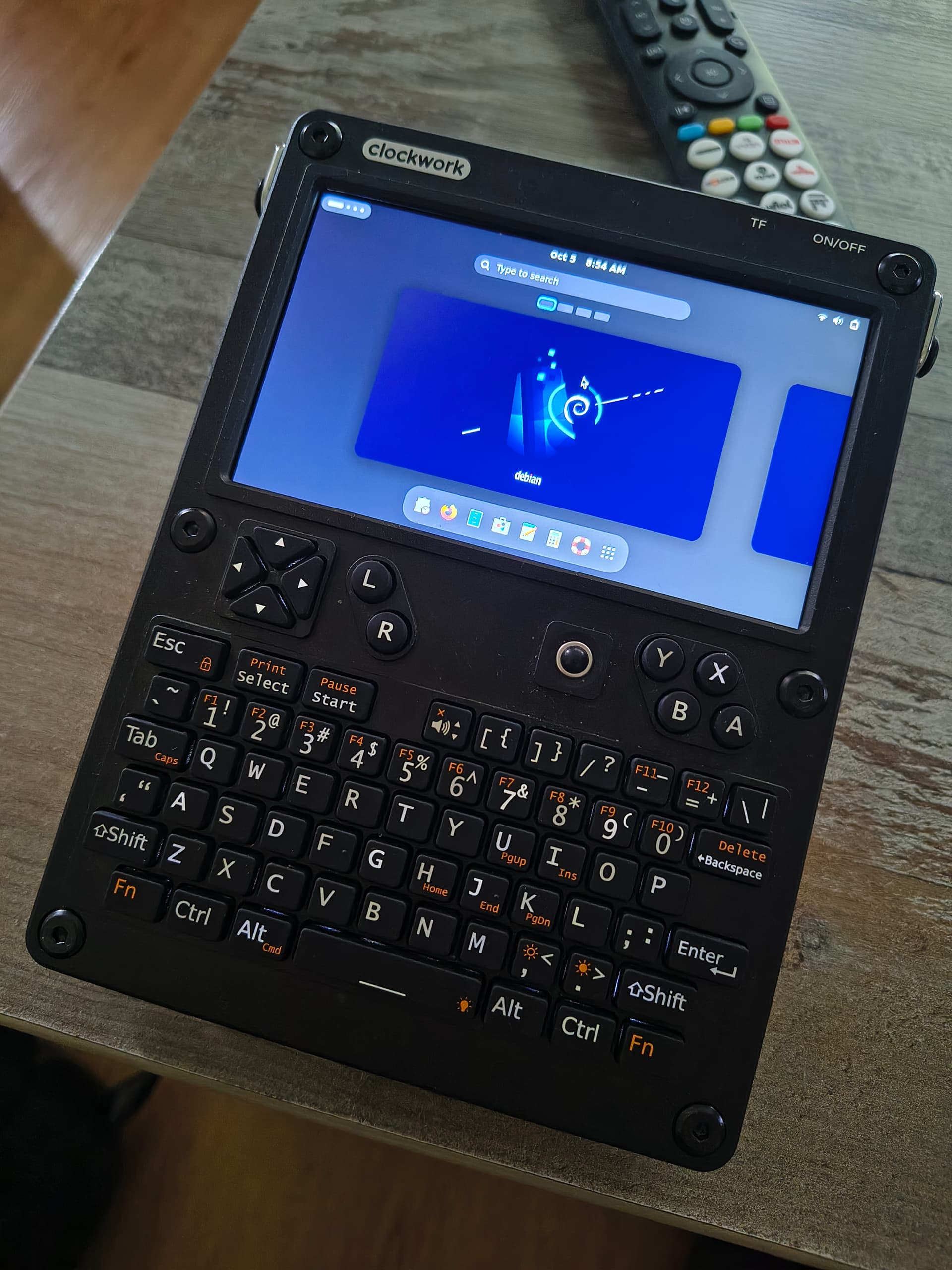
Fn+Cmd == Start

So, to press Start+D, for example, I need to press Fn+Cmd+D

1 Like