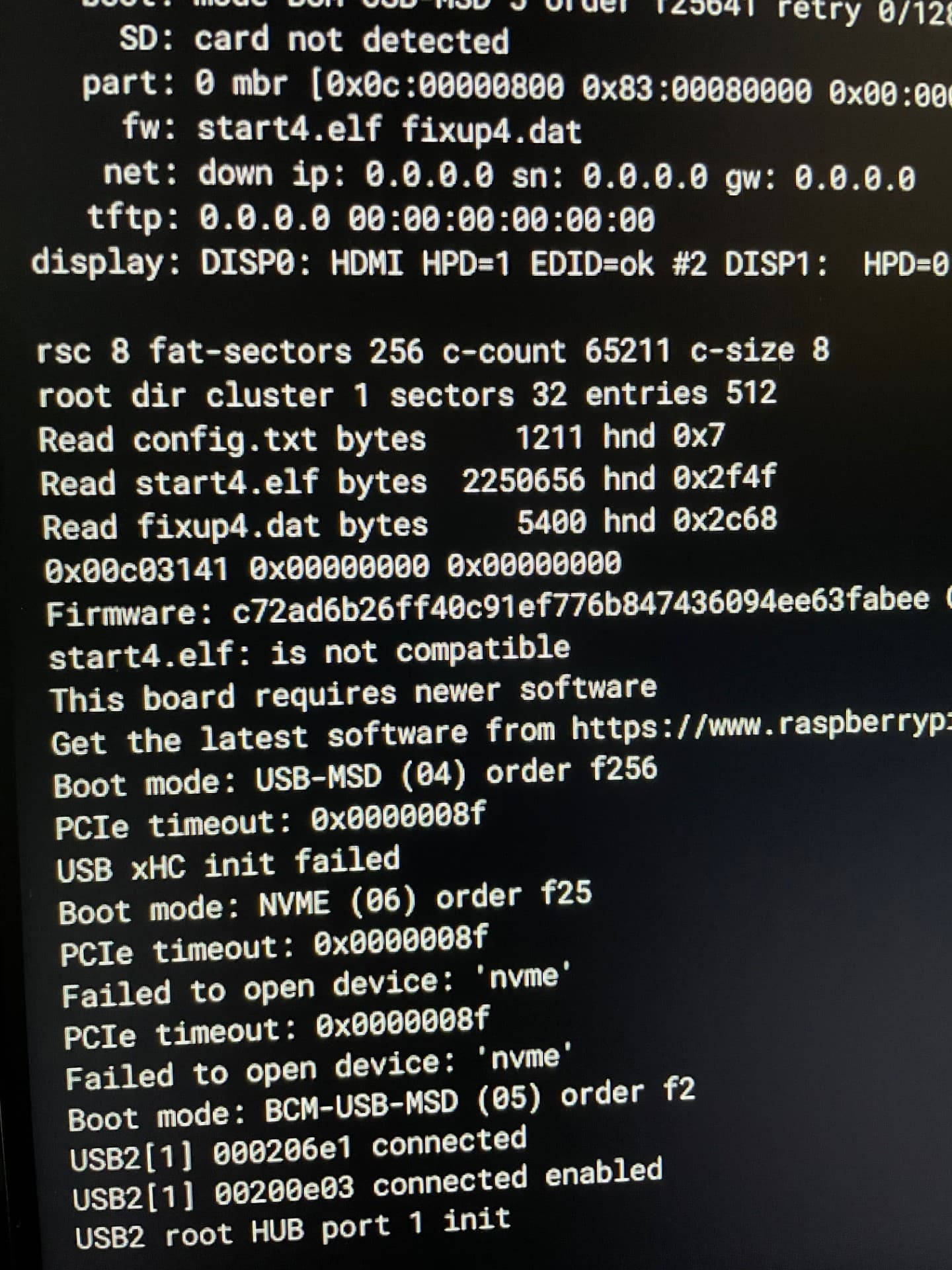
Hi folks. I’m a fellow uconsole owner (x2 actually). Assembled and both working with the included SD Cards and out of box raspian OS. Wanting to run Ubuntu and found Rex’s thread on images he had built. Did all the sudo apt update && sudo apt upgrade commands prior. Cool, downloaded, flashed another SD card with Balena Etcher… no dice. See attached photo. Tried other SD cards that are known good, same thing. Tried other images, same thing. Tried writing the images with RPI Imager… same thing. Have another regular RPI 4 that had Ubuntu running, put that SD card in and it boots on uconsole, but with only micro HDMI output as expected.
Have been struggling with this for days now and I’m really stumped. Ran sudo rpi-update to upgrade the firmware, seemed to work, reboot, same deal… will not boot images, including even the RPI Boot Loader SD image from RPI Imager.
Put the original and backup working Raspian OS SD cards in and boots right up.
I feel like I must be missing something obvious, but can not put my finger on the issue. Bootloader? I tried even moving the start4.elf and fixup.dat files from booting SD cards over to ones that are not booting, and that also does not work.
Any ideas or help from someone who has solved the same would be very welcome. Thanks for reading and even better if you can reply and help me get past this issue.
It says that the SD card is not detected. You are on a CM4 correct?
What are you running rpi-update on? Running that on one of my images will replace my custom kernel with the stock RPi one and the uConsole won’t work right.
Download the image, don’t extract it and flash with RPi imager without using any custom settings. Then boot in the device, you can run apt update and apt upgrade but not rpi-update or dist-upgrade or you risk replacing the kernel.
@Rex Thank you sir for the speedy reply and clearly god tier work on community images. Correct, CM4, sorry I should have said. I am downloading your images and flashing with RPi imager with no custom setting. I am not modifying in any way, they won’t boot for me for some damn reason.
I threw the orginal SD card in with Raspian to run rpi-update since boot screen was complaining about needed newer software, assuming firmware would flash to the CM4 hardware like a BIOS/Firmware update, then tried your Ubuntu image flashed and unmodified as stated above. Still issue persists. Vanilla images with either RPi or Balena Etcher don’t boot for me for some reason. I’m stumpped because from other threads I see they are working for others. I tried your Bookworm and Parrot OS images in same way, same results. Tried multiple and even brand new micro SD cards, same issue.
“You can run apt update and apt upgrade but not rpi-update or dist-upgrade or you risk replacing the kernel.”
OK, so I did run “sudo apt update && sudo apt dist-upgrade && sudo apt autoremove” out of habit like other linux machines on the raspian OS SD card BEFORE I tried your images. But would that only affect that particular OS running on that particular SD card, correct? Would not modify the bits on the CM4 hardware, right?
OK - I’m an idiot. Seems these SD cards were not formatted correctly? I did an erase in RPI imager first, then flashed SD, now working. In typical fashion, something basic.