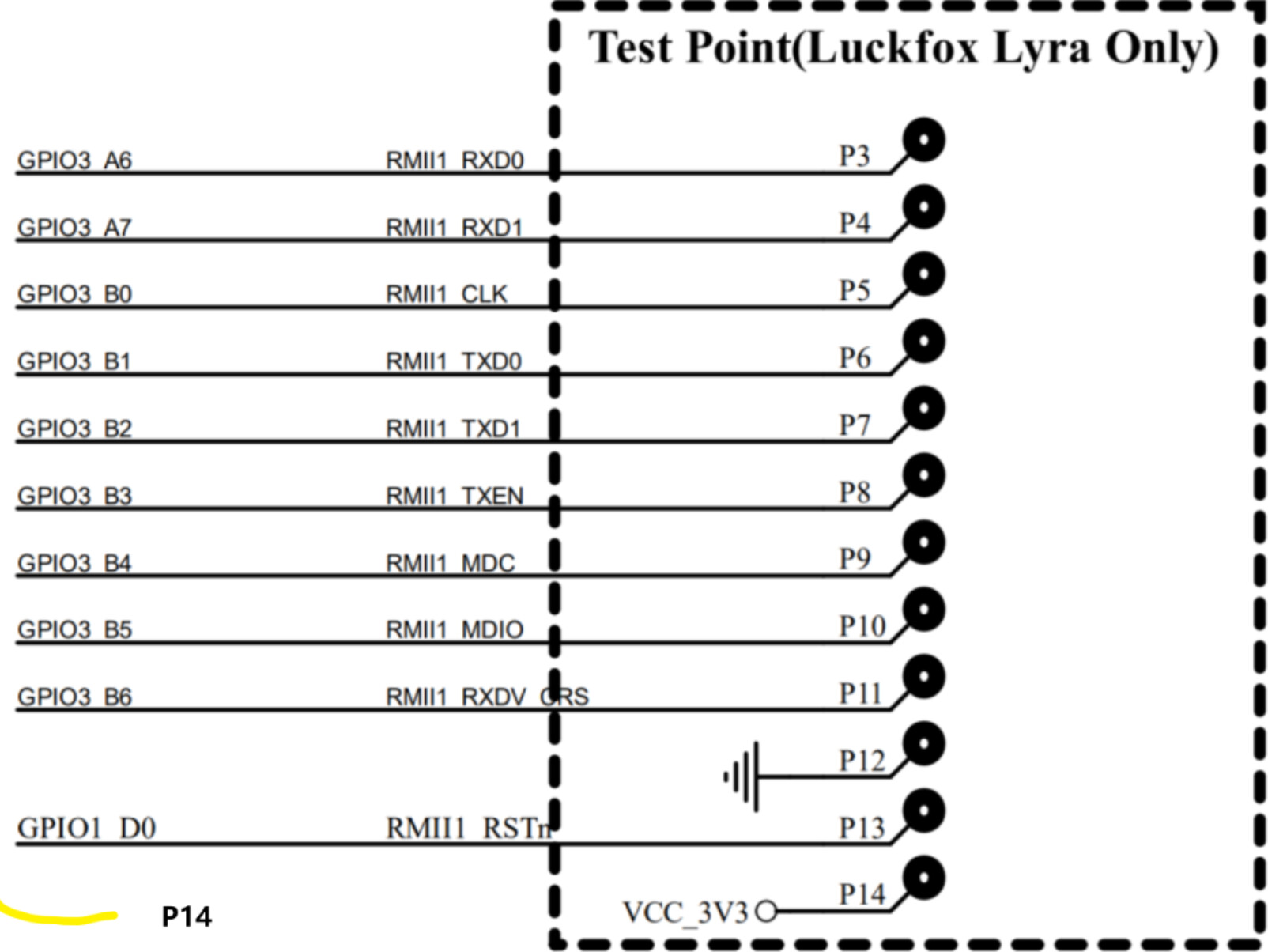
I found these other pictures of the Ethernet pinout on the Luckfox Forum

2 Likes
You would still need the actual display DSI panel-init-sequence for this specific display to be defined in device-tree not just the connection. The 10.1 inch is the default display defined
This is quite nice. Can these pins be used for sound?
Im not quite sure if they are indeed available for any user use like the specific RM_IO pins (that can be assigned for any use).
On the Milk-V DUO for example they were multiplexed for either network or i2s use - 【i2s】Milk-V Duo添加speaker——i2s2 - Duo - Milk-V Community

1 Like
That is one heck of a weird pin out. Ah well.
3,4,5, and 6 have an i2s peripheral, so with a codec, they could be used for sounds without having to use soft pwm. I’m planning to experiment with that eventually, but it probably won’t be soon.
From the datasheet:
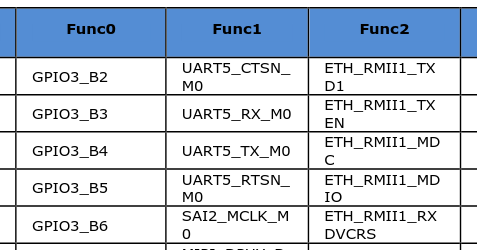

GPIO1_D0 has a few more options, but it’s still not one of the remappable IO pins. These all can be set to GPIO (and then software SPI or something could be used), ethernet, I2S, or UART. I think anything flexible is going to require bitbanging.
I’m sure this will require configuration in the devicetree.
1 Like
little PSA for everyone, you need to recompile the kernel if you want to have wifi support, most of the modules have not been selected when the kernel was built
yes, with my image the default kernel config only includes the minimal modules enabled by default.
I received the Luckfox Lyra Zero W today and will be looking if i can make adaptor in the near future to fit PicoCalc
512mb ram will result much less swap usage

3 Likes
I’ve had one of these sitting around from an old Anbernic game system build, the chip is an RTL8821CU and they’re extremely cheap on aliexpress: Amazon.com: USB WiFi Bluetooth Adapter, 600Mbps Dual Band 2.4/5Ghz Wireless Network External Receiver, Mini WiFi Dongle for PC/Laptop/Desktop : Electronics
It’s an RTL8821CU chip, will this work outright with the latest version or will I need to compile a kernel with drivers?
I haven’t gotten my Picocalc yet but I’m super grateful for all the hard work being done, this is looking like everything I dreamed of when I was in high school a quarter century ago.
I ordered such a dongle already, waiting to receive it, but think it will also be the rtw88 driver.
so yes compile from the already posted notes
Also i can already see the Luckfox Lyra Zero W using the same aic800 driver I have for the large external dongle - i posted before - Luckfox Lyra on PicoCalc - #426 by markbirss
so wifi works and ble on Luckfox Lyra Zero W
im using lyra compiled image at the moment
root@luckfox:/# speedtest-cli
Retrieving speedtest.net configuration...
Testing from OPTINET (197.94.94.95)...
Retrieving speedtest.net server list...
Selecting best server based on ping...
Hosted by WIOCC (Johannesburg) [1259.92 km]: 22.033 ms
Testing download speed................................................................................
Download: 44.71 Mbit/s
Testing upload speed......................................................................................................
Upload: 27.05 Mbit/s
root@luckfox:/# bluetoothctl
Waiting to connect to bluetoothd...[bluetooth]# hci0 new_settings: powered bondable ssp br/edr le secure-conn
[bluetooth]# Agent registered
[bluetooth]# [CHG] Controller D8:74:EF:67:24:2D Pairable: yes
[bluetooth]#
lsusb
root@luckfox:/# lsusb -tv
/:  Bus 001.Port 001: Dev 001, Class=root_hub, Driver=dwc2/1p, 480M
    ID 1d6b:0002 Linux Foundation 2.0 root hub
    |__ Port 001: Dev 002, If 0, Class=Hub, Driver=hub/4p, 480M
        ID 1a86:8091 QinHeng Electronics
        |__ Port 001: Dev 003, If 0, Class=Wireless, Driver=btusb, 480M
            ID a69c:88dc
        |__ Port 001: Dev 003, If 1, Class=Wireless, Driver=btusb, 480M
            ID a69c:88dc
        |__ Port 001: Dev 003, If 2, Class=Vendor Specific Class, Driver=aic8800_fdrv, 480M
            ID a69c:88dc
root@luckfox:/#
Thanks, I was looking at the thread the other day and saw that other 8821 chip things were working, so I figured it was probably going to be usable.
I’ve been playing with a Luckfox Pico Mini for a few months, it’s crazy how much people expect of computers now when I first started using linux on a 166mhz 32mb packard bell. That thing was FIRE when my dad bought it.
1 Like
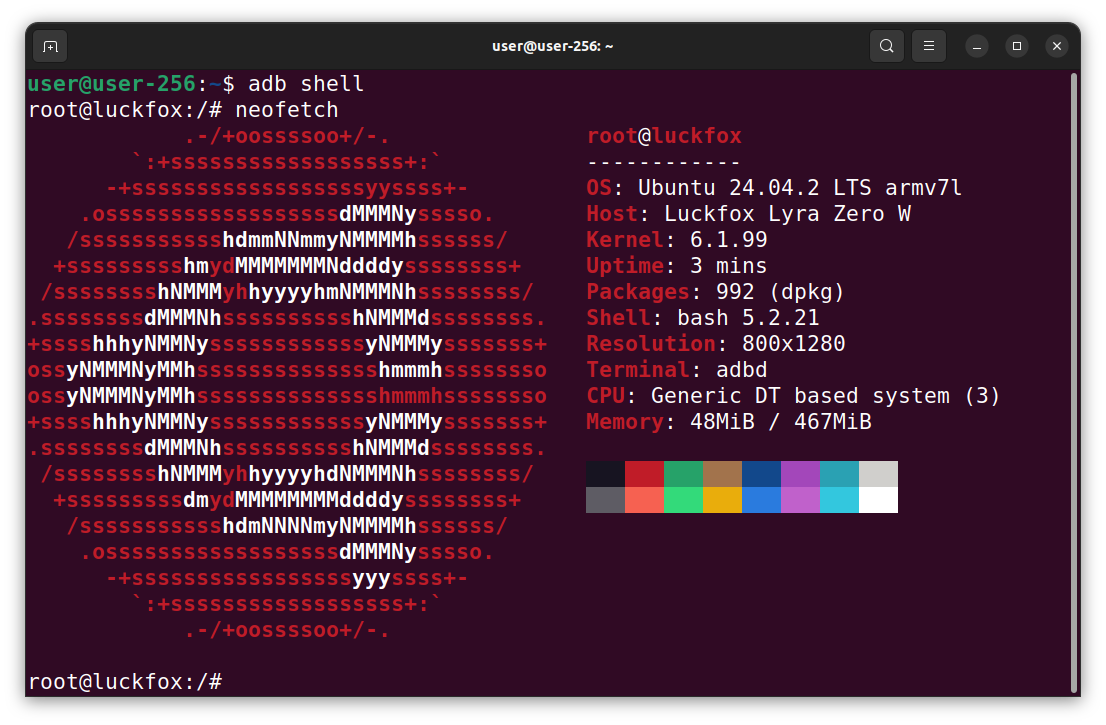
Probably will need to recompile the kernel, there were very, very few Wi-Fi drivers selected.
I finally have some time to dip into the Ubuntu image. I was not super happy with hisptoot’s image because it required too much work to get to a usable state. Before I jump in, I have a couple of questions.
I have a TP-Link Nano USB WiFi (rtl8821cu) one of the supported drivers or will I need to recompile the kernel?
I understand I will have to manually update the kernel, but other than that, can I just use the apt repositories to install software or do I need to build from source if I want to add anything?
you wont be re-compiling the whole kernel just modules using the kernel source, kernel headers and driver source
the kernel source, kernel headers, wifi firmware binaries and some driver source is already incl in the developer image, yes you must compile the module and install them
I have not pre-compiled the various drivers i found since they overlap with the support they offer.
make install
refer to the driver source for full instructions
Yes, simplest is to start with sharing your internet connection over USB
adb shell
dhclient usb0
then check if you can ping 1.1.1.1 or www.google.com
then apt update and apt install as usual
If I have compiled the drivers I need on the device is it possible to generate a image? What would be the tool for this?
I not found a tool or way to interact with the “image” files for the partitions yet. I tried x-rock and upgrade_tool to read my firmware back, but this creates files as large as your sdcard and not user mountable like other image files
I used the approach of modifying the supplied/used “ubuntu.tar.gz” and the various ubuntu rootfs creation scripts in the SDK
1 Like
Cool, I am an old hand at this, I can handle compiling and installing kernel modules, I just wanted to know what needed to be done. Thank you.
1 Like
sudo ~/Downloads/linux/upgrade_tool uf update.img
Were do I get this “upgrade_tool”?
Found it. This Rockchip is all quite confusing and cumbersome. “Proprietäre Kackscheiße” as we would say in german…
I guess I stay at hitpots dist, as long as Pico8 runs and I have internet I am fine 
All the best,
Carsten