Hi everyone, long time no see!
Some of you may remember me from the old days here, when I was trying to contribute as much as I could to the scene, with ports and also my own projects like GSP . I was the one also stubbornly asking for more modules for the GameShell, a better screen above all. That module never came, so in the end I built my own “screen module” out of something I had in a drawer: a PSP-1000.
The project is called PSPExp. The GameShell runs the games, and the PSP plugged into it by USB becomes its screen, sound and controller: a bigger, brighter 480x272 display, real buttons and an analog nub. The PSP even draws the frames with its own graphics chip, so the GameShell’s little CPU only has to run the game.
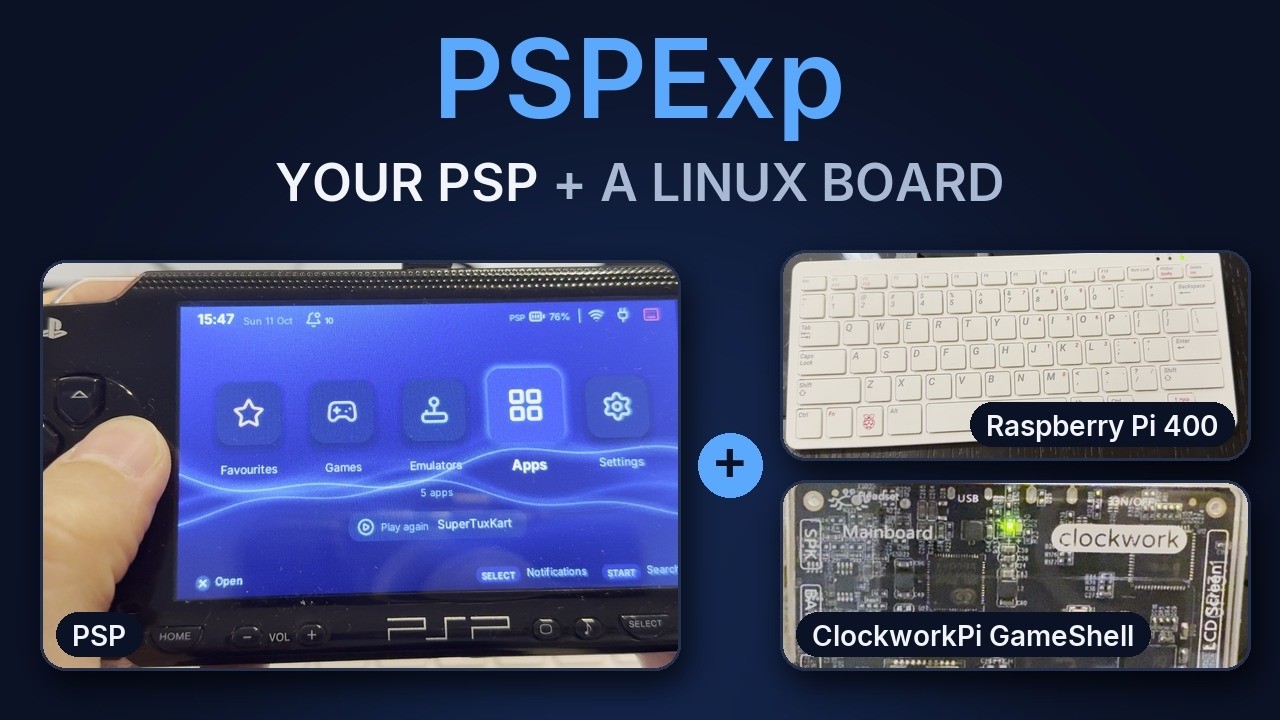
It gave my GameShell a second life, and I hope it does the same for yours.
What you get on the GameShell
- A ready card image: a small, current Debian 13 (kernel 6.18) that boots straight into PSPExp.
- A launcher on the PSP for games, emulators, apps and settings. Wi-Fi, the time zone and SSH are all set from the PSP.
- 47 packages you install from the PSP in two presses: Freedoom, OpenTyrian, Cave Story, SuperTux, Quake, the Revolution adventures, Warcraft I/II (with your own data), and emulators: NES, SNES, Mega Drive, Game Boy/Color/Advance, Lynx, WonderSwan (bring your own ROMs).
- A music player, a file manager that also opens the PSP’s memory stick, a system monitor, a terminal, and Bluetooth headphones.
Measured on the PSP: Freedoom and OpenTyrian at a full 35 fps, the 2D emulators at full speed, most OpenGL games at 40–60 fps.
What you need
- A GameShell (CPI v3 board) and a microSD card (8 GB+). Writing the image erases the card, ClockworkOS included, so keep your old card if you want to go back.
- A PSP-1000 with custom firmware, its mini-USB data cable, and a USB OTG adapter for the GameShell’s micro-USB port.
Getting started
- Download
pspexp-gameshell-v1.0.0.img.xzfrom Release PSPExp v1.0.0 · pleft/PSPExp · GitHub and write it with balenaEtcher or Raspberry Pi Imager. - Unzip
PSPExp-psp-v1.0.0.zipat the root of the PSP’s memory stick. - Plug the PSP into the GameShell’s OTG port, start PSPExp on the PSP, and switch the GameShell on. The first boot takes a minute or two.
- On the PSP: join Wi-Fi, open Apps > Packages, install a game.
The GameShell’s page in the manual: PSPExp on a ClockworkPi GameShell · PSPExp
Site: https://pspexp.dev · Source (MIT): GitHub - pleft/PSPExp: Expand the PSP with a Linux board sidekick: the board runs the games, the PSP draws them, plays their sound and is the controller · GitHub
The image’s login is cpi / cpi. SSH stays off until you switch it on in Settings (change the password first). The kernel and boot loader sources are attached to the release.
It runs on a Raspberry Pi too, but the GameShell and the PSP make the nicest pocket pair. I’d love to hear what you think, and bug reports and ideas are very welcome, here or on GitHub. (Not affiliated with Sony.)
