Going to start off with this image:

It worked!! I’m ecstatic that it’s finally working after so long!
I fixed it by upping the lcd_dclk_freq in the cwu50_config.c file from 62 to 67. There was some trial and error (the flickering gets worse as the number goes up until about 67) but now the screen displays the drawn pixels correctly.
I had tested the initialization timings for the display by touching to pins 24 (LCD RST) and 39 (3.3V) on the J302 connector and this is what mine came out to:
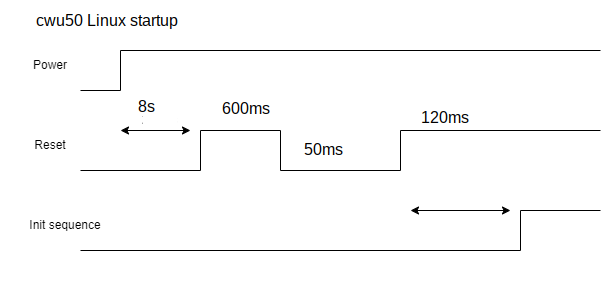
I edited the RTT driver to match but that didn’t help. I then tried to match up some properties that were difference between the cwu50 and the cwd686, like the pixel clock. When I set the cwu50 pixel clock (lcd_dclk_freq) to 55 to match the cwd686, the flickering went away, which was a good sign. I then took a look at the datasheet for the cwu50 and saw this, which matches the resolution of the screen:

Plugging the values from the cwu50 config into the formula at the bottom does equal about 62 MHz, which is what the cwu50’s config is set to, but I pushed it further to see if I could increase the bandwidth. That worked! I don’t know if it affects battery life or the life of the screen, but at least there’s something on the screen now.
Also, I checked the schematics for the R01/Main board and SPI1 is just routed to the EXT mPCI port, so it definitely doesn’t have anything to do with the display.