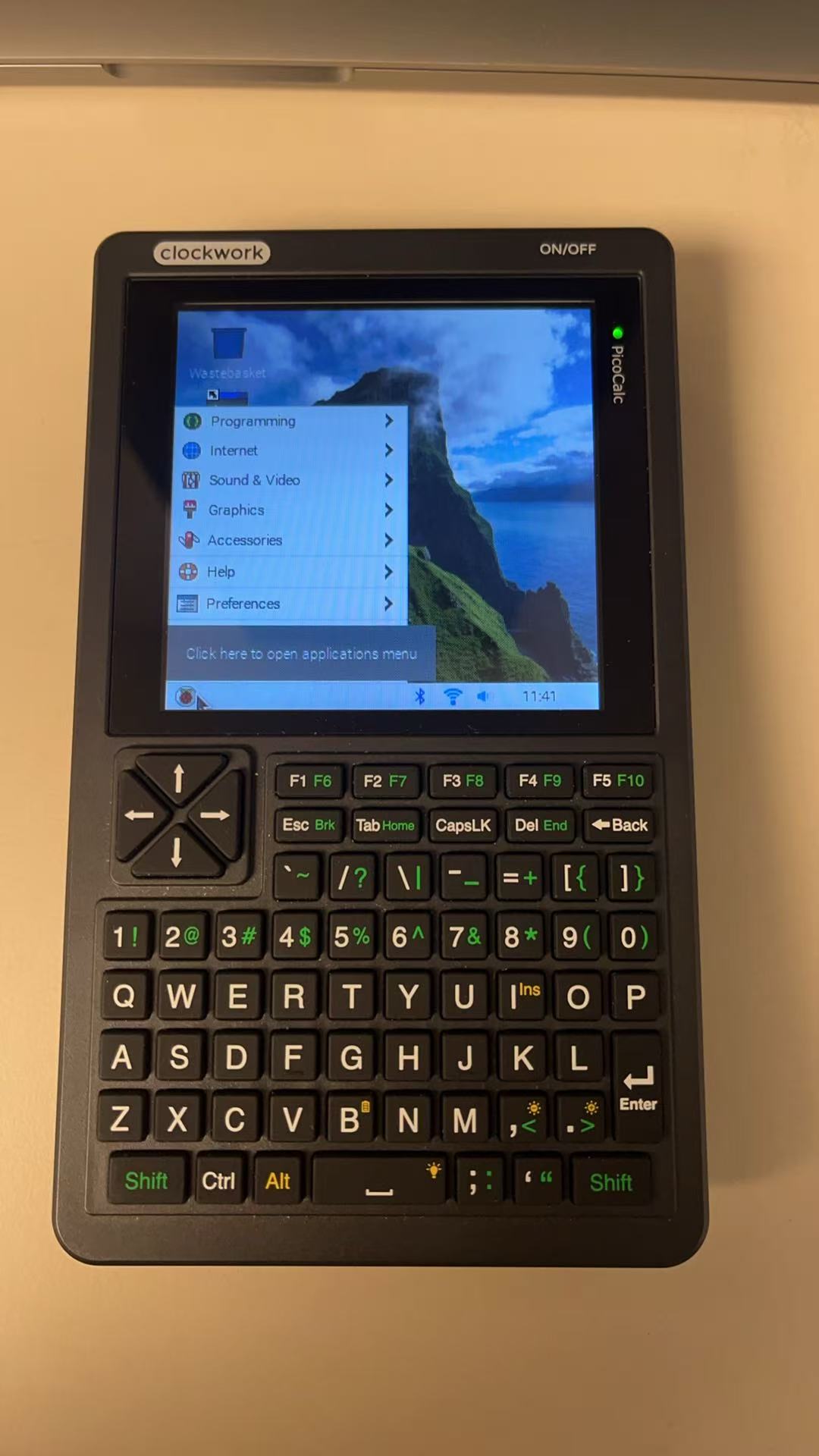
Installation of another desktop environment on PI OS is a bit tricky for some reasons I ignore. I did not find how to get lightdm working.
On my PI400 and PI5 I followed those instructions to install xfce4:
Installation of another desktop environment on PI OS is a bit tricky for some reasons I ignore. I did not find how to get lightdm working.
On my PI400 and PI5 I followed those instructions to install xfce4:
Thanks Michael I will try this
xfce4 can run on Trixie 32 nice.
The virtual desktop/screen and more than one screen is mission impossible.
On Trixie 64 bit too, but by launching startx once connected in console mode.
Has anyone tried Diet Pi on this setup yet?
DId i see details somewhere about how to use the full size SD card slot as extra storage?
Don’t worry i just spent 2 hours going through all the comments on this post and found SD details lol
Could you share a link to what you found, please?
hi guys, what is your battery life with these linux SoCs vs rp2350 MCU ?? keep in mind that linux is totally different thing, sure… I myself considered some of these more powerfull “zero” form-factor board for something battery powered but, it is different class … sure drastic is also TFT backlit and active WIFI (or any kind of radio), with MCU rather only switched on momentarily … here we quickly skipped into this with Lyra …
I followed the instructions in GitHub - ironat/picocalc_trixie only with desktop (not the light) and it all works beside that the screen resolution is to big, and there is no way to “move” the screen to see the rest of screen
under the resolution menu I have only 320x320.
how can I make it all fit in the screen.
the solution that worked for me is to go into the settings, and under a tab (i don’t know which one) there are presets for small, medium and large screens. I started with the preset for small screens, but i wanted to fit more things on my taskbar, so i switched to the preset for the medium screens, and with that preset i can fit more things on my taskbar, while still being able to read the tekst.
I haven’t found anything for the resolution yet, i just grab the top of the window and drag it side to side to see the things. I am looking for a fix to see the whole desktop, and that the windows show all the information instead of a part of it.
I tried playing with it and still not everything fit in the screen.
adding “video=SPI-1:320x320M@60” to the config.txt file made the screen fit correctly
it did fit everything on the screen when i started it up for the first time, but i think i know the problem why most of the windows aren’t fitting within the screen limits. I think it’s because the whole device was designed for terminal use, and for that, it works fine, but for a desktop os it doesn’t. Moving windows everytime you want to see a other part of the window is irritating and takes time. I will look into some options that are availible, and share them on this forum
I just asked chatGPT (yes, i know, i’m lazy ) and this is what it said:
This is a very common issue on the PicoCalc with the ZeroCalc mod 
What’s happening is:
The desktop itself fits the screen correctly
But the window manager thinks the screen is wider than it really is, or
Window decorations (title bars + borders) push windows outside the visible area
So new windows open partially off-screen, and you have to drag them back every time.
Below are the best solutions, from quick fixes to more permanent ones.
Works in most X11 window managers (Openbox, Fluxbox, etc.).
 Alt + right mouse button
Hold Alt
Right-click and drag anywhere in the window
This lets you resize the window from any edge, even if the borders are off-screen
Very handy if you can’t grab the title bar.
Title bars and borders often make windows just a bit too wide.
Reload config:
openbox --reconfigure
Edit:
~/.config/openbox/rc.xml
Add:
<application class="*">
  <decor>no</decor>
</application>
 No title bars = windows suddenly fit the screen.
Many apps scale themselves too large because DPI is wrong.
xdpyinfo | grep dimensions
If it reports a resolution larger than your actual PicoCalc display, that’s the problem.
xrdb -merge <<EOF
Xft.dpi: 96
EOF
Or even smaller:
Xft.dpi: 72
Restart your desktop or apps after this.
You can force windows to never exceed the screen size:
wmctrl -r :ACTIVE: -e 0,0,0,320,240
Replace 320x240 with your actual PicoCalc resolution.
Useful for stubborn applications.
If you don’t mind changing workflow:
dwm
i3
tinywm
Windows cannot go off-screen
No wasted space
Excellent for very small displays like the PicoCalc
Surprisingly comfortable once set up.
Some apps support fixed geometry:
appname --geometry 300x200+0+0
Not elegant, but effective.
did you try any of the solutions?
can you report what works?
I also have the windows issue
Edit:
I manage to change the scale to a fraction scale (not available in the screen menu) with this command:
wlr-randr --output SPI-1 --scale 0.8
however I find the legibility laking.
I may just go back to a “terminal” PicoCalc with the pi zero.
Hi there!
Pi zero 2W installed, running trixie (64bit).
Thanks to those who provided the gerber file and trixie/driver installation instructions.
I’m using it in console mode - I mainly use it as a CAN bus debug tool.
Everything is working quite well, but there are still a few annoying things that I cannot work out:
My right shift key is not working. I updated the STM32 firmware to v1.4 - but nothing got better. Also sometimes (rarely) the 4 arrow keys stop working - I fix that with rmmod+modprobe of the kernel keyboard driver. Help!
A boot time, sometimes, the display stays black/empty (backlight works) and the pi boots OK. I can connect using ssh (or blindly typing my user/password and doing a shutdown). In dmesg, I can’t see anything special, no errors. Same in systemd’s journal : nothing meaningful. It happens randomly (after a reboot or shutdown) - no pattern that I could identify. When the display works, it’s solid: the display never goes black.
[solved with STM32 BIOS v1.4] the main board was not turning off when shutting down the pi. Now it works !
Other than that, cmus music player works (speakers, headphones, and bluetooth). GNU screenrc has a hardstatus line that shows battery level; ipv6 is fully disabled; banners, motd and other messages have been removed… I’m loving it.
If I can fix the remaining issues, that’ll be next level 
I just checked the source code of the keyboard driver:
The right shift key is used to switch from keyboard to mouse. So, pressing right shift once blocks the cursor movement and switches to mouse mode. Pressing it once more reactivate the cursor movement.
I’ll probably fork the driver and suppress mouse support which I don’t need at all.
Do you guys think that it would be possible to have kali linux running on the pi? Will all the commands that are needed for the keyboard and screen work on kali linux? I think that it is really cool to have a portable device that i can do some stuff with that is possible with kali linux. I think that all the commands should work, because kali linux is debian based, just like raspberry pi os.
Hi, I did the mod with Michael Mayer’s PCB and I am running Trixie (without desktop), works great! I mainly want to use this device for PICO-8 development so it would be very handy to be able to switch between PICO-8 and another console on tty2 or having seperate windows with tmux. That way i can tail my log file. But it seems like PICO-8 grabs all keyboard input, so I can’t get it to work.
I tried:
But what every I try PICO-8 always seem to run on top of the consoles. Any ideas what I could try next?