cm4s is different from cm4, but they’re so hard to get that you’re mostly on your own
you’ll probably need a custom device tree overlay
@snipeytje is right you’ll need a custom DToverlay to get full function out of the CM4S, I don’t have one so I couldn’t test to add one into the kernel or image.
Thanks for the explanation, Rex, Shipeytje
2 Rex: If you would have time and desire to test and add dtoverlay for on-board Wi-Fi/BT module, I may send you CM4S as a present, in the sake of the science ( and a little bit of mine humble interest :)).
I’ve passed through almost all the posts here about CM4S, some guy purchased them and stuck with no solution available.
Hey I am hoping someone can help. My cm5/ uconsole worked fine for a few months up until an update a while back. I can Flash fine, updated eeprom, but only the USB on my hacker gadgets AIO board and the HDMI out work on it. I tinkered and switched an I2C (I think) setting in raspi config, and did get it working once or twice fully but only for one power cycle. The backlight works, but the power button is always green. I tried reflashing a few times but can never seem to get past this stage anymore. I am still learning and would really appreciate help as I really want to have this working again.
Just to clarify it runs fine with HDMI out and just my hacker gadgets USB ports.
Hello Sorry if I missed it is Meshtastic still not working on trixie I was going to try this build? I have the expansion board and was running bookworm but noticed meshtastic is down on there also?
Get the updated aiov2_ctl 
https://github.com/hackergadgets/aiov2_ctl/wiki/Applications#meshtasticd-boot-control
1 Like
Cheers much tinkering and reading all good 

1 Like
Can you do a radxa cm5 guide too I have the kits on the way once build I will review them on my channels.
Not got one of those myself but happy to work with you to debug it.
1 Like
I have the one with 8gb ram and GPU with emmc on board so we can flash the OS on emmc and boot a second os from SD card. When you take SD card out then it reverts to emmc.
Isn’t the SD card wired to same pins as the onboard eMMC? So it’s one or the other? It’s that way on the official compute modules anyway.
2 Likes
1 Like
Hi all and big thanks to Rex for your support in all this - I spent this whole day trying the below and I give up now since I have no more ideas - maybe there is someone having solved this or it’s just not working today.
I’m using a CM5 emmc with Rex Trixie image - on top of that I’m using sway as wm and everything is working as a charme except games overall. As an example I tried using “Into the Breach” (GOG-linux ARM version) which raises CPU consumption into the orbit as I found out that using sway there is no 3D acceleration from the GPU due to reasons with wlroots and other independancies.
So I looked into starting games from tty directly. I can successfully start kmscube (in the right orientation) - perfect! If I’m now starting “Into the Breach” again, everything is smooth, nearly zero CPU usage, but unfortunately the orientation is wrong (the display is not rotated).
So I looked into this trying to use “gamescope” from Valve which I needed complicatedly to compile - but this is not registering the video output (vulkan cannot open the display regardless which parameter for usage of card1 or DSI2 I handed over). Ok, so next try to use “weston”, which is starting fluently, but in the end stopping once I tried to open the game again. Ok I thought, back to the roots - lets start it just literally from tty. I just need to find a solution to rotate the display for SDL or vulkan there. The console is fine (as we all know) but once you start something with graphics, it’ll be wrongly oriented. So I tried to change the /boot/firmware/config.txt and the cmdline.txt, but nothing changed (I rebooted like 10 times or so)…
And now as I stated earlier I’m just running out of ideas. Is it that just Trixie is too old or the hardware too fresh or what is it? Any ideas?
1 Like
Finally got around to flashing Trixie, and I must say it made my CM4 uConsole a whole new device. This image is rock solid, stable, snappy, and power efficient. Thanks Rex & everyone who contributed. Amazing work.
2 Likes
forgive me for not reading the entirty of this forum as its going too fast some days.
but I wanted to enquire, @Rex will this build work with the Hacker Gadgets AIO (ver 1) AND the hacker Gadgets m.2 mods? and by that I mean I am able to use the GPS/Lora/SDR, and boot from m.2 / etc
if not, do you have want/need of a guinea pig?
1 Like
yes, apply then this:
1 Like
I just received my upgrade kit from Vileer.
I’m using a CM5 in my uConsole (64GB eMMC / 8GB RAM).
Until now I was running @Rex ‘s Trixie image on the eMMC. I’ve now flashed the same image to the M.2 SSD. So far so good — it boots, and on an external monitor I can see it starting up, but then it gets stuck at this point:
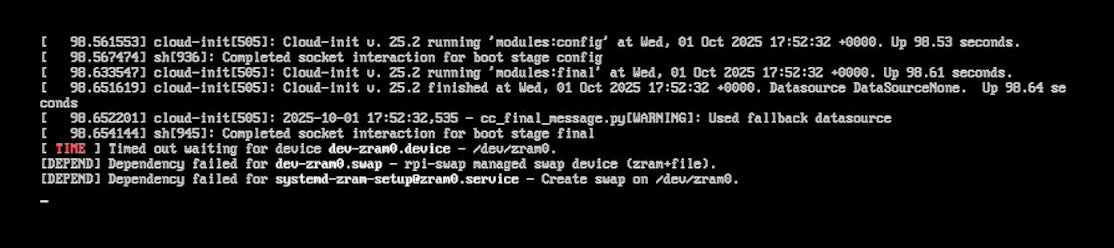
Any idea what could cause this and how to fix it?
Make sure your NVME is not on raspberry pis unsupported list. If it is then strange stuff can happen.
@rex I cloned my existing installation from emmc to nvme and it seems to work without any problems. It appears that something after or during the execution of cloud-init is causing this.
Cloned with: https://rpi-clone.jeffgeerling.com/
1 Like
@Rex I tried yesterday Ubuntu and this your new Trixie, but didn’t work well, so i go back to back to old one. Ubuntu is like installed on Pi3 so very slow and cannot be used, and Trixie when i open the file manager it’s showing the menu but nothing else like empty no folders or documents and after few seconds block all the system and another few seconds later uConsole restarts, this is happening over and over if i open the file manager. For me an Android should be perfect because i must to use a dj app that is not on Linux but is on windows, mac, ios, android.