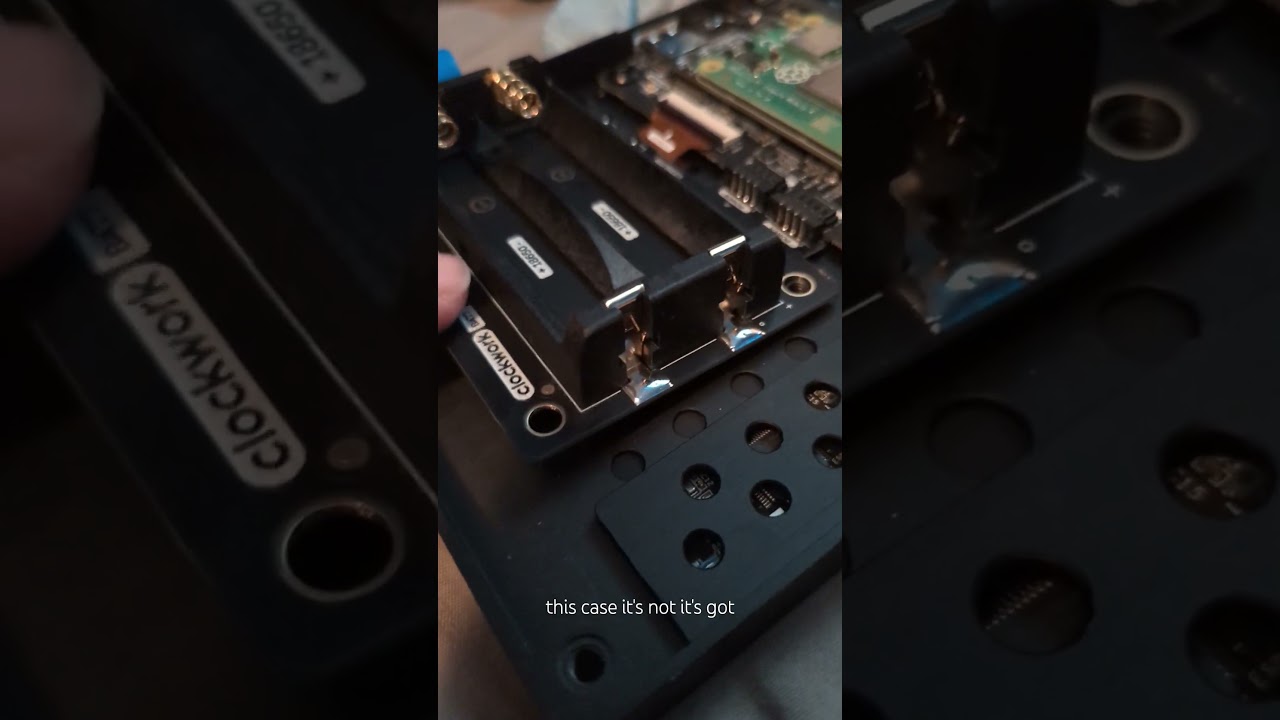
hey folks, I’m still getting frequent-but-unpredictable times when my uConsole dies at a supposed 50% battery charge.
possible causes I’ve read about:
weird power connector inside. I don’t know how to fix this more but I made a short video to see if I’m even understanding the problem correctly.
miscalibrated charge meter in the OS. I’ve tried setting /usr/class/power_supply/apx20_whatever/calibrate to 1 and then doing a full charge, full discharge cycle at least half a dozen times. would still love to know how to know when that process has decided it’s successfully done?
What should the max energy show up as when looking at uevent? Does the axp228 driver actually adjust those values based on the batteries used, or does it just lock in at an expected normal value?
your battery tray is find, mine does that also. how long is it lasting before it dies? i’m using samsung 35Es and i get about 3-5 hours with a cm5 and 5-6 with a cm4.
the battery capacity is set but you can change it with this overlay. clockworkpi-custom-battery.dtbo
to use the overlay, in you config.txt add this line and edit to your needs.
dtoverlay=clockworkpi-custom-battery,charge_full_design_uah=<full charge in uAh>,energy_full_design_uwh=<full charge in uWh>
Still weird. Both batteries fully charge evenly, no obvious loose connections that I can tell. Might try different batteries but it still just seems weird that it’s so sure of being at half charge when it dies.
Hey Josh, how is the battery life going on your end?
I have unpredictable times too, 100% to 50% seems to have a consumption of about 1%-2% per 10 mins (idle) but once the battery charge reaches 50%, the power consumption goes to 1% every minute (idle)
Noone else chimed on this thread… I wonder if it’s because of the batteries or the hardware or software.
I remember my first setup had the battery tray loose, it wasn’t all the way in, I fixed that but now I’m wondering if that caused some sort of damage.
got this issue a while ago whenever I remove any component. I had to reseat the batteries and the battery board a couple of times to get the battery properly drain. while cleaning the contacts work, I HIGHLY recommend getting a Hacker gadget’s battery board to add a reset button, then calibrate your battery as stated by Rex
I just removed the batteries and the tray, cleaned with isopropyl alcohol (sold at shop that specializes in electronics.) and assembled everyting very carefully. I will now proceed to charge and calibrate the batteries as per Rex’s suggestion.
Maybe it’s just paranoia but I noticed one of the batteries had a slightly darker section near the bottom (near the negative side). The batteries have a green cover and it looked slightly darker there, like it had moisture.
It wasn’t moisture but that’s what it reminded me (pressed the green skin to see if something moved underneath and nothing happened). Looks like when you’re sweating and the shirt is darker near the armpits.
In any case, I think I will get a new pair of batteries. If it’s not the batteries, it still won’t hurt to have a spare pair.
The batteries still last for a good amount of time (about 6 hours on idle before the battery starts to drain at a fast rate) Given I mainly use the uConsole to learn linux and C++, I think it’s a good amount of time.
It’s still bothersome to know that somewhere between 50 and 40% the battery will just start to die fast.I would prefer to have a more predictable behaviour… looks like the 40% is (in fact) a 10% and the other 60% is a 90%
I wonder if this could mean only ONE of the batteries is faulty
Your problem seems to be solved, but for future readers there are two main reasons this might happen:
If your window manager crashes and you see shutdown kernel messages before your system dies, your kernel is shutting down to prevent the battery dying, which is an issue with either battery calibration (where the max and min voltages are unset; see Rex’s reply) or your batteries (in that their voltages are changing unexpectedly).
If the system blinks out abruptly, you’re pulling too much current from your batteries which can’t handle the load, causing your computer to power off due to insufficient power in places that need it. My system’s had this problem lately because my battery cells weren’t designed for the loads they’ve been taking. I’m considering getting vape cells or maybe just 4 18650s to wire in parallel, sticking some outside the case…
I think in my case it was the calibration; I’ve tried setting it to calibrate and doing a charge-discharge cycle before and it seems to … sort of help, but still reads as wonky.
But also, I keep switching which distro I’m running, swapping SD cards out, so I’ve mostly just resigned myself to not taking the battery readout too seriously.
Yeah, I will probably do the same (resign to my fate)
I mean, the uConsole dies at 0% as expected, it’s just that at some point, the discharge rate starts to rise from 10% per hour to 1% per minute.
uConsole does not get hot and this happens even on idle so… who knows
Anyways, I will get the new pair of batteries and do some tests. I wrote this post from the uConsole and the behaviour is still the same despite the cleaning and reseat of the tray.
Thanks, I figured it out on the uconsole and got my CM5 model to calibrate, but the CM4 model isn’t calibrating. The battery indicator is showing 92%. When it dies, I am going to run some more calibrations and see if that changes
I noticed that the issue with the battery not showing the correct percentage on my uconsole running the CM4 is only happening on the Bookworm version of Debian and shows the correct percentage on Trixie
I was able to improve the accuracy of the battery indicator by carrying out the calibration whilst the device was under load. It’s still not perfect, but it has improved.
Mine does that with the cm4 I decided to replace the main board that holds the cm4. Mostly an issue with the battery connectors. Uconsole switches off at 50%. 2-2.5 hrs runtime hrs (batteries calibrated).
I’m using cm5 and only started getting issues after getting hackergadgets nvme battery board.
After I checked the battery voltage I saw that they were different and that one of the springs in the battery holder was much softer than the other one so it got straightened out to have the same force and now it works normally for me.