I tried diffrent firmware and 2 32GB SD Cards but he doesnt wanna mount it the PicoCalc Bootloader says Stabilizing SD Card and then just gives me this error “Failed to mount SD card“
are they formatted as fat32
yeah i formated them to fat 32
for example one of them is formated like this
Gerät Boot Anfang Ende Sektoren Größe Kn Typ
/dev/sdd1 * 2048 61886463 61884416 29,5G c W95 FAT32 (LBA)
/dev/sdd2 61886464 61951999 65536 32M 83 Linux
Not unusual, the price of memory is getting higher and the quality is getting worse. The “normal” interface to the SD card reader is SDIO but most (if not all) cards also support the SPI interface. The PicoCalc uses the SPI interace.
My experience with a large number of SD cards is that ALL cards will work with the SDIO interface but many fail using SPI with higher clock rates. Not too long ago, while going through the PicoMite source code I noticed that this uses a “high” clock speed that many cards do not support. I have build a test rig using a Pico 1 to validate cards, until now almost EVERY card below 1GB failed, and many of the cards > 1GB.
My recommendation is to use SanDisk, with these you should not have problems, any other brand may give problems.
2 Likes
thx i will test it i think i have an sandisk sd card lying around somewhere
i tried it again with another sd card this time with an sandisk one maybe i am just unlucky but still no success in the next days i will try to buy a new one in the hope that the new one would work
Would you be able to try with the PicoCalc Starter Kit? I am curious if works with your SD Cards.
Though I do understand switching firmware is a pain, so don’t do so if it is too much trouble.
Might also be worth trying the uf2loader and the diag app. It was created to test compatibility of cards with the loader, but I imagine if a card passes with that, it might work with other firmwares.
If you’ve only tried loading .bin files with the old loader that ships with the PicoCalc, then that might be the problem. For one thing, you’ll be unable to load any new firmware with it since no one is building .bin files to support it, and maybe the few old .bin files that were available have some kind of issue with certain SD cards? I can’t really say, as I’ve never used that official loader since it was basically obsolete shortly after its release.
Flashing a uf2 file directly would be a better test. (Blair’s Starter Kit provides all kinds of diagnostics and works both directly and through the uf2loader.) Also, before flashing firmware it’s probably a good idea to use the Raspberry Pi provided flash nuke, just to make sure things are clean before you copy a new image over. I doubt that would cause an SD card issue, but it doesn’t hurt.
https://www.raspberrypi.com/documentation/microcontrollers/pico-series.html#resetting-flash-memory
I was already on the Standard Firmware the Firmware hast the Same Problem for me
I will try IT today maybe it works
i just tried it the uf2loader just gives me black screen so i testet the diag_pico.uf2 and got
SD Card Init FAIL
with the shipped sd card and the sandisk one could it be that my sd card reader is broken?
There are two other possible fails: the Pico and the mainboard (unlikely).
Thx If i dont find a solution in the next 2 weeks i See maybe i ask for replacement in the Hope that IT Work then
I don’t remember what the specific issue was, but there has been at least one other post here on the forums where someone had a component on their mainboard that wasn’t soldered properly and that was causing the problem. So it might be that some solder connection related to the SD reader on the mainboard is broken or faulty. That would be a thing to email alex@clockworkpi.com about, and for them to send you a replacement board.
Sounds like you’ve tried several cards and still have the issue. It’s also unusual that the Lexar card it shipped with is failing. I’m not sure I’ve seen anyone post about having that problem on the forum, though when people have swapped it for other cards there have sometimes been issues.
As ernst suggested, if you have another module to swap in to replace the pico that would be a good test as well. If another pico or pico2 has the same problem with different SD cards then I’d guess it was the mainboard. (Be careful of the screen if you swap out the module. The screen is very fragile and easy to break if it’s not taped down.)
1 Like
I agree that if the PicoCalc is having trouble reading the card the PicoCalc shipped with then that points to a hardware problem, either with the PicoCalc mainboard or with Pico in it. I would first try replacing the Pico (but be extremely careful to not break your display!) but if that does not fix it I would look into contacting alex@clockworkpi.com about a mainboard replacement.
Sadly i dont have an second Pico but i will try to contact Alex thx for the Information
This source could be a bit quicker to deliver a new Pico:
https://www.berrybase.de/raspberry-pi-pico-rp2040-mikrocontroller-board-mit-headern
https://www.berrybase.de/raspberry-pi-pico-2-rp2350-mikrocontroller-board-mit-headern
A second Pico (or Pico 2W, which I would recommend these days) should be very inexpensive to obtain, even if you get an H variant so you don’t have to solder it. I would recommend getting a Pico 2W and trying that out first just to be on the safe side, and even if it turns out that the mainboard is bad after all (which honestly is likely) then you will have a Pico 2W to use.
If you are willing to shell out a bit more money I would highly recommend getting a Pimoroni Pico Plus 2W, which will be fully backwards-compatible with the Pico 2W but which has 16 MiB of flash and 8 MiB of on-board PSRAM (which is much easier to use and faster than the PicoCalc’s PSRAM).
Please note that with the Pimoroni Pico Plus 2W the WIFI + PSRAM is not (officially) supported by WebMite.
If you dare, and if your Picocalc is opened, you can check the SDcard connections.
Remove the battery, and remove the SD CARD.
Use an ohmmeter in continuity mode (beeps when the probe are shorting), and check that the following points are in connection :
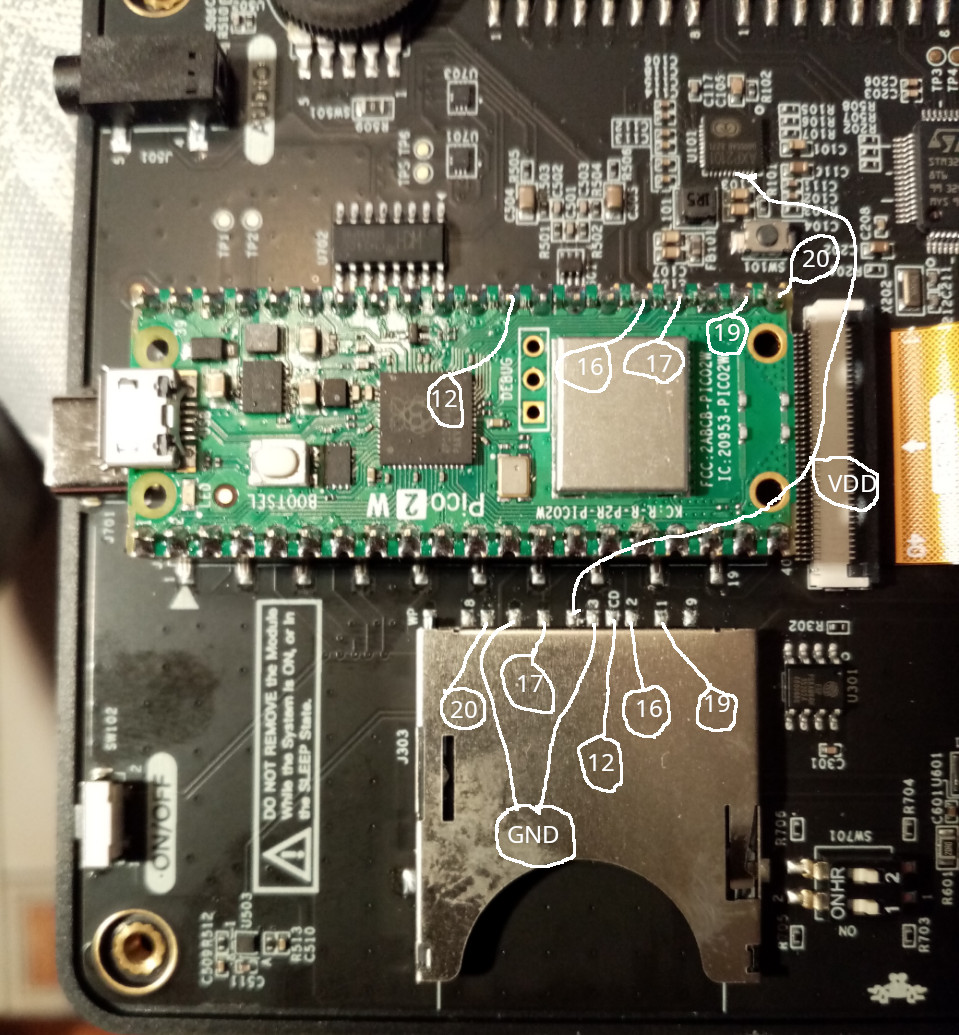
The power VDD comes from the chip U101 up to pin 4 of the SD connector, the U101 is so small that you can check by rubbibg lightly your probe around the area i indicated, it should beep at some point. Be gentle.
Note that the numbers of the SD connector are funny (9, 1, 2, 3, CD, 3, …, 8, WP)
I take NO responsability if somethingg bad happens. (Nevertheless, I just did this to my picocalc, and it still works, so you should be safe)
Hope you find your problem.