according to this post I have an updated eeprom, so I just did the config part and it works now. Thanks again!
1 Like
Hello @Rex, thank you for the images! I’ve installed Trixie and I’m trying to run Sway WM, but it won’t start due to error Unable to parse EDID. I’ve tried both full and lite versions of the Trixie image. Did you know how to properly install Sway? BTW I’m using CM5.
I’m sorry I don’t I’ve never used sway. I always use a classic desktop style DE. (LXDE, xfce…)
maybe not a Trixie problem in particular, but if anyone knows what is wrong when I get error about not properly installed initramfs-tools let me know.
Is this initramfs-tools a part of Trixie or uConsole? Or is it some dependency installed during other experiments?
It doesn’t like the custom kernel we’re using. If you reinstall the kernel it will fix it. sudo apt reinstall clockworkpi-kernel or issue this command sed -i '/^MODULES=dep/c\MODULES=most' "/etc/initramfs-tools/initramfs.conf" then finish what you were doing.
It happens when initramfs-tools updates and changes the config file we need to install the custom kernel.
This happens because of something funky happening with the libwlroots-0.18 package (one of the libraries sway depends on). With the default configuration, running apt install sway will install sway from the upstream debian repository. But the raspberry pi folks build their own libwlroots-0.18 package, with a version string that makes it seem newer than the upstream debian one. So the raspberry pi package gets installed and sway throws this error.
I fixed it with a small apt configuration fragment that tells apt to lower the raspberry pi archive priority for the libwlroots-0.18 package, so that the upstream debian one is used. sway now works properly, and I’ve not noticed any other problems (yet) from using this package instead.
To do this, create a file /etc/apt/preferences.d/10-libwlroots-0.18-pin.conf containing:
Package: libwlroots-0.18
Pin: origin "archive.raspberrypi.com"
Pin-Priority: -10
After saving that, you’ll have to remove and reinstall the package. I ended up running
sudo apt purge libwlroots-0.18
sudo apt install sway
and sway now works.
5 Likes
OK. Wow. I’ve been running with that configuration in place for months now. But a couple of days after I write it up and post it here, I do an apt upgrade which pulls in sway version 1.10.1-2+rpt1 from the raspberrypi repository. So, uh, you can just remove that /etc/apt/preferences.d/10-libwlroots-01.8-pin.conf again and do an upgrade, it will install both packages from the raspi repo and work fine.
Or do what I did and update the pin to also pin sway to the debian repo just out of spite. 
1 Like
@Rex Hi I’m new to the Uconsole. I have just purchased the RTL SDR card and I’m wondering when it arrives will it work with Trixie or do I use the older Bookworm version? Thanks in advance.
It’s all set to go on Trixie just follow the direction on my hackergadgets aio thread.
1 Like
I apologize if I missed something obvious or a note further up. I have the hackergadget SDR card installed in my UConsole. I installed ClockworkPi-Trixie-6.12.48 image and walked through basic setup. No issues. However audio is extremely low and static-y and distorted on any app I use. This includes through the headphone jack as well as the speakers. The desktop volume widget on the task bar does not seem to do anything. The keyboard volume buttons seem to work, but aren’t really helping. I previously had a slightly older version of the Bookworm image from here installed and audio was fine on that. Other than the Hackergadget card, things are stock. CM4 included with the kit. What am I missing? EDIT: Just installed the ClockworkPi-Bookworm-6.12.45 image and sound is working normally.
Hi @Rex , there is a small issue with kernel package - one of the additional files created on install via depmod is not being removed on package remove via postrm script “for extra_file” loop, resulting in “directory not empty, not removing” warning and directory leftovers during kernel package upgrade. The file is modules.weakdep (for example /lib/modules/6.12.51-v8-16k+/modules.weakdep )
1 Like
I’ve been having audio issues on Trixie as well, but not with everything. Youtube and GQRX work, but I can’t get any audio out of SDR++ or SDRTrunk.
1 Like
did you setup an audio sink in sdr++? you can find instructions here.
Hi, @Rex , still relevant to the latest 6.12.55:
$ uname -a
Linux uc 6.12.52-v8+ #2 SMP PREEMPT Fri Oct 17 09:49:12 EDT 2025 aarch64 GNU/Linux

$ cat /etc/apt/sources.list.d/ak-rex.list
deb [arch=arm64] https://raw.githubusercontent.com/ak-rex/ClockworkPi-apt/main/debian stable main

$  sudo apt -y update
...
1 package can be upgraded. Run 'apt list --upgradable' to see it.

$ apt list --upgradable -a
clockworkpi-kernel/stable 6.12.55-v8-16k+ arm64 [upgradable from: 6.12.52-v8-16>
clockworkpi-kernel/now 6.12.52-v8-16k+ arm64 [installed,upgradable to: 6.12.55>

$ apt policy clockworkpi-kernel
clockworkpi-kernel:
  Installed: 6.12.52-v8-16k+
  Candidate: 6.12.55-v8-16k+
...
$ sudo apt -y dist-upgrade
...
Get:1 https://raw.githubusercontent.com/ak-rex/ClockworkPi-apt/main/debian stable/main arm64 clockworkpi-kernel arm64 6.12.55-v8-16k+ [96.2 MB]
...
dpkg: warning: unable to delete old directory '/lib/modules/6.12.52-v8-16k+': Directory not empty
...
$ find /lib/modules/6.12.52-v8-16k+/
/lib/modules/6.12.52-v8-16k+/
/lib/modules/6.12.52-v8-16k+/modules.weakdep

$ cat /lib/modules/6.12.52-v8-16k+/modules.weakdep
# Weak dependencies extracted from modules themselves.

$ sudo rm -rf /lib/modules/6.12.52-v8-16k+/

$ grep depmod /var/lib/dpkg/info/clockworkpi-kernel.postinst
depmod $version
$ cat /var/lib/dpkg/info/clockworkpi-kernel.postrm
#!/bin/sh -e

version=6.12.55-v8-16k+
image_path=/boot/vmlinuz-$version

rm -f /lib/modules/$version/.fresh-install

if [ "$1" != upgrade ] && command -v linux-update-symlinks >/dev/null; then
    linux-update-symlinks remove $version $image_path
fi

if [ -d /etc/kernel/postrm.d ]; then
    DEB_MAINT_PARAMS="$*" run-parts --report --exit-on-error --arg=$version \
              --arg=$image_path /etc/kernel/postrm.d
fi

if [ "$1" = purge ]; then
    for extra_file in modules.dep modules.isapnpmap modules.pcimap \
                      modules.usbmap modules.parportmap \
                      modules.generic_string modules.ieee1394map \
                      modules.ieee1394map modules.pnpbiosmap \
                      modules.alias modules.ccwmap modules.inputmap \
                      modules.symbols modules.ofmap \
                      modules.seriomap modules.\*.bin \
                      modules.softdep modules.devname; do
        eval rm -f /lib/modules/$version/$extra_file
    done
    rmdir /lib/modules/$version || true
fi

exit 0
Hopefully it is clear now how to resolve it easily, if not and you need any help - let me know )
i saw and know how to resolve it, but i just haven’t got around to it yet. next kernel update it will be fixed.
4 Likes
Why do I recently get the following message when I start the Chromium browser? “Bookworm and Trixie.” And can I disable it?
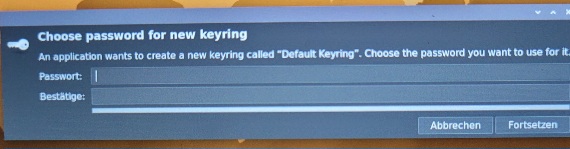
it’s wanting to setup a keyring that manages and protects your passwords and cryptographic keys. you can just set it up without a password and it will leave you alone after that or setup a password and enter it when the keyring needs accessed.
2 Likes
I entered a PIN. But now the browser still asks for it every time I start it. This is new and hasn’t happened before. Can I disable the request?
yes every time it starts it will ask for it to decrypt the keyring. you need to not use a password then it won’t ask anymore. you can delete the existing keyring and set a new one up without a password.
If you don’t mind logging in to your uConsole using a password, you can do the following:
From Control Centre, setup your uConsole to ask for your password when logging in. Then go to Accessories → Passwords and Keys and create a new Password keyring called “login”. Set the password for this keyring to be the same as your login password, and also set this keyring to be the default keyring.
If you do that, then the keyring will be unlocked automatically when you login, and apps that save credentials to the default keyring, such as Chromium, will be able to do so without requiring you to unlock the keyring. Note that the default keyring needs to be named “login” and also it needs to be unlocked using the same password that you use to login with your username.
1 Like