I have a uConsole that was booting fine off a microSD card. I added a 1TB NVMe and used the rp imager on it. It verified OK. I set Trixie to boot from the NVMe. Now when I turn on the uConsole, nothing happens. The screen stays black. Is there a way to boot from the SD card without having to remove the NVMe? What could’ve gone wrong with the boot?
# Default BOOT_ORDER for provisioning
# SD -> NVMe -> USB -> Network
BOOT_ORDER=0xf461
1 Like
I made a change to boot from the NVMe first without looking at the SD card and now it’s trying to boot from the NVMe rather than the SD card. I’d like to switch it back to boot from the SD card first without having to take the machine apart again.
You may have some luck plugging a screen and peripherals in, at least to do some debugging on why booting isn’t working for you.
i’m having the same issue. i’ve read as many of these threads as i can find. i’ve done all the stuff rex has said to do. i’m still having issue. as i’ve already swapped the pcie ribbon, wondering if my hacker gadget board is defective. here’s a shot from an external monitor when i clicked out the sd card and tried to use the nvme. i reached out to their tech support but haven’t heard back yet.
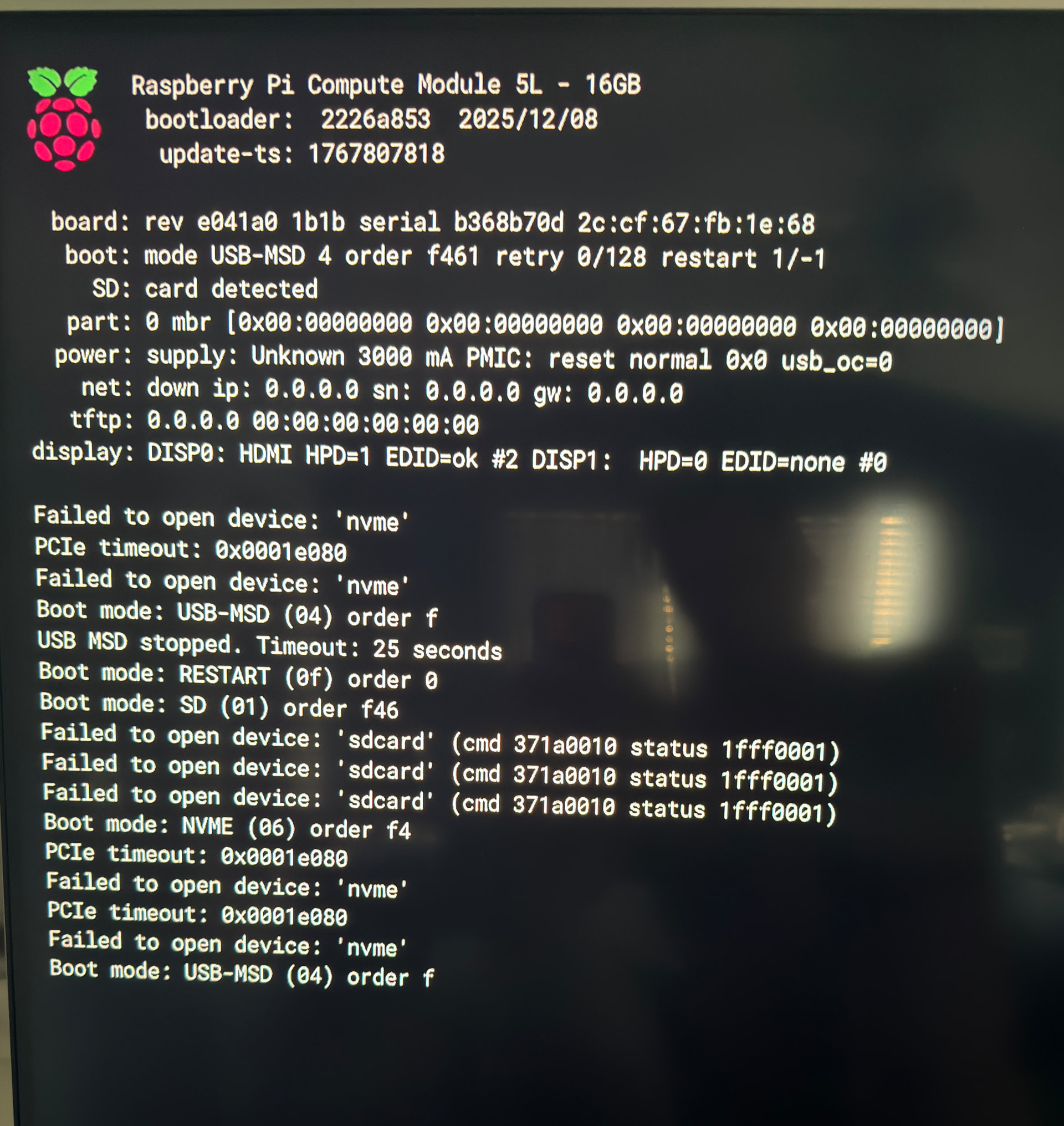
Have you tried a different nvme drive?
no i have not. it’s a new wd sn850x. it reads in all my other devices. and reads on the console through usb. just not the pcie battery board. is there a brand you’ve seen success with?#
-Aaron Bray
also, this
-Aaron Bray
Im still waiting for my board to arrive and I think it will take a couple of months to arrive… So in the meantime I’m reading all these posts so I know what to when it gets here lol. Ive seen some posts recommending a gen 3 or gen4 nvme because the gen 5 nvme are not not working due to a bootloader issue. So im thinking of picking up an older nvme drive when my board arrives,
I’m still waiting for my uConsoles, but I already have the HG Upgrade Kit (2 x) and a NVMe SSD. Since I’ll be running my uConsole with a CM4, the NVMe speed isn’t that high anyway.
Since I generally prefer reliability over speed, I opted for a WD Red, which is declared by WD as PCIe Gen 3.
I’m glad I already bought it when I see how prices are rising.
1 Like
I am using a gen3/4 1tb 2230. I am able to boot from SD card using both kali and bookworm. I flashed the SSD with kali and left the settings default. I booted into bookworm using the sd card and updated and altered the eeprom .conf I also did a full upgrade. The NVMe is visible using both lsblk and lspci. When I remove the sd card and attempt to boot from the SSD the red and green lights come on and stay solid. nothing boots, no activity on the screen at all. no other indication it is doing anything other than the lights. I have tried 2 different SSD’s different sizes physically and storage and generation. I have flashed every available img that rex has created for the CM5. I have removed every other expansion that might interfere including the ipex connection for the wifi antenna. I changed the boot order in raspi-config as well as copy and paste exactly the provided eeprom config. At this point I believe the expansion board to be defective. I have had this uConsole since 9/4/24 and use it daily, my excitement for this upgrade has been severely diminished by these complications. IF I somehow missed a step PLEASE tell me, as I am moments away from throwing this entire device in the dumpster.
1 Like
i did everything you did with the differences being
a) i am using Rex’s ubuntu image
b) i used rpi-clone from a working SD instead of directly flashing the NVME.
i also troubleshooted it the same way as you did.
i also initially had issues with “black screen”.. and honestly, i panicked… as everything was working on CM5 with the original boards. 
i did then re-seat the CM5 a few times… re-inserted the carrier board, rubbed the connectors… it was almost like there was a “coat” of something on the connectors that needed to be cleaned off. This happened not just for the CM5 but the ribbon cables as well. (remember the old nintendo catridges? this was also something that we did when we used to get new RAM back in the 90s)
i also had to battery remove to power off a few times.
But it finally fame up after a final CM5 re-seat.
After getting it up once, it boots subsequently without issue. I’ve been on NVMe and rebooted multiple times with no issues since. I did all these while on SD card booting.
Only after that did i rpi-clone
Might you want to try using the (b) method to get the image on the NVME?
I am trying SD card copier that’s installed on Trixie says it copies the SD card to any device and is bootable clone

Oh wow it booted up in a few seconds that’s my NVME problem solved. It was so very easy in the end. No need to use rpi-clone this is even easier and takes a few mins. Trixie and SD card copier is your key to NVME SSD booting.

With SD card in Ubuntu happily booting.

This way suits me as I can quickly test other OS on SD card. Then revert back to SSD
3 Likes
Glad you finally got it working 
1 Like
I am flashing Trixie to an SD now, but I am not confident that will help. I flashed kali to an SD card installed rpi-clone but now it doesn’t even see the ssd, not using lspci nor lsblk… I will flash trixie and report back but not holding my breath.
Trixie found my SSD no issues and wanted Trixie cloned to ssd
I was able to clone trixie, I want to run kali.
Ubuntu doesn’t boot from nvme because the config.txt has nvme disabled ..
you can just enable it in config.txt.
dtparam=pciex1
i’m running ubuntu with this option in my config and never had an issue.
1 Like