I love the history display with the up/down buttons and the sprite test seems very promising!
1 Like
Interesting. I just tried compiling the latest from the github repo (which doesn’t have this change, I checked), and it built and linked without errors. I was building for the default pico_2w target, so maybe this is only a problem for certain targets? Going to try running it now under uf2loader.
EDIT:
Just checked and it seems to run fine too with the default CMakeLists.txt. There’s one “row” of the sprite test that looks a little glitchy, unless it was intentional, but otherwise the new functionality seems to work.
I wonder if you were using a different version of the Pico SDK, or were building for a target other thatn pico2_w? I’ve been using version 2.2.0.
Thanks you for your remark, you are absolutely right, sorry, it seems I used pico2 as PICO_BOARD. pico2_w works like charm. Forget my “correction”, please.
I’m using the lastest version of Pico SDk (2.2.0). I’m compiling and testing only for PiOC2W. I haven’t tried it with Pico2 or Pico.
I have created a new branch (“dev”) that I’m using to save my work in progress.I am currently working on using DMA to send data to the display. I’m also moving the management of sprite and tile graphics to core1. I However in this moment the DMA is synchronous; I’m working to making it asynchronous.
2 Likes
I just updated the main branch with the latest changes from the DEV branch. I removed the double buffer management for a single buffer that is never destroyed but updated. Modified the sprite redraw routine. Moved all graphics procedures to core1. Data transfer to the LCD is done via semi-asynchronous DMA. Core0 and Core1 communicate via a FIFO command buffer. The glitch seems to be fixed. I hope.
1 Like
I should draw your attention to this note in the SDK documentation:
The inter-core FIFOs are a very precious resource and are frequently used for SDK functionality (e.g. during core 1 launch or by the lockout functions). Additionally they are often required for the exclusive use of an RTOS (e.g. FreeRTOS SMP). For these reasons it is suggested that you do not use the FIFO for your own purposes unless none of the above concerns apply; the majority of cases for transferring data between cores can be eqaully well handled by using a queue
Thanks a lot. I missed this information. I’ll be change the communication.
1 Like
Modified communication between cores. Replaced inter-core FIFOs with queues to comply with the specifications indicated on PICO SDK (thanks BlairLeduc). Initial tests show that communication is slightly slower than FIFO management. Obviously, the code is not optimized.
Added a new command “ted”. This is a simple a text editor with a four functionalities: Load (F1) Save AS (F2), Save (F3). Press F6 to see a list of files in the current directory. I wanted like to try to create a simple editor.
Very interesting updates, works well and compiled without issue on my setup. I am curious about the DMA thing for the screen updates, does it improve performance significantly ? I am looking at “porting” some graphics heavy thing to the PicoCalc and was wondering if it was worth looking into it ?
And BTW I don’t know if you looked at it but the “official” ClockworkPi Shapones port (the NES emulator on the SD) seems to be using some PIO and DMA to good effect, check the picocalc.cpp file, it is lightly commented but looks interesting.
2 Likes
Thanks for the information about Shapones (NES) I’ll look it.
From official Pico SDK documentation:
The DMA data throughput is significantly higher than the RP-series processors. The DMA can perform one read access and one write access, up to 32 bits in size, every clock cycle.
Key DMA Characteristics:
- Maximum theoretical throughput: 1 read + 1 write (up to 32 bits) per clock cycle Raspberry Pi
- Parallelism: 12 independent DMA channels available Raspberry Pi
- Zero CPU overhead: DMA leaves processors free to attend to other tasks or enter low-power sleep states Raspberry PiAPS
Thanks for your feedback.
In a forum an user shared concrete results for a 320x240 RGB565 LCD display:
- Full framebuffer transfer: 18ms at 300 MHz CPU clock with 75 MHz SPI using DMA Raspberry Pi Forums
- Blocking SPI (without DMA) was 19% slower Raspberry Pi Forums
In my example: the Core 0 continue calculations while Core 1 + DMA handle the display. In current version the DMA is yet semi-asynchronous. I have noticed improvements in performance compared to using only the CPU for data transfer. There are some other optimisation to do.
Cool, thanks for the details, that seems really promising !
1 Like
@BlairLeduc Hello… I just released a small project (port of runCPM) made from your framework, it works great !
I found a microscopic bug in clib.c and made a PR for you.
Thank you for the great job !
jF
1 Like
Hi,
Next to come: an onboard C compiler by a freaking good programmer (not me !)
Best wishes
2 Likes
Hi Blair!
I’m trying to open a file located in the root directory of the SD card. Below I’m pasting the relevant part of the code I’m using.
I’ve tried several approaches, but I still can’t get it to open. Do you have a small example showing the correct way to do it?
A bit of context: I’m working on a program to run CHIP-8 files, and I can’t open the ROM files from the SD card.
My code:
int main(void)
{
    picocalc_init();

    fat32_init();
    fat32_mount();

    con_clear();
    con_reset();

    con_print("CHIP-8: loading ROM...\n");

    chip8_t c8;
    chip8_init(&c8, chip8_config_default());
    chip8_picocalc_init();

    // Buffer para ROM: maximo 4096-0x200 = 3584 bytes
    static uint8_t rom_buf[CHIP8_MEM_SIZE - CHIP8_ROM_BASE];
    uint32_t rom_len = 0;

    const char *rom_path = "roms/1-chip8-logo-ch8";

    if (!leer_archivo_fat32(rom_path, rom_buf, sizeof(rom_buf), &rom_len)) {
        con_print("ERROR: no pude leer la ROM.\n");
        for (;;);
    }

    if (!chip8_load_rom(&c8, rom_buf, rom_len)) {
        con_print("ERROR: ROM invalida o demasiado grande.\n");
        for (;;);
    }

    con_print("OK: ROM cargada. Ejecutando...\n");
Well, I cannot see the code that actually opens the file, but did you try using a pathname such as “/roms/1-…” (starting with a “/”)?
ups…sorry!
Yes, i try with “/” and without “/”. ( “IBMLOGO.CH8” and “/IBMLOGO.CH8”). Short names, uppercase…
This is the code to open file:
void user_interrupt(void) { }

// Lee un archivo completo desde FAT32 (ya abierto) a un buffer
static fat32_error_t leer_fat32_completo(fat32_file_t *f, uint8_t *dst, uint32_t max_len, uint32_t *out_len)
{
    fat32_error_t err = FAT32_OK;
    size_t br = 0;
    *out_len = 0;

    while (*out_len < max_len) {
        uint32_t space = max_len - *out_len;
        err = fat32_read(f, dst + *out_len, space, &br);
        if (err != FAT32_OK) return err;
        if (br == 0) break; // EOF
        *out_len += (uint32_t)br;
    }

    return FAT32_OK;
}
(Sorry I made a boo boo in my previous answer)
There is no fat32_open() call in the code you show here.
Hi! First of all, thanks for replying. Yes, I was using fat32_open(). I wrote another small program that only tries to open the file. The file is in the root of the SD card, and its name is IBMLOGO.CH8.
// main.c - FAT32 open/read debug for PicoCalc
//
// Goal:
//  - Mount FAT32
//  - Open "/IBMLOGO.CH8"
//  - Read it fully (or up to max buffer)


#include "drivers/picocalc.h"
#include "drivers/console.h"
#include "drivers/fat32.h"

#include <stdint.h>
#include <stdbool.h>
#include <stdio.h>

void user_interrupt(void) { }

// Reads whole file into buffer (already opened).
static fat32_error_t read_entire_file(fat32_file_t *f, uint8_t *dst, uint32_t max_len, uint32_t *out_len)
{
    fat32_error_t err = FAT32_OK;
    size_t br = 0;
    *out_len = 0;

    while (*out_len < max_len) {
        uint32_t space = max_len - *out_len;
        err = fat32_read(f, dst + *out_len, space, &br);
        if (err != FAT32_OK) return err;
        if (br == 0) break; // EOF
        *out_len += (uint32_t)br;
    }
    return FAT32_OK;
}

// Simple hexdump (first N bytes)
static void hexdump_first_bytes(const uint8_t *buf, uint32_t len, uint32_t n)
{
    if (n > len) n = len;

    con_print("\nFirst bytes (hex):\n");
    for (uint32_t i = 0; i < n; i++) {
        con_printf("%02X ", buf[i]);
        if ((i % 16) == 15) con_print("\n");
    }
    if ((n % 16) != 0) con_print("\n");
}

int main(void)
{
    picocalc_init();

    con_clear();
    con_reset();

    con_print("PicoCalc FAT32 debug tool\n");
    con_print("------------------------\n\n");

    // FAT32 init + mount
    fat32_init();
    fat32_error_t merr = fat32_mount();
    con_printf("fat32_mount() -> %d\n", (int)merr);
    if (merr != FAT32_OK) {
        con_print("ERROR: FAT32 mount failed.\n");
        for (;;);
    }

    // Try opening the ROM
    const char *path = "/IBMLOGO.CH8";
    fat32_file_t f;
    fat32_error_t err = fat32_open(&f, path);
    con_printf("fat32_open('%s') -> %d\n", path, (int)err);

    if (err != FAT32_OK) {
        con_print("\nERROR: Could not open file.\n");
        con_print("Notes:\n");
        con_print("- Make sure the file exists at the root of the SD card.\n");
        con_print("- Try 8.3 name and uppercase, e.g. /IBMLOGO.CH8\n");
        for (;;);
    }

    // Read file into buffer
    // Max size for CHIP-8 ROM area is 4096-0x200 = 3584, but for debug
    // we can read up to that and report truncation if it exceeds.
    static uint8_t buf[4096 - 0x200];
    uint32_t read_len = 0;

    err = read_entire_file(&f, buf, sizeof(buf), &read_len);
    fat32_close(&f);

    con_printf("read_entire_file() -> %d\n", (int)err);
    con_printf("bytes_read = %lu\n", (unsigned long)read_len);
    con_printf("buffer_max = %lu\n", (unsigned long)sizeof(buf));

    if (err != FAT32_OK) {
        con_print("\nERROR: Read failed.\n");
        for (;;);
    }

    if (read_len == sizeof(buf)) {
        con_print("\nWARNING: File may be larger than buffer; read was truncated.\n");
    } else {
        con_print("\nOK: File read completed (EOF reached).\n");
    }

    // Print a tiny "signature" style summary
    if (read_len >= 4) {
        con_printf("\nSignature bytes: %02X %02X %02X %02X\n",
                   buf[0], buf[1], buf[2], buf[3]);
    }

    // Hexdump first 64 bytes
    hexdump_first_bytes(buf, read_len, 64);

    con_print("\nDone. Press BREAK to reset (or power cycle).\n");
    for (;;);
}
Below is the code, and I’m also attaching the output I see on the PicoCalc. Basically, I’m seeing that:
fat32_mount()→ 0 (the card mounted fine)fat32_open("/IBMLOGO.CH8")→ 1 (it looks like it failed to open the file)
If it’s not abusing your generosity, do you happen to have some code you could share that successfully reads a file, so I can compare it with mine and see what differences I might be missing?
Thanks again for your help.

1 Like
First note that I don’t have your “console.*” things so I use printf() instead.
Next, try to modify the init part of your main() like this :
int main(void)
{
picocalc_init();
printf("PicoCalc FAT32 debug tool\n");
printf("------------------------\n\n");
// FAT32 init + mount
/* REMOVE ALL THIS
fat32_init();
fat32_error_t merr = fat32_mount();
printf("fat32_mount() -> %d\n", (int)merr);
if (merr != FAT32_OK) {
printf("ERROR: FAT32 mount failed.\n");
for (;;);
}
*/
// Try opening the ROM
const char *path = "/IBMLOGO.CH8";
fat32_file_t f;
fat32_error_t err = fat32_open(&f, path);
printf("fat32_open('%s') -> %d\n", path, (interr);…
Like this, it works for me.
Rgds
1 Like
I try:
#include "pico/stdlib.h"
#include <stdio.h>
#include <stdint.h>

#include "drivers/picocalc.h"
#include "drivers/fat32.h"

void user_interrupt(void) { }

static void hexdump_first(const uint8_t *buf, size_t n)
{
    if (n > 64) n = 64;
    for (size_t i = 0; i < n; i++) {
        printf("%02X ", buf[i]);
        if ((i % 16) == 15) printf("\n");
    }
    if ((n % 16) != 0) printf("\n");
}

int main(void)
{
    stdio_init_all();
    picocalc_init();

    printf("\nPicoCalc FAT32 debug tool (stdio)\n");
    printf("---------------------------------\n");

    const char *path = "/IBMLOGO.CH8";

    fat32_file_t f;
    fat32_error_t err = fat32_open(&f, path);
    printf("fat32_open('%s') -> %d\n", path, (int)err);

    if (err != FAT32_OK) {
        printf("ERROR: open failed.\n");
        while (1) tight_loop_contents();
    }

    uint8_t buf[64];
    size_t br = 0;

    err = fat32_read(&f, buf, sizeof(buf), &br);
    printf("fat32_read(64) -> err=%d br=%lu\n", (int)err, (unsigned long)br);

    fat32_close(&f);

    if (err == FAT32_OK && br > 0) {
        printf("First bytes:\n");
        hexdump_first(buf, br);
    } else {
        printf("ERROR: read failed or returned 0 bytes.\n");
    }

    while (1) tight_loop_contents();
}
And…Works excellent!
With the code you just shared, I was able to find the error.
I’ve now managed to open files and read their contents.
Thank you very much!

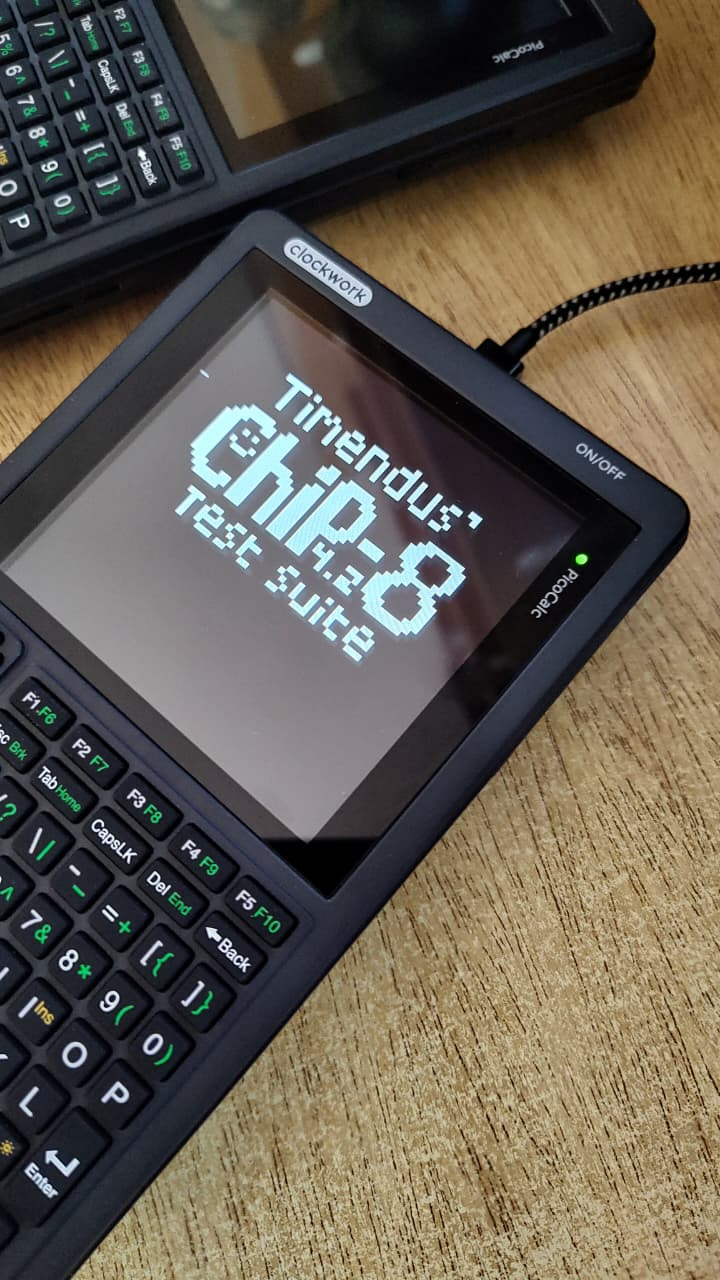
Post data: the CHIP-8 emulator is now much closer! 
3 Likes